Thngy53 matter weather station app, build error.

Hello, I recently acquired the thingy53 device and I am trying to use the example of the weather station with matter:

Weather Station

. I am following what the documentation tells me, in the construction part of the application, but every time I want to build it, the following error appears:

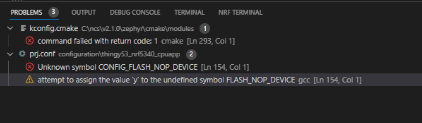
I'm not sure what they mean, since I'm not very familiar with the use of thingy 53,  except what I saw in the basic course, could you tell me what this could be due to?

Parents
  • Hello Brando,

    I am looking into this and will get back to you shortly. Thank you for your patience.

    Kind Regards,

    Maria

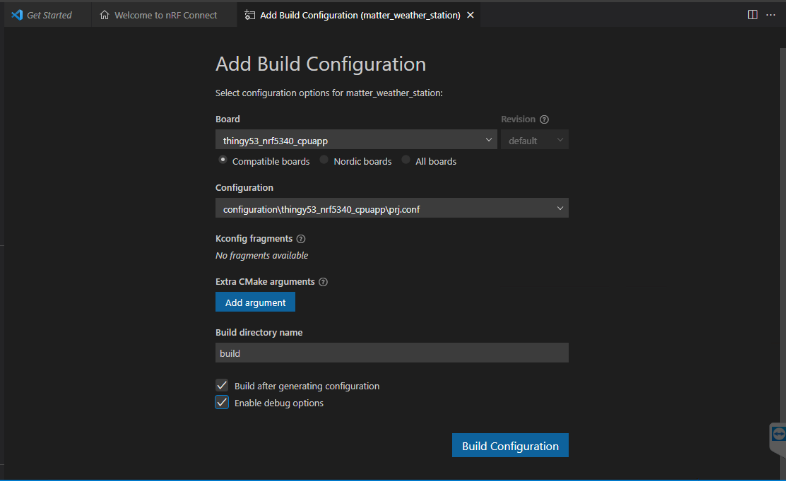
  • Hello, When I begin to build the app, I use this configuration:


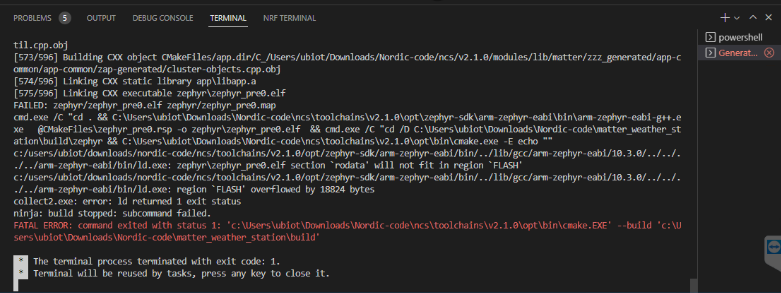
    When the code finish the build process this messages is appears:


    I

    i

    I

  • ok, thanks for the reply,  I tried to do the built without debug option and works. should i try to pass the code to thingy or it's better wait for your reply?

  • Hello,

    Great that you were able to build the application.

    The application can be flashed to and run on your Thingy:53. You just won't be able to debug the application with debugging software. Logging is still available if you have it enabled in the prj.conf of the application.

    My suspicion in my previous reply has been confirmed. The application was too big for the Thingy:53 when the debug options were enabled. The Matter applications and samples are in general quite large, needing most of the available flash on the device. If you want to make your application smaller you can take a look at the Memory footprint optimization for Matter.

    Building the application with prj_release.conf instead of prj.conf will also make it possible to build with debug options enabled. So depending on your preferences you may consider that option if you want to debug with debugging software. Note that the Thingy:53 does not have an onboard debugger, and you would need an external debug probe to debug the flashed application with for example an nRF5340 DK.

    Kind Regards,
    Maria

  • hanks for the help maria, try to pass the app to the thingy and the flash was done correctly, now I am currently facing the following problem:

    I am trying to use the chip tool via android, the documentation tells me that for this app the nrf tag is used as a way to commission the device, I saw a video of the nordic webinar, where they show how to make that connection that is just bringing the phone to the antenna of the thingy and wait for the pairing to start.


    However, I can't get that process to start, according to the documentation, when the app is transferred to the nordic it activates the viable provisioning for 15 min, so in that period of time it should be able to do it.

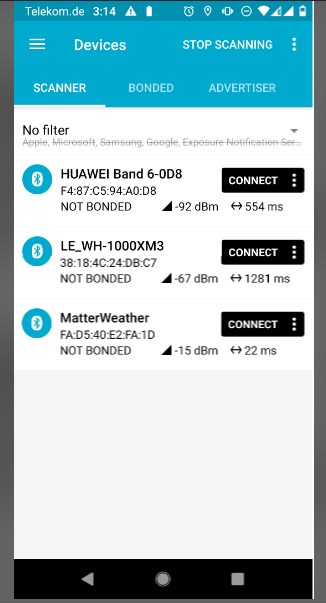
    when i use the nrf tool i am able to see the device so the ble is active, i can also see it via bluetooth. What can this be due to?

  • i receive this logs via serial:

    1:01:39.198,028] <dbg> chip: [DMG]Endpoint 2, Cluster 0x0000_0405 update versi on to 8b35a2fb
    [01:01:39.199,981] <dbg> chip: [DMG]Endpoint 0, Cluster 0x0000_002F update versi on to 73a7196a
    [01:01:39.200,164] <dbg> chip: [DMG]Endpoint 0, Cluster 0x0000_002F update versi on to 73a7196b
    [01:01:39.200,347] <dbg> chip: [DMG]Endpoint 0, Cluster 0x0000_002F update versi on to 73a7196c
    [01:01:39.200,531] <dbg> chip: [DMG]Endpoint 0, Cluster 0x0000_002F update versi on to 73a7196d
    [01:01:39.200,683] <dbg> chip: [DMG]Endpoint 0, Cluster 0x0000_002F update versi on to 73a7196e
    [01:01:39.200,866] <dbg> chip: [DMG]Endpoint 0, Cluster 0x0000_002F update versi on to 73a7196f
    [01:01:39.201,049] <dbg> chip: [DMG]Endpoint 0, Cluster 0x0000_002F update versi on to 73a71970
    [01:01:42.197,662] <dbg> chip: [DMG]Endpoint 1, Cluster 0x0000_0402 update version to 137d3293
    [01:01:42.197,814] <dbg> chip: [DMG]Endpoint 3, Cluster 0x0000_0403 update version to d1200e80
    [01:01:42.198,028] <dbg> chip: [DMG]Endpoint 2, Cluster 0x0000_0405 update version to 8b35a2fc
    [01:01:42.200,012] <dbg> chip: [DMG]Endpoint 0, Cluster 0x0000_002F update version to 73a71971
    [01:01:42.200,195] <dbg> chip: [DMG]Endpoint 0, Cluster 0x0000_002F update version to 73a71972
    [01:01:42.200,347] <dbg> chip: [DMG]Endpoint 0, Cluster 0x0000_002F update version to 73a71973
    [01:01:42.200,531] <dbg> chip: [DMG]Endpoint 0, Cluster 0x0000_002F update version to 73a71974
    [01:01:42.200,714] <dbg> chip: [DMG]Endpoint 0, Cluster 0x0000_002F update version to 73a71975
    [01:01:42.200,897] <dbg> chip: [DMG]Endpoint 0, Cluster 0x0000_002F update version to 73a71976
    [01:01:42.201,080] <dbg> chip: [DMG]Endpoint 0, Cluster 0x0000_002F update version to 73a71977
    [01:01:45.197,662] <dbg> chip: [DMG]Endpoint 1, Cluster 0x0000_0402 update version to 137d3294
    [01:01:45.197,814] <dbg> chip: [DMG]Endpoint 3, Cluster 0x0000_0403 update version to d1200e81
    [01:01:45.198,028] <dbg> chip: [DMG]Endpoint 2, Cluster 0x0000_0405 update version to 8b35a2fd
    [01:01:45.200,012] <dbg> chip: [DMG]Endpoint 0, Cluster 0x0000_002F update version to 73a71978
    [01:01:45.200,195] <dbg> chip: [DMG]Endpoint 0, Cluster 0x0000_002F update version to 73a71979
    [01:01:45.200,347] <dbg> chip: [DMG]Endpoint 0, Cluster 0x0000_002F update version to 73a7197a
    [01:01:45.200,531] <dbg> chip: [DMG]Endpoint 0, Cluster 0x0000_002F update version to 73a7197b
    [01:01:45.200,714] <dbg> chip: [DMG]Endpoint 0, Cluster 0x0000_002F update version to 73a7197c
    [01:01:45.200,866] <dbg> chip: [DMG]Endpoint 0, Cluster 0x0000_002F update version to 73a7197d
    [01:01:45.201,080] <dbg> chip: [DMG]Endpoint 0, Cluster 0x0000_002F update version to 73a7197e


  • Hello,

    I am still looking into this. Thank you for your patience.

    Kind Regards,
    Maria

Reply Children
No Data
Related