nRF5340 SAADC power consumption

I'm profiling the current consumption of our device, on an nRF5340 module, at SDK 2.1.0.

So far as I can tell, the ADC is using approximately 1000 uA. It's sampling via PPI, and is triggered from an external clock signal at 1 kH.

The current consumption figures for the SAADC here show typical current consumption based on different configuration options. It looks like ~1000 uA is on the high end of what is expected, and that setting LPOP=LowPower would save us a considerable amount of current.

However I can't find anything about LPOP or LowPower anywhere else, either in the SAADC documentation or in the SDK.

Any tips as to where This can be enabled? I've seen this for an old version of the SDK, but it seems to come down to setting saadc_config.low_power_mode = true; which isn't part of the config struct in the current SDK.

  • Hi,

    Have you tried running the DK in high-voltage mode (through nRF_USB or external supply), to see if you see the same current consumption there? See nRF5340 power source.

    I will check with our current experts if they have seen something like this. Could you share your schematics for reference? 

    Best regards,
    Jørgen

  • Can you talk me through how to measure the power consumption via the external supply? So far the only way I've managed to get sensible current measurements off the Dev Kit is using the PPK in source meter mode, and powering the nRF chip via the current measurement pin following this method.

    If I want to use the PPK in Source Meter mode to measure High Voltage mode, it looks like I can just connect VOut on the PPK to + and GND to - on the external voltage pins, but then I'm not sure what to do with the nRF POWER SOURCE switch, the POWER on/off switch, and the two micro-switches on the bottom of the dev kit (VEXT->nRF and nRF ONLYDEFAULT).

    I'm getting more-or-less what I expect if I set VEXT->nRF to off, and nRF ONLYDEFAULT to what I think is on (switch is to the left, where the dot is). Then power and power source don't seem to make any difference, and I get ~3.5 uA when the CPU is in sleep mode (as in, the main function exits, no tasks or interrupts configured).

    Does that sound right? If so, I can try again with different test code and see if I can reproduce the same ~900 uA current draw.

  • Hi,

    I have not done much current measurements in high voltage mode, but what worked for me was to put the "nRF power source" switch in USB position, cut SB41 (VDD_HV) on the DK, then connect Vout from PPK2 to the upper pin of VDD_HV, the GND pin from PPK2 to "-" pin of external supply, then set the PPK2 application in source meter mode. All other switches are in default positions.

    Could you check if this works on your end as well? It could be beneficial to program a BLE example or similar to the board until you get the current measurements working correctly, then you can see the spikes when the radio is active (for instance at the advertising or connection interval).

    Best regards,
    Jørgen

  • Thanks Jørgen, that's really helpful.

    I've tried my interrupt test code on the dev kit, and now get something like I was getting on our custom hardware.

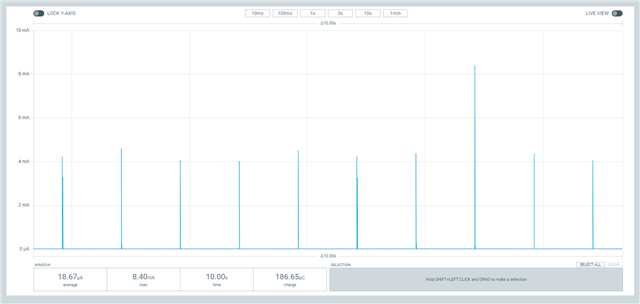
    Without the Signal Generator connected, I get ~18 uA with a spike every second when the CPU wakes up and immediately goes back to sleep. That's pretty much what I expect, although I'll double check the current figure.

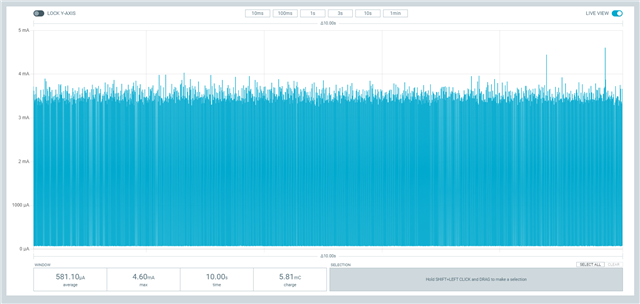
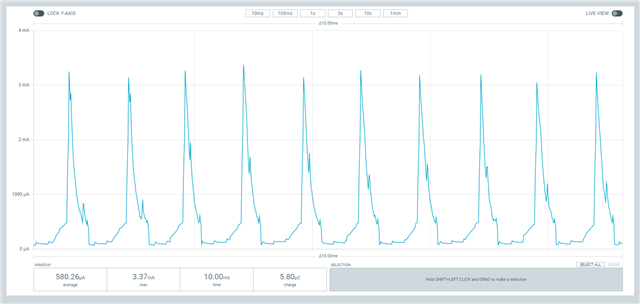
    With the sig gen connected and at 1000 Hz, I get about 580 uA, with the same sort of 3 mA spikes as I was getting before - except these are at 1 kHz, which matches the sig gen.

    Zoomed in it looks like this

    So it looks like I get similar behaviour on the dev kit to what I get on our own board. But the spikes are at a lower frequency, so the overall current consumption is a bit lower.

    ETA: current consumption increases even more if I change the gpiote interrupt config - In my test code I had set the pullup to NRF_GPIO_PIN_NOPULL and hi_accuracy to false while trying to get to the bottom of the current draw.

    Setting the pull back to NRF_GPIO_PIN_PULLUP I'm now getting just under 650 uA, and setting high accuracy mode to true it jumps to 1.4 mA.

    One thing I want to check with you though - I've now cut both SB 40 and SB 41, I assume I need to put a jumper across whichever one I'm not using to power the nRF53?

Related