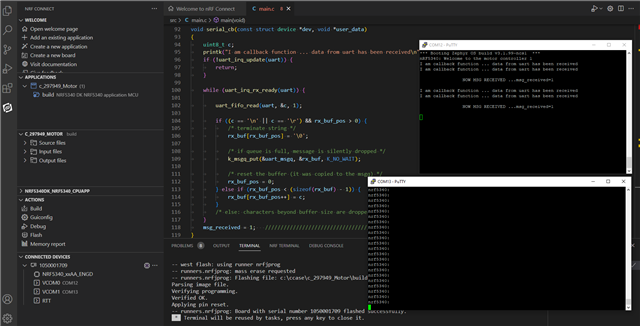
Hi,
I have written a code for the motor driver and that is going to be flashed onto nRF5340. There are two communication buses that I am using in the code: UART and GPIO. Attachin code for the references:
Main.c:
#include <zephyr/zephyr.h>
#include <sys/printk.h>
#include <drivers/uart.h>
#include <drivers/gpio.h>
#include <cJSON.h>

#define SLEEP_TIME_MS   1000
#define RECEIVE_BUFF_SIZE 10
#define MSG_SIZE 1024

cJSON *root;
#define RECEIVE_TIMEOUT 100

/* queue to store up to 10 messages (aligned to 16-byte boundary) */
K_MSGQ_DEFINE(uart_msgq, MSG_SIZE, 10, 16);

static const struct gpio_dt_spec led0 = GPIO_DT_SPEC_GET(DT_ALIAS(led0), gpios);
static const struct gpio_dt_spec led1 = GPIO_DT_SPEC_GET(DT_ALIAS(led1), gpios);
static const struct gpio_dt_spec led2 = GPIO_DT_SPEC_GET(DT_ALIAS(led2), gpios);
static const struct gpio_dt_spec led3 = GPIO_DT_SPEC_GET(DT_ALIAS(led3), gpios);

const struct device *uart= DEVICE_DT_GET(DT_NODELABEL(uart0));
/**
 * @brief Start/stop motor.
 *
 * Motor would be running in the desired direction based on the provided values
 *
 *     gpio_pin_configure(spec->port, spec->pin, spec->dt_flags | extra_flags);
 *
 * @param is_Enable
 * @return
 */

static struct gpio_callback gpio_cb;
int motor_pos = 0;      /*Reference position of the motor*/
unsigned int input_steps = 0;
int num = 0;
int motor_direction = 0; /* 0 : Motor stopped, Motor Direction CW: +1, Motor Direction CCW: -1 */

static void motor_controller(bool enable, bool direction, const struct gpio_dt_spec *pin1, const struct gpio_dt_spec *pin2)
{
	if(!enable)
	{
		gpio_pin_configure_dt(pin1, GPIO_OUTPUT_INACTIVE);
        gpio_pin_configure_dt(pin2, GPIO_OUTPUT_INACTIVE);
		motor_direction = 0;
	}
	else
	{
		motor_pos = 0;
		gpio_pin_configure_dt(pin1, GPIO_OUTPUT_INACTIVE);
        gpio_pin_configure_dt(pin2, GPIO_OUTPUT_INACTIVE);

        if(direction)
		{
			motor_direction = -1;
			/* Counter Clockewise direction Movement */
			gpio_pin_configure_dt(pin1, GPIO_OUTPUT_ACTIVE);
		}
		else
		{
			motor_direction = 1;
			/* Clockwise direction Movement */
			gpio_pin_configure_dt(pin2, GPIO_OUTPUT_ACTIVE);
		}
	}
}

static void motor_counter(const struct device *dev, struct gpio_callback *cb, uint32_t pins)
{
	(void) dev;
	(void) cb;
	(void) pins;

		motor_pos++;

		if(motor_pos >= input_steps && motor_direction != 0)
		{
			printk("Stopping motor from the callback function\n");
			motor_controller(false, false, &led0, &led1);
		}
		printk("Rotation:%d , Motor Pos:%d\n",motor_direction, motor_pos);
}

/* receive buffer used in UART ISR callback */
static char rx_buf[MSG_SIZE];
static int rx_buf_pos;
/*
 * Read characters from UART until line end is detected. Afterwards push the
 * data to the message queue.
 */
void serial_cb(const struct device *dev, void *user_data)
{
	uint8_t c;

	if (!uart_irq_update(uart)) {
		return;
	}

	while (uart_irq_rx_ready(uart)) {

		uart_fifo_read(uart, &c, 1);

		if ((c == '\n' || c == '\r') && rx_buf_pos > 0) {
			/* terminate string */
			rx_buf[rx_buf_pos] = '\0';

			/* if queue is full, message is silently dropped */
			k_msgq_put(&uart_msgq, &rx_buf, K_NO_WAIT);

			/* reset the buffer (it was copied to the msgq) */
			rx_buf_pos = 0;
		} else if (rx_buf_pos < (sizeof(rx_buf) - 1)) {
			rx_buf[rx_buf_pos++] = c;
		}
		/* else: characters beyond buffer size are dropped */
	}
}

void parse_cmd()
{

}

void create_cmd()
{

}

/*
 * Print a null-terminated string character by character to the UART interface
 */
void print_uart(char *buf)
{
	int msg_len = strlen(buf);

	for (int i = 0; i < msg_len; i++) {
		uart_poll_out(uart, buf[i]);
	}
}

int main(void)
{
	int ret = 0;
	char tx_buf[MSG_SIZE];

    printk("nRF5340: Welcome to the motor controller 1\n");
/*  Verify that the UART device is ready */
	if (!device_is_ready(uart)){
		printk("Device is not ready");
		return 1 ;
	}
/*  Verify that the controller devices are ready */
	if (!device_is_ready(led0.port)){
		printk("GPIO device is not ready\r\n");
		return 1;
	}
	input_steps =1500;

	gpio_pin_configure_dt(&led2, GPIO_INPUT);
	gpio_pin_interrupt_configure_dt(&led2, GPIO_INT_EDGE_RISING);
	gpio_init_callback(&gpio_cb, motor_counter, BIT(led2.pin));
	gpio_add_callback(led2.port, &gpio_cb);

	/* configure interrupt and callback to receive data */
	uart_irq_callback_user_data_set(uart, serial_cb, NULL);
	uart_irq_rx_enable(uart);

	/* indefinitely wait for input from the user */
	while (k_msgq_get(&uart_msgq, &tx_buf, K_FOREVER) == 0 && num) {
		print_uart("nrf5340:\n");
		print_uart(tx_buf);
		print_uart("\r\n");
	}
	motor_controller(true, true, &led0, &led1);

	while (1) {
		k_msleep(SLEEP_TIME_MS);
	}
}
proj.conf file:
CONFIG_MINIMAL_LIBC=n
CONFIG_NEWLIB_LIBC=y
CONFIG_NEWLIB_LIBC_FLOAT_SCANF=y
CONFIG_NEWLIB_LIBC_FLOAT_PRINTF=y
CONFIG_CJSON_LIB=y
CONFIG_UART_ASYNC_API=y
CONFIG_UART_INTERRUPT_DRIVEN=y
No addition in the overlay file.
I am having a normal DC motor with encoder, encoder is based on the interrupt. After motor runs for x number of ticks I have to stop the motor. The value of x, receiving from another board using UART bus in cJSON format.
If I comment out the code from line number 170 to 174 in main.c file that motor is rotating otherwise not I am not able to debug the issue why it is happening?
Please let me know if some more information is required here.
Also I am not able to get the print statement output on the nRF terminal as well as putty terminal. Earlier it was working but with same code suddenly I am not able get print statement on th nRF terminal and putty application terminal also.
Please help me with this issues.