Server and client echo - server crash when client on

I've created the samples for Socket Echo Client https://developer.nordicsemi.com/nRF_Connect_SDK/doc/2.0.2/zephyr/samples/net/sockets/echo_client/README.html#sockets-echo-client-sample

and Socket Echo Server https://developer.nordicsemi.com/nRF_Connect_SDK/doc/2.0.2/zephyr/samples/net/sockets/echo_server/README.html#sockets-echo-server-sample

I've done this as a starting point to try and get BLE and native 802.15.4 working with our existing devices. Using https://developer.nordicsemi.com/nRF_Connect_SDK/doc/2.0.2/nrf/samples/nrf5340/multiprotocol_rpmsg/README.html#multiprotocol-rpmsg-sample is my plan eventually, but because the multiple images section is currently confusing me I'm just using the echo samples.

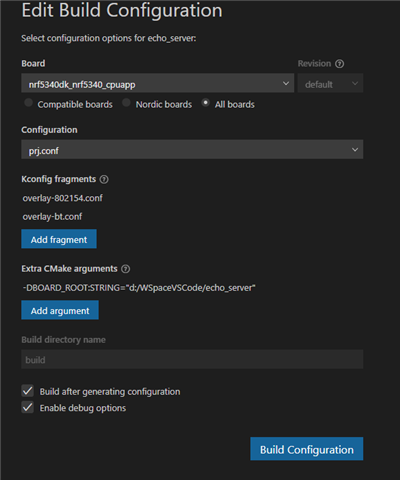
I have two nrF5340 DKs for the client I've built it with the overlay-802154.conf, for the server I have built it with the overlay-802154.conf and overlay-bt.conf

The server runs on it's own, but when the client is switched on it crashes:

uart:~$ *** Booting Zephyr OS build v3.1.99-ncs1 ***
[00:00:00.264,038] <inf> ieee802154_nrf5: nRF5 802154 radio initialized
[00:00:00.266,479] <wrn> net_if: You have 1 IPv6 net_if addresses but 2 network interfaces
[00:00:00.266,510] <wrn> net_if: Consider increasing CONFIG_NET_IF_MAX_IPV6_COUN T value.
[00:00:00.308,563] <inf> bt_hci_core: HW Platform: Nordic Semiconductor (0x0002)
[00:00:00.308,563] <inf> bt_hci_core: HW Variant: nRF53x (0x0003)
[00:00:00.308,593] <inf> bt_hci_core: Firmware: Standard Bluetooth controller (0 x00) Version 242.24551 Build 4087489391
[00:00:00.313,049] <inf> bt_hci_core: Identity: CB:43:E9:71:1B:D9 (random)
[00:00:00.313,049] <inf> bt_hci_core: HCI: version 5.3 (0x0c) revision 0x21a7, m anufacturer 0x0059
[00:00:00.313,079] <inf> bt_hci_core: LMP: version 5.3 (0x0c) subver 0x21a7
[00:00:00.316,833] <inf> net_config: Initializing network
[00:00:00.425,842] <inf> net_config: IPv6 address: 2001:db8::1
[00:00:00.426,086] <inf> net_echo_server_sample: Run echo server
[00:00:00.426,116] <inf> net_echo_server_sample: Waiting network to be connected
uart:~$
[00:00:09.739,410] <err> os: ***** USAGE FAULT *****
[00:00:09.739,440] <err> os: Stack overflow (context area not valid)
[00:00:09.739,471] <err> os: r0/a1: 0xaaaaaaaa r1/a2: 0xaaaaaaaa r2/a3: 0x0003ff54
[00:00:09.739,471] <err> os: r3/a4: 0x01000000 r12/ip: 0x00000001 r14/lr: 0x00000000
[00:00:09.739,471] <err> os: xpsr: 0x00000000
[00:00:09.739,501] <err> os: Faulting instruction address (r15/pc): 0x00000000
[00:00:09.739,501] <err> os: >>> ZEPHYR FATAL ERROR 2: Stack overflow on CPU 0
[00:00:09.739,532] <err> os: Current thread: 0x20004040 (rx_q[0])
[00:00:09.820,648] <err> fatal_error: Resetting system

I'm not sure why this is crashing. I've built the client on a nrF52840 as well and the server still crashes. I have made no edits to any of the code.

Parents
  • Hi,

    I am not able to reproduce the error you get. When I try performing the same steps as you I get "Network disconnected" instead of "Waiting network to be connected", but it does not fail afterwards.. How do you add overlay-802154.conf and overlay-bt.conf? Which version of nRF5340 DK do you have? You should find the version on the sticker on the DK, the line under "PCA10095".

    Best regards,

    Marte

  • Hi Marte,

    I have 2.0.0 as the next line.

    I add the overlays by using the "Add fragment" button:

    Best regards,

    Richard

  • Hi Richard,

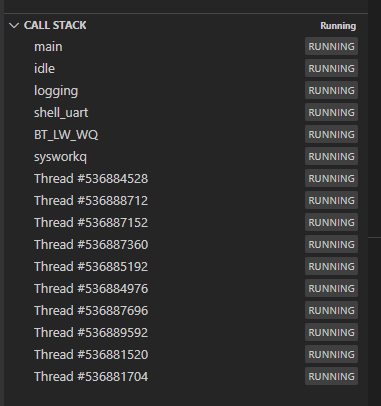
    I am still not able to get it to crash. I have the same DK version as you, and added the overlays in the same way. Now I see "Waiting network to be connected", but no crash. Are you debugging while this happens? Can you check what the callstack is?

    Best regards,

    Marte

  • Hi Marte,

    I wasn't running in debug, but just have and here is the call stack:

    I don't think I specified I'm using V2.1.0 of the Connect SDK (It just happens to be the version that was current when I first started evaluating, so no issues with upgrading if necessary).

    Just for clarification: the server only crashes for me when the echo client is switched on. I've had the client running on a 5340DK PCA10095, 2.0.0 (so exactly the same as what the server is running on) but also run it on a 52840DK (PCA10056 1.0.0) same result.

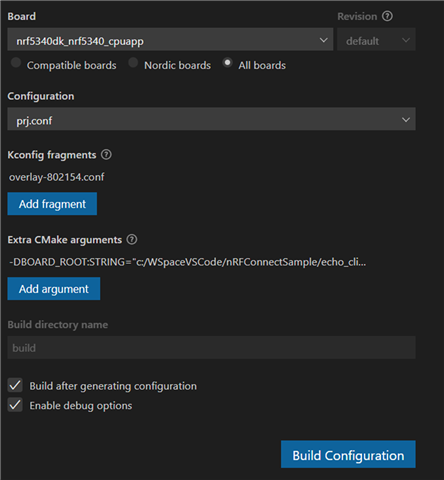
    Here's the build config for the client:

    and here's the putty terminal output which constantly repeats the udp output line with varying byte values. The server crashes at the same time as an output to the terminal.

    uart:~$ *** Booting Zephyr OS build v3.1.99-ncs1  ***

    [00:00:00.523,162] <inf> ieee802154_nrf5: nRF5 802154 radio initialized

    [00:00:00.546,875] <inf> net_config: Initializing network

    [00:00:00.654,754] <inf> net_config: IPv6 address: 2001:db8::2

    [00:00:00.654,907] <inf> net_echo_client_sample: Run echo client

    [00:00:00.654,937] <inf> net_echo_client_sample: Network connected

    [00:00:00.654,968] <inf> net_echo_client_sample: Starting...

    [00:00:00.660,919] <dbg> net_echo_client_sample: send_udp_data: IPv6 UDP: Sent 58 bytes

    [00:00:10.661,041] <err> net_echo_client_sample: UDP IPv6: Data packet not received

    [00:00:10.667,144] <dbg> net_echo_client_sample: send_udp_data: IPv6 UDP: Sent 83 bytes

    [00:00:20.667,266] <err> net_echo_client_sample: UDP IPv6: Data packet not received

    [00:00:20.673,492] <dbg> net_echo_client_sample: send_udp_data: IPv6 UDP: Sent 16 bytes

    [00:00:30.673,583] <err> net_echo_client_sample: UDP IPv6: Data packet not received

    [00:00:30.680,511] <dbg> net_echo_client_sample: send_udp_data: IPv6 UDP: Sent 19 bytes

    Thank you,

    Best regards,

    Richard

  • The same thing happens when using the latest SDK release (2.1.2)

    I've also gone back and used my older PC which had SDK 1.7.0 on it, in this instance the client doesn't need to be on for it to crash.

    This is the output that happens on repeat:

    <ESC>_[1;32muart:~$ <ESC>_[m*** Booting Zephyr OS build v2.6.99-ncs1  ***<CR><LF>

    <ESC>_[8D<ESC>_[J[00:00:00.265,502] <ESC>_[0m<inf> ieee802154_nrf5: nRF5 802154 radio initialized<ESC>_[0m<CR><LF>

    <ESC>_[1;32muart:~$ <ESC>_[m<ESC>_[8D<ESC>_[J[00:00:00.266,113] <ESC>_[1;33m<wrn> net_if: You have 1 IPv6 net_if addresses but 2 network interfaces<ESC>_[0m<CR><LF>

    <ESC>_[1;32muart:~$ <ESC>_[m<ESC>_[8D<ESC>_[J[00:00:00.266,113] <ESC>_[1;33m<wrn> net_if: Consider increasing CONFIG_NET_IF_MAX_IPV6_COUNT value.<ESC>_[0m<CR><LF>

    <ESC>_[1;32muart:~$ <ESC>_[m<ESC>_[8D<ESC>_[J[00:00:00.309,875] <ESC>_[0m<inf> bt_hci_core: HW Platform: Nordic Semiconductor (0x0002)<ESC>_[0m<CR><LF>

    <ESC>_[1;32muart:~$ <ESC>_[m<ESC>_[8D<ESC>_[J[00:00:00.309,906] <ESC>_[0m<inf> bt_hci_core: HW Variant: nRF53x (0x0003)<ESC>_[0m<CR><LF>

    <ESC>_[1;32muart:~$ <ESC>_[m<ESC>_[8D<ESC>_[J[00:00:00.309,906] <ESC>_[0m<inf> bt_hci_core: Firmware: Standard Bluetooth controller (0x00) Version 63.28743 Build 1318420878<ESC>_[0m<CR><LF>

    <ESC>_[1;32muart:~$ <ESC>_[m<ESC>_[8D<ESC>_[J[00:00:00.313,537] <ESC>_[1;33m<wrn> bt_ecc: ECC HCI commands not available<ESC>_[0m<CR><LF>

    <ESC>_[1;32muart:~$ <ESC>_[m<ESC>_[8D<ESC>_[J[00:00:00.313,659] <ESC>_[0m<inf> bt_hci_core: Identity: CB:43:E9:71:1B:D9 (random)<ESC>_[0m<CR><LF>

    <ESC>_[1;32muart:~$ <ESC>_[m<ESC>_[8D<ESC>_[J[00:00:00.313,659] <ESC>_[0m<inf> bt_hci_core: HCI: version 5.2 (0x0b) revision 0x225b, manufacturer 0x0059<ESC>_[0m<CR><LF>

    <ESC>_[1;32muart:~$ <ESC>_[m<ESC>_[8D<ESC>_[J[00:00:00.313,659] <ESC>_[0m<inf> bt_hci_core: LMP: version 5.2 (0x0b) subver 0x225b<ESC>_[0m<CR><LF>

    <ESC>_[1;32muart:~$ <ESC>_[m<ESC>_[8D<ESC>_[J<ESC>_[1;32muart:~$ <ESC>_[m<ESC>_[1B<ESC>_[9D<ESC>_[8D<ESC>_[J[00:00:00.317,596] <ESC>_[0m<inf> net_config: Initializing network<ESC>_[0m<CR><LF>

    <ESC>_[8D<ESC>_[J[00:00:00.425,476] <ESC>_[0m<inf> net_config: IPv6 address: 2001:db8::1<ESC>_[0m<CR><LF>

    <ESC>_[8D<ESC>_[J[00:00:00.425,689] <ESC>_[0m<inf> net_echo_server_sample: Run echo server<ESC>_[0m<CR><LF>

    <ESC>_[8D<ESC>_[J[00:00:00.425,720] <ESC>_[0m<inf> net_echo_server_sample: Waiting network to be connected<ESC>_[0m<CR><LF>

    <ESC>_[8D<ESC>_[J[00:00:01.288,238] <ESC>_[1;31m<err> os: ***** USAGE FAULT *****<ESC>_[0m<CR><LF>

    <ESC>_[8D<ESC>_[J[00:00:01.288,238] <ESC>_[1;31m<err> os:   Stack overflow (context area not valid)<ESC>_[0m<CR><LF>

    <ESC>_[8D<ESC>_[J[00:00:01.288,238] <ESC>_[1;31m<err> os: r0/a1:  0x20003ff8  r1/a2:  0x2007f800  r2/a3:  0x00000000<ESC>_[0m<CR><LF>

    <ESC>_[8D<ESC>_[J[00:00:01.288,238] <ESC>_[1;31m<err> os: r3/a4:  0x2000e890 r12/ip:  0x2000e890 r14/lr:  0x00034f77<ESC>_[0m<CR><LF>

    <ESC>_[8D<ESC>_[J[00:00:01.288,269] <ESC>_[1;31m<err> os:  xpsr:  0x01000000<ESC>_[0m<CR><LF>

    <ESC>_[8D<ESC>_[J[00:00:01.288,269] <ESC>_[1;31m<err> os: Faulting instruction address (r15/pc): 0x00034e7a<ESC>_[0m<CR><LF>

    <ESC>_[8D<ESC>_[J[00:00:01.288,269] <ESC>_[1;31m<err> os: >>> ZEPHYR FATAL ERROR 2: Stack overflow on CPU 0<ESC>_[0m<CR><LF>

    <ESC>_[8D<ESC>_[J[00:00:01.288,299] <ESC>_[1;31m<err> os: Current thread: 0x20003e18 (sysworkq)<ESC>_[0m<CR><LF>

    <ESC>_[8D<ESC>_[J[00:00:01.380,828] <ESC>_[1;31m<err> fatal_error: Resetting system<ESC>_[0m<CR>

    <CR><LF>

    BR 
    Richard

Reply
  • The same thing happens when using the latest SDK release (2.1.2)

    I've also gone back and used my older PC which had SDK 1.7.0 on it, in this instance the client doesn't need to be on for it to crash.

    This is the output that happens on repeat:

    <ESC>_[1;32muart:~$ <ESC>_[m*** Booting Zephyr OS build v2.6.99-ncs1  ***<CR><LF>

    <ESC>_[8D<ESC>_[J[00:00:00.265,502] <ESC>_[0m<inf> ieee802154_nrf5: nRF5 802154 radio initialized<ESC>_[0m<CR><LF>

    <ESC>_[1;32muart:~$ <ESC>_[m<ESC>_[8D<ESC>_[J[00:00:00.266,113] <ESC>_[1;33m<wrn> net_if: You have 1 IPv6 net_if addresses but 2 network interfaces<ESC>_[0m<CR><LF>

    <ESC>_[1;32muart:~$ <ESC>_[m<ESC>_[8D<ESC>_[J[00:00:00.266,113] <ESC>_[1;33m<wrn> net_if: Consider increasing CONFIG_NET_IF_MAX_IPV6_COUNT value.<ESC>_[0m<CR><LF>

    <ESC>_[1;32muart:~$ <ESC>_[m<ESC>_[8D<ESC>_[J[00:00:00.309,875] <ESC>_[0m<inf> bt_hci_core: HW Platform: Nordic Semiconductor (0x0002)<ESC>_[0m<CR><LF>

    <ESC>_[1;32muart:~$ <ESC>_[m<ESC>_[8D<ESC>_[J[00:00:00.309,906] <ESC>_[0m<inf> bt_hci_core: HW Variant: nRF53x (0x0003)<ESC>_[0m<CR><LF>

    <ESC>_[1;32muart:~$ <ESC>_[m<ESC>_[8D<ESC>_[J[00:00:00.309,906] <ESC>_[0m<inf> bt_hci_core: Firmware: Standard Bluetooth controller (0x00) Version 63.28743 Build 1318420878<ESC>_[0m<CR><LF>

    <ESC>_[1;32muart:~$ <ESC>_[m<ESC>_[8D<ESC>_[J[00:00:00.313,537] <ESC>_[1;33m<wrn> bt_ecc: ECC HCI commands not available<ESC>_[0m<CR><LF>

    <ESC>_[1;32muart:~$ <ESC>_[m<ESC>_[8D<ESC>_[J[00:00:00.313,659] <ESC>_[0m<inf> bt_hci_core: Identity: CB:43:E9:71:1B:D9 (random)<ESC>_[0m<CR><LF>

    <ESC>_[1;32muart:~$ <ESC>_[m<ESC>_[8D<ESC>_[J[00:00:00.313,659] <ESC>_[0m<inf> bt_hci_core: HCI: version 5.2 (0x0b) revision 0x225b, manufacturer 0x0059<ESC>_[0m<CR><LF>

    <ESC>_[1;32muart:~$ <ESC>_[m<ESC>_[8D<ESC>_[J[00:00:00.313,659] <ESC>_[0m<inf> bt_hci_core: LMP: version 5.2 (0x0b) subver 0x225b<ESC>_[0m<CR><LF>

    <ESC>_[1;32muart:~$ <ESC>_[m<ESC>_[8D<ESC>_[J<ESC>_[1;32muart:~$ <ESC>_[m<ESC>_[1B<ESC>_[9D<ESC>_[8D<ESC>_[J[00:00:00.317,596] <ESC>_[0m<inf> net_config: Initializing network<ESC>_[0m<CR><LF>

    <ESC>_[8D<ESC>_[J[00:00:00.425,476] <ESC>_[0m<inf> net_config: IPv6 address: 2001:db8::1<ESC>_[0m<CR><LF>

    <ESC>_[8D<ESC>_[J[00:00:00.425,689] <ESC>_[0m<inf> net_echo_server_sample: Run echo server<ESC>_[0m<CR><LF>

    <ESC>_[8D<ESC>_[J[00:00:00.425,720] <ESC>_[0m<inf> net_echo_server_sample: Waiting network to be connected<ESC>_[0m<CR><LF>

    <ESC>_[8D<ESC>_[J[00:00:01.288,238] <ESC>_[1;31m<err> os: ***** USAGE FAULT *****<ESC>_[0m<CR><LF>

    <ESC>_[8D<ESC>_[J[00:00:01.288,238] <ESC>_[1;31m<err> os:   Stack overflow (context area not valid)<ESC>_[0m<CR><LF>

    <ESC>_[8D<ESC>_[J[00:00:01.288,238] <ESC>_[1;31m<err> os: r0/a1:  0x20003ff8  r1/a2:  0x2007f800  r2/a3:  0x00000000<ESC>_[0m<CR><LF>

    <ESC>_[8D<ESC>_[J[00:00:01.288,238] <ESC>_[1;31m<err> os: r3/a4:  0x2000e890 r12/ip:  0x2000e890 r14/lr:  0x00034f77<ESC>_[0m<CR><LF>

    <ESC>_[8D<ESC>_[J[00:00:01.288,269] <ESC>_[1;31m<err> os:  xpsr:  0x01000000<ESC>_[0m<CR><LF>

    <ESC>_[8D<ESC>_[J[00:00:01.288,269] <ESC>_[1;31m<err> os: Faulting instruction address (r15/pc): 0x00034e7a<ESC>_[0m<CR><LF>

    <ESC>_[8D<ESC>_[J[00:00:01.288,269] <ESC>_[1;31m<err> os: >>> ZEPHYR FATAL ERROR 2: Stack overflow on CPU 0<ESC>_[0m<CR><LF>

    <ESC>_[8D<ESC>_[J[00:00:01.288,299] <ESC>_[1;31m<err> os: Current thread: 0x20003e18 (sysworkq)<ESC>_[0m<CR><LF>

    <ESC>_[8D<ESC>_[J[00:00:01.380,828] <ESC>_[1;31m<err> fatal_error: Resetting system<ESC>_[0m<CR>

    <CR><LF>

    BR 
    Richard

Children
  • Hello,

    The log you indicates that you have a stack overrun in your system work queue thread. You can increase this stack size through the CONFIG_SYSTEM_WORKQUEUE_STACK_SIZE symbol.

    Best regards,

    Vidar

  • I have doubled this value from 2048 up to 16384 and it makes no difference. I'm not sure why I would need to edit Nordic sample to run for me when it appears to run out of the box for Marte.

  • The stack usages will increase some when you check the "enable debug options" in the create project  wizard as it adds CONFIG_DEBUG_OPTIMIZATIONS and CONFIG_DEBUG_THREAD_INFO to your build, but it will not increase by that much.

    Does the log still report a stack overflow in your 'sysworkq' thread?

  • Here's the sever output when a client is switched on:

    uart:~$ *** Booting Zephyr OS build v3.1.99-ncs1-1 ***
    [00:00:00.274,169] <inf> ieee802154_nrf5: nRF5 802154 radio initialized
    [00:00:00.320,983] <inf> bt_hci_core: HW Platform: Nordic Semiconductor (0x0002)
    [00:00:00.321,014] <inf> bt_hci_core: HW Variant: nRF53x (0x0003)
    [00:00:00.321,044] <inf> bt_hci_core: Firmware: Standard Bluetooth controller (0x00) Version 41.37468 Build 2457941745
    [00:00:00.325,683] <inf> bt_hci_core: Identity: CB:43:E9:71:1B:D9 (random)
    [00:00:00.325,714] <inf> bt_hci_core: HCI: version 5.3 (0x0c) revision 0x21d8, manufacturer 0x0059
    [00:00:00.325,744] <inf> bt_hci_core: LMP: version 5.3 (0x0c) subver 0x21d8
    [00:00:00.329,711] <inf> net_config: Initializing network
    [00:00:00.438,079] <inf> net_config: IPv6 address: 2001:db8::1
    uart:~$
    [00:00:08.154,113] <err> os: ***** USAGE FAULT *****
    [00:00:08.154,174] <err> os: Stack overflow (context area not valid)
    [00:00:08.154,174] <err> os: r0/a1: 0xaaaaaaaa r1/a2: 0xaaaaaaaa r2/a3: 0x0003f8e2
    [00:00:08.154,205] <err> os: r3/a4: 0x01000000 r12/ip: 0x00000001 r14/lr: 0x00000000
    [00:00:08.154,205] <err> os: xpsr: 0x00000000
    [00:00:08.154,205] <err> os: Faulting instruction address (r15/pc): 0x00000000
    [00:00:08.154,235] <err> os: >>> ZEPHYR FATAL ERROR 2: Stack overflow on CPU 0
    [00:00:08.154,266] <err> os: Current thread: 0x20004028 (rx_q[0])
    [00:00:08.235,321] <err> fatal_error: Resetting system
    uart:~$

    The sysworkq issue only happened on the older SDK.

    This issue is taking a backseat for me as I've edited the client to try and talk to our existing coordinator NRF_802154_USE_RAW_API is always being set to 1 

    BR

    Richard

  • Hi Richard,

    Sorry, I missed the fact the workqueue thread only overflowed with the older SDK version.

    I find it a bit strange that you get these overflows while Marte didn't. Could it be because of the debug settings being enabled?  Either way, the last log you sent shows a overflow in rx_q now, so you may try to increase the CONFIG_NET_RX_STACK_SIZE setting if you want to test this again.

    Best regards,

    Vidar

Related