

Hello,
I am currently developing an LTE/LwM2M application on a custom board using the nRF9160 and NCS version 2.1.0.We are almost finished with our application and the final open milestone is the modem firmware update implementation.
I used the "http_update/full_modem_update" sample and the "http_update/modem_delta_update example" as a starting point to implement both options for the modem update, however I am updating the firmware over LWM2M instead of HTTP. I first got the FMFU working using external flash, then I started working on the delta updates, expecting it would be far easier, however I ran into some errors. The modem firmware is currently updated to the latest version (1.3.3) and I am trying to update the firmware using the delta image "mfw_nrf9160_update_from_1.3.3_to_1.3.3-FOTA-TEST.bin". As can be seen in the image below, the write operation failed with the error code 22. I've look up this error code: "NRF_MODEM_DELTA_DFU_ERROR_INTERNAL_04" and have no idea what it means. Could someone elaborate on this and suggest a solution? Is it a bug in the modem or am I missing something?
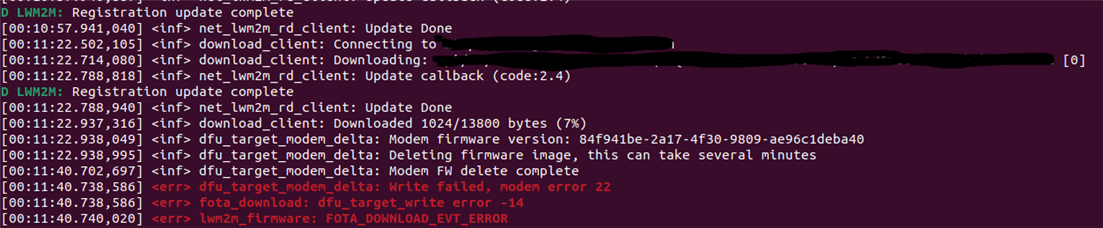
Below you can find the "prj.conf" I am using:
#
# Copyright (c) 2020 Nordic Semiconductor ASA
#
# SPDX-License-Identifier: LicenseRef-Nordic-5-Clause
#

# General config
CONFIG_NEWLIB_LIBC=y
CONFIG_NEWLIB_LIBC_FLOAT_PRINTF=y
CONFIG_CBPRINTF_FP_SUPPORT=y
CONFIG_ASSERT=y
CONFIG_REBOOT=y

# DEBUGGING
CONFIG_SERIAL=y
CONFIG_UART_CONSOLE=n
CONFIG_RTT_CONSOLE=y
CONFIG_USE_SEGGER_RTT=y

# Logging
CONFIG_LOG=y
CONFIG_ELEO_LOG_LEVEL_DBG=y

# Network
CONFIG_NETWORKING=y
CONFIG_NET_NATIVE=n
CONFIG_NET_IPV6=n
CONFIG_NET_IPV4=y
CONFIG_NET_SOCKETS=y
CONFIG_NET_SOCKETS_OFFLOAD=y

# LwM2M
CONFIG_LWM2M=y
CONFIG_LWM2M_COAP_BLOCK_SIZE=512
CONFIG_LWM2M_COAP_MAX_MSG_SIZE=1024
CONFIG_LWM2M_ENGINE_MAX_OBSERVER=100
CONFIG_LWM2M_ENGINE_MAX_MESSAGES=20
CONFIG_LWM2M_ENGINE_MAX_PENDING=20
CONFIG_LWM2M_ENGINE_MAX_REPLIES=20
CONFIG_LWM2M_ENGINE_VALIDATION_BUFFER_SIZE=128
CONFIG_LWM2M_ENGINE_DEFAULT_LIFETIME=30
CONFIG_LWM2M_DNS_SUPPORT=y
CONFIG_LWM2M_SERVER_DEFAULT_PMIN=0
CONFIG_LWM2M_SERVER_DEFAULT_PMAX=120
CONFIG_LWM2M_CLIENT_UTILS=y
CONFIG_LWM2M_DTLS_SUPPORT=y
CONFIG_LWM2M_SECURITY_KEY_SIZE=33
CONFIG_LWM2M_SHELL=y

# LwM2M 1.1
CONFIG_LWM2M_VERSION_1_1=y
CONFIG_LWM2M_RW_SENML_CBOR_SUPPORT=y
CONFIG_ZCBOR=y
CONFIG_ZCBOR_CANONICAL=y
CONFIG_LWM2M_RW_SENML_CBOR_RECORDS=35
CONFIG_LWM2M_COMPOSITE_PATH_LIST_SIZE=10
CONFIG_LWM2M_RW_OMA_TLV_SUPPORT=y

# Disable unused object supports
CONFIG_LWM2M_PORTFOLIO_OBJ_SUPPORT=n
CONFIG_LWM2M_CLIENT_UTILS_SIGNAL_MEAS_INFO_OBJ_SUPPORT=n

# CoAP
CONFIG_COAP_INIT_ACK_TIMEOUT_MS=4000
CONFIG_COAP_EXTENDED_OPTIONS_LEN=y
CONFIG_COAP_EXTENDED_OPTIONS_LEN_VALUE=40

# LTE link control
CONFIG_LTE_LINK_CONTROL=y
CONFIG_LTE_AUTO_INIT_AND_CONNECT=n
CONFIG_LTE_NETWORK_MODE_LTE_M_NBIOT_GPS=y

# Modem library
CONFIG_NRF_MODEM_LIB=y
CONFIG_NRF_MODEM_LIB_SYS_INIT=n
CONFIG_MODEM_INFO=y
CONFIG_MODEM_INFO_ADD_DATE_TIME=n
CONFIG_MODEM_KEY_MGMT=y
CONFIG_FMFU_FDEV=y

# Crypto (used for full modem update)
CONFIG_OBERON_BACKEND=y
CONFIG_NORDIC_SECURITY_BACKEND=y
# Disable all non-used crypto
CONFIG_NRF_SECURITY_RNG=n
CONFIG_MBEDTLS_AES_C=n
CONFIG_MBEDTLS_CHACHA20_C=n
CONFIG_MBEDTLS_POLY1305_C=n
CONFIG_MBEDTLS_ECP_C=n
CONFIG_MBEDTLS_RSA_C=n
CONFIG_MBEDTLS_DHM_C=n
CONFIG_MBEDTLS_SHA1_C=n
CONFIG_MBEDTLS_SHA384_C=n
CONFIG_MBEDTLS_SHA512_C=n
CONFIG_MBEDTLS_GCM_C=n
# This is the one we need
CONFIG_MBEDTLS_SHA256_C=y

# Enable settings storage
CONFIG_SETTINGS=y
CONFIG_FCB=y
CONFIG_SETTINGS_FCB=y

# DFU Target
CONFIG_DFU_TARGET=y
CONFIG_DFU_TARGET_STREAM=y
CONFIG_DFU_TARGET_FULL_MODEM=y

# Allow FOTA downloads using download-client
CONFIG_DOWNLOAD_CLIENT=y
CONFIG_DOWNLOAD_CLIENT_STACK_SIZE=4096
CONFIG_DOWNLOAD_CLIENT_HTTP_FRAG_SIZE_1024=y
CONFIG_FOTA_DOWNLOAD=y
CONFIG_LWM2M_FIRMWARE_UPDATE_OBJ_SUPPORT_MULTIPLE=y
CONFIG_LWM2M_FIRMWARE_UPDATE_OBJ_INSTANCE_COUNT=3

# Heap and stacks
CONFIG_HEAP_MEM_POOL_SIZE=20480
CONFIG_MAIN_STACK_SIZE=4096
CONFIG_LWM2M_ENGINE_STACK_SIZE=4096
CONFIG_SYSTEM_WORKQUEUE_STACK_SIZE=2048
CONFIG_AT_MONITOR_HEAP_SIZE=1024

## PSM
CONFIG_LTE_PSM_REQ_RPTAU="00000011"
CONFIG_LTE_PSM_REQ_RAT="00100001"

## eDRX
CONFIG_LTE_EDRX_REQ=y
CONFIG_LTE_EDRX_REQ_VALUE_LTE_M="1001"

# GPS
CONFIG_GNSS_PRIORITY_ON_FIRST_FIX=n
CONFIG_GNSS_SEARCH_TIMEOUT=120
CONFIG_GNSS_SEARCH_INTERVAL_TIME=180
CONFIG_SUPL_CLIENT_LIB=y

# Application Event Manager
CONFIG_APP_EVENT_MANAGER=y
CONFIG_APP_EVENT_MANAGER_LOG_EVENT_TYPE=y
CONFIG_APP_EVENT_MANAGER_LOG_LEVEL_INF=y
CONFIG_APP_EVENT_MANAGER_SHOW_EVENTS=y

# Set SPM as default secure firmware
CONFIG_BUILD_WITH_TFM=n
CONFIG_SPM=y

# GPIO
CONFIG_GPIO=y

# SPI
CONFIG_SPI=y
CONFIG_SPI_NRFX=y
CONFIG_SPI_NOR=y
CONFIG_SPI_NOR_SFDP_RUNTIME=y
CONFIG_SPI_NOR_FLASH_LAYOUT_PAGE_SIZE=4096
CONFIG_SPI_NRFX_RAM_BUFFER_SIZE=32

# FLASH
CONFIG_FLASH=y
CONFIG_STREAM_FLASH=y
CONFIG_STREAM_FLASH_ERASE=y
CONFIG_FLASH_PAGE_LAYOUT=y
CONFIG_FLASH_JESD216_API=y
CONFIG_FLASH_MAP=y
CONFIG_NVS=y
CONFIG_MPU_ALLOW_FLASH_WRITE=y

# MCUBOOT
CONFIG_BOOTLOADER_MCUBOOT=y

# Image manager
CONFIG_IMG_MANAGER=y
CONFIG_IMG_ERASE_PROGRESSIVELY=y

# WDT
CONFIG_WATCHDOG=y
CONFIG_WATCHDOG_WINDOWN_MIN=0
CONFIG_WATCHDOG_WINDOWN_MAX=90000

# Partition Manager
CONFIG_PM_EXTERNAL_FLASH_MCUBOOT_SECONDARY=y
CONFIG_PM_OVERRIDE_EXTERNAL_DRIVER_CHECK=y

# Date-Time library
CONFIG_DATE_TIME=y
CONFIG_DATE_TIME_UPDATE_INTERVAL_SECONDS=86400

