Adding buttonless DFU to BLE App using SDK 15.3. Should I upgrade to SDK 17 first?

Hi,

After lots of issues with build and deploy, I eventually have a working version of a BLE App running on a XM122 Radar module.  This module have to be packeaged with the XA122 Battery holder and later updated with new software.  This means I do not have a DFU button available and need to add Buttonless DFU support to the project.  I read documentation, searched forums and saw lots of issues.  I have unfortunately up to now been confronted with various documentation all stating a different solutions to same problem and only 1 out of 5 options actually working.  For this reason the questions below:

1) I found this piece of resource that seems like the best info of how to add Buttonless DFU to a BLE App  "Implementing Nordic nRF52 OTA DFU over Bluetooth LE – Part 4" from Novelbits at https://novelbits.io/nrf52-ota-dfu-ble-part-4/  Would you recommend this procedure or which actual documentation would you recommend?

2) Would you recommend upgrading to SDK 17.1 before adding Buttonless DFU  as this documentation is on SDK 17.1 but my current App is on SDK 15.3?  Or should this work as is on 15.3 as well?

Thanks

Cheers

Andreas

  • Hi Andreas, 

    1. I'm not very familiar with the novelbit tutorial so it's hard for me to give an advice. However, my suggestion is to get familiar with the bootloader and make sure you can use it to do DFU without problem before you move to implement buttonless service in the application. I would suggest to have a look at my blog here.

    In the blog I give an instruction on how to test the bootloader and have some discussion on how the buttonless service works. Please see Appendix 3.

    2. It's always good to have your application running on latest SDK. However I don't see much point of upgrading to SDK v17.1 just for the bootloader and buttonless DFU. As far as I know the mechanism doesn't change much.

    My suggestion is to follow my blog, study (and test) the ble_app_buttonless_dfu and implement the same to your application. You can follow the Novelbit blog after you are familiar with the bootloader and the ble_app_buttonless_dfu example. 

  • Thanks Hung,

    I took your advise and rather went to your blog that I have not previously seen.  I scanned it and it also looked like a good option, so I dove in.

    First part went smooth, I had all the tools and decided to go for the Oberon crypto lib.

    On the project changes, you suggested to change as follows

    NRF_CRYPTO_BACKEND_MICRO_ECC_ENABLED to 0  //This was already 0

    NRF_CRYPTO_BACKEND_NRF_SW_ENABLED to 0  //This was already 0

    NRF_CRYPTO_BACKEND_OBERON_ENABLED to 1 //I made this change

    Then it did not want to compile, I had to disable a few more settings in the sdk_config.h that shipped with the 15.3 SDK:

    NRF_CRYPTO_BACKEND_CC310_BL_ENABLED 0 //This was 1

    NRF_CRYPTO_BACKEND_CC310_BL_ECC_SECP256R1_ENABLED 0 //This was 1

    This made the source compile, great start!  Note: there was no micro_ecc_lib_nrf52.lib to remove from the segger project in : nRF5_SDK_15.3.0_59ac345\examples\dfu\secure_bootloader\pca10056_ble\ses  (Chose this project for nRF52840DK board to be used which uses the S140 Softdevice)

    1)  I hope this is all correct thus far as it seems to work? 

    Then I went on to try and build, but first needed to change the FLASH targets/sizes as suggested due to Oberon 

    I could not find the settings your blog refers to, "For example for the nRF52840 project you change IROM1 start from 0x78000 to 0x77000 and IROM1 size from 0x6000 to 0x7000. This meant your bootloader now +4kB larger. This is the draw back of using Oberon library instead of uEcc" so I started to search and found this resource  Adjustment of RAM and Flash memory 

    Reading this I assume you were using Keil to write the blog.  I tried following their SES instructions but not successful and need help please.

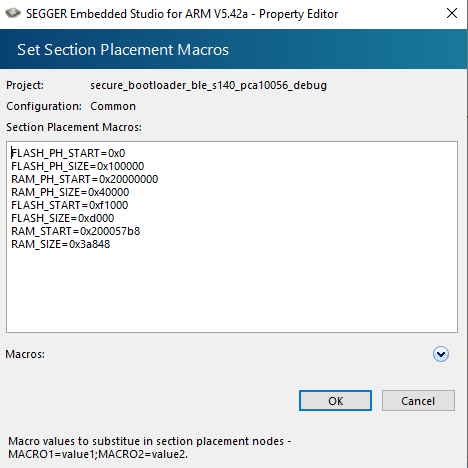
    I tried setting the Section Placement Macros and picked the values as they suggested for Blinkey with softdevice:

    FLASH_PH_START=0x0
    FLASH_PH_SIZE=0x100000
    RAM_PH_START=0x20000000
    RAM_PH_SIZE=0x40000
    FLASH_START=0x26000
    FLASH_SIZE=0xda000
    RAM_START=0x200022B0
    RAM_SIZE=0x3dd50

    Tried compiling but get same 4 linker errors as without the new settings (which was empty to start with, both in project and solution)

    section .uicr_bootloader_start_address VMA [0000000000000ff8,0000000000000ffb] overlaps section .reserved_flash VMA [0000000000000000,00000000000f7fff]

    section .mbr_params_page VMA [00000000000fe000,00000000000fefff] overlaps section .text VMA [00000000000f83bc,00000000000feb57]

    section .bootloader_settings_page VMA [00000000000ff000,00000000000fffff] overlaps section .rodata VMA [00000000000febc4,00000000000ff103]

    It seems like the setting is ignored in generating the linker file.

    2) Where does it get the current settings from?

    3) Where should I set them (probably same as 3 but just confirming)?

    4) Are they the correct settings I am trying to use?

    5) If not, where/how do I find the correct settings for this project?

    I have a working .hex for the App so need this step to continue.

    6) Can I mix a Debug App hex with the Release Bootloader as you suggest we use to start with?

    Your help is appreciated!

    Thanks

    Cheers

    Andreas

  • Hi Andreas, 

    If you are using the nRF52840 the hardware CC310 cryptocell is used and you don't need to compile uECC or Oberon as they are software backend. My blog was based on NRF52832 which doesn't have hardware crypto. 
    The example should compile out of the box for nRF52840. 

    Have you tried to compile \examples\dfu\secure_bootloader\pca10056_ble_debug\ses with no modification ? 
    You may need to apply this patch  if you use newer version of SES. 

    AndreasLiebenberg said:
    Reading this I assume you were using Keil to write the blog

    Yes you were right. It was Keil configuration I was referring to. If you use SES it's FLASH_START and FLASH_SIZE you need to change. However, you should not use the configuration for blinky example to use on the bootloader. 
    The bootloader has a different start address compare to normal application: 

    AndreasLiebenberg said:
    6) Can I mix a Debug App hex with the Release Bootloader as you suggest we use to start with?

    Yes, the debug variant of the bootloader only reduce the requirement of version control and can use the default key. It has nothing to do with debugging option of the compiler. 

  • Hi,

    Thanks for the quick reply!

    I tried compiling the secure_bootloader_ble_s140_pca10056_debug SES project without any mods.  Does not compile, complains about 

    __vfprintf.h: No such file or directory

    in SEGGER_RTT_Syscalls_SES.c

    I am using SES version:

    SEGGER Embedded Studio for ARM
    Release 6.34a Build 2022083102.51023
    Windows x64

    I managed to apply "fix" as in  Compiling issue with SEGGER EMBEDDED STUDIO V6.30 ,this basically ignores most of what is in SEGGER_RTT_Syscalls_SES.c with a #ifdef

    That seemed to work and got me to the error you said would happen, for that I applied the +0x1000 -0x1000 in the flash_placement.xml as described in your mentioned patch

    Now compiles, thanks!  I repeated above on release version and it also works, now on to the next step.

    Step C1: nrfutil pkg generate --hw-version 52 --application-version 1 --application acc_bluetooth_beacon.hex --sd-req 0xB6 --key-file ..\private.key app_dfu_ble_dist.zip  //No errors

    Step D1 connected to XB122 through nRF52840DK:

    nrfjprog -f nrf52 --program s140_nrf52_6.1.1_softdevice.hex --sectorerase --verify //No errors

    Step D2 connected to XB122 through nRF52840DK:  

    nrfjprog -f nrf52 --program secure_bootloader_ble_s140_pca10056.hex --sectorerase --verify

    After this, try to connect to DFU any App to XB122 after disconnecting from nRF52840, but do not see any BLE device to DFU to...neither could I see it with a BLE Scanner.

    Are my commands to Flash Softdevice and Bootloader correct, you did not give samples?

    Where do I start looking, there were no errors in the process?

    Thanks

    Cheers

    Andreas

  • Hi Andreas, 


    Could you please test using nRF52840DK ? 
    Please test DFU with the nRF52840DK first before you move to the XB122.

    If you don't have 32kHz crystal on the XB122 you may need to configure the bootloader to user RC instead of the crystal. 

    It's correct that you just need to flash the softdevice and then flash the bootloader to test the bootloader. It should advertiser as "DFUTarg" and then you can use nRF Connect app on the phone to connect and do DFU 

Related