Beware that this post is related to an SDK in maintenance mode
More Info: Consider nRF Connect SDK for new designs

GATT Error issue(Error 133) when DFU Firmware updating through nRFConnect application

Hi,

followed below link to do the firmware updating using DFU service with "nRF Connec"t application on Android mobile.

https://novelbits.io/nrf52-ota-dfu-ble-part-4/

While updating the Zip file I am getting Error 133 (0x85):GATT Error, please check the below log and video for more information 

nRF Connect, 2022-12-01
NordicUART (D2:EB:38:F0:47:E8)
V 12:01:54.568 Connecting to D2:EB:38:F0:47:E8...
D 12:01:54.568 gatt = device.connectGatt(autoConnect = false, TRANSPORT_LE, preferred PHY = LE 1M)
D 12:01:54.683 [Callback] Connection state changed with status: 0 and new state: CONNECTED (2)
I 12:01:54.683 Connected to D2:EB:38:F0:47:E8
V 12:01:54.685 Discovering services...
D 12:01:54.685 gatt.discoverServices()
D 12:01:54.695 [Broadcast] Action received: android.bluetooth.device.action.ACL_CONNECTED
I 12:01:55.318 Connection parameters updated (interval: 7.5ms, latency: 0, timeout: 5000ms)
D 12:01:55.671 [Callback] Services discovered with status: 0
I 12:01:55.671 Services discovered
V 12:01:55.675 Generic Access (0x1800)
- Device Name [R W] (0x2A00)
- Appearance [R] (0x2A01)
- Peripheral Preferred Connection Parameters [R] (0x2A04)
- Central Address Resolution [R] (0x2AA6)
Generic Attribute (0x1801)
- Service Changed [I] (0x2A05)
   Client Characteristic Configuration (0x2902)
Unknown Service (6e40bbaa-b5a3-f393-e0a9-e50e24dcca9e)
- Unknown Characteristic [W WNR] (6e400004-b5a3-f393-e0a9-e50e24dcca9e)
- Unknown Characteristic [N] (6e400005-b5a3-f393-e0a9-e50e24dcca9e)
   Client Characteristic Configuration (0x2902)
Secure DFU Service (0xFE59)
- Buttonless DFU [I W] (8ec90003-f315-4f60-9fb8-838830daea50)
   Client Characteristic Configuration (0x2902)
D 12:01:55.675 gatt.setCharacteristicNotification(00002a05-0000-1000-8000-00805f9b34fb, true)
D 12:01:55.678 gatt.setCharacteristicNotification(6e400005-b5a3-f393-e0a9-e50e24dcca9e, true)
I 12:01:55.759 Connection parameters updated (interval: 45.0ms, latency: 0, timeout: 5000ms)
V 12:01:58.332 Enabling indications for 8ec90003-f315-4f60-9fb8-838830daea50
D 12:01:58.332 gatt.setCharacteristicNotification(8ec90003-f315-4f60-9fb8-838830daea50, true)
D 12:01:58.334 gatt.writeDescriptor(00002902-0000-1000-8000-00805f9b34fb, value=0x0200)
I 12:01:58.414 Data written to descr. 00002902-0000-1000-8000-00805f9b34fb, value: (0x) 02-00
A 12:01:58.414 "Indications enabled" sent
V 12:01:58.416 Indications enabled for 8ec90003-f315-4f60-9fb8-838830daea50
V 12:02:04.264 [DFU] DFU service started
V 12:02:04.264 [DFU] Opening file...
I 12:02:04.292 [DFU] Firmware file opened successfully
V 12:02:04.292 [DFU] Connecting to DFU target...
D 12:02:04.292 [DFU] gatt = device.connectGatt(autoConnect = false, TRANSPORT_LE, preferredPhy = LE_1M | LE_2M)
I 12:02:04.301 [DFU] Connected to D2:EB:38:F0:47:E8
V 12:02:04.301 [DFU] Discovering services...
D 12:02:04.301 [DFU] gatt.discoverServices()
I 12:02:04.301 [DFU] Services discovered
D 12:02:04.314 [DFU] wait(1000)
W 12:02:05.306 [DFU] Application with buttonless update found
V 12:02:05.306 [DFU] Jumping to the DFU Bootloader...
V 12:02:05.306 [DFU] Enabling indications for 8ec90003-f315-4f60-9fb8-838830daea50
D 12:02:05.306 [DFU] gatt.setCharacteristicNotification(8ec90003-f315-4f60-9fb8-838830daea50, true)
D 12:02:05.308 [DFU] gatt.writeDescriptor(00002902-0000-1000-8000-00805f9b34fb, value=0x02-00)
I 12:02:05.479 [DFU] Data written to descr.8ec90003-f315-4f60-9fb8-838830daea50, value (0x): 02-00
V 12:02:05.479 [DFU] Notifications enabled for 8ec90003-f315-4f60-9fb8-838830daea50
A 12:02:05.479 [DFU] Indications enabled
D 12:02:05.480 [DFU] wait(1000)
V 12:02:06.495 [DFU] Writing to characteristic 8ec90003-f315-4f60-9fb8-838830daea50
D 12:02:06.496 [DFU] gatt.writeCharacteristic(8ec90003-f315-4f60-9fb8-838830daea50)
I 12:02:06.560 Indication received from 8ec90003-f315-4f60-9fb8-838830daea50, value: (0x) 20-01-01
A 12:02:06.560 "Response for: Enter bootloader
Status: Success" received
A 12:02:06.560 [DFU] Enter bootloader sent (Op Code = 1)
I 12:02:06.560 [DFU] Notification received from 8ec90003-f315-4f60-9fb8-838830daea50, value (0x): 20-01-01
A 12:02:06.560 [DFU] Response received (Op Code = 1, Status = 1)
D 12:02:06.560 [DFU] gatt.refresh() (hidden)
D 12:02:06.565 [DFU] gatt.disconnect()
D 12:02:06.565 [DFU] gatt.close()
V 12:02:06.568 [DFU] Scanning for the DFU Bootloader... (timeout 5000 ms)
I 12:02:06.635 [DFU] DFU Bootloader found with address D2:EB:38:F0:47:E8
V 12:02:06.644 [DFU] DFU service started
I 12:02:06.644 [DFU] Firmware file opened successfully
D 12:02:06.644 [DFU] wait(1000)
I 12:02:07.017 Connection parameters updated (interval: 7.5ms, latency: 0, timeout: 5000ms)
D 12:02:07.647 [DFU] wait(1000)
V 12:02:08.647 [DFU] Connecting to DFU target...
D 12:02:08.647 [DFU] gatt = device.connectGatt(autoConnect = false, TRANSPORT_LE, preferredPhy = LE_1M | LE_2M)
I 12:02:08.664 [DFU] Connected to D2:EB:38:F0:47:E8
V 12:02:08.664 [DFU] Discovering services...
D 12:02:08.664 [DFU] gatt.discoverServices()
D 12:02:12.030 [Callback] Connection state changed with status: 0 and new state: DISCONNECTED (0)
I 12:02:12.030 Disconnected
E 12:02:12.060 [DFU] Disconnected
D 12:02:12.060 [DFU] gatt.refresh() (hidden)
D 12:02:12.060 [DFU] gatt.disconnect()
D 12:02:12.060 [DFU] gatt.close()
D 12:02:12.060 [Broadcast] Action received: android.bluetooth.device.action.ACL_DISCONNECTED
D 12:02:12.066 [DFU] [Broadcast] Action received: android.bluetooth.device.action.ACL_DISCONNECTED
D 12:02:12.066 [DFU] wait(600)
D 12:02:12.666 gatt.close()
D 12:02:12.668 wait(200)
V 12:02:12.868 Connecting to D2:EB:38:F0:47:E8...
D 12:02:12.868 gatt = device.connectGatt(autoConnect = false, TRANSPORT_LE, preferred PHY = LE 1M)
D 12:02:42.884 [Callback] Connection state changed with status: 133 and new state: DISCONNECTED (0)
E 12:02:42.885 Error 133 (0x85): GATT ERROR
I 12:02:42.885 Disconnected

We are using

nrf5 SDK v17.1.0  

S140 softdevice

nRF conncet on Google pixel6 phone with Android 12  

What could  be the cause for it and how to over come 

Regards,

Sudheer

Parents
  • Hello,

    What application is running on your nRF? Does the log from the nRF say anything particular at the disconnect? They are supposed to disconnect, but the nRF should reboot into DFU mode. Does it do that? If you are using an nRF52833 DK, does two of the leds turn on and remain on (indicating that it is in DFU mode)? 

    Did you modify the bootloader in any way? Did you program the bootloader at all?

    If you could share some more details on what's going on on the nRF side, that would be great. The phone application just says that "something is not working".

    Best regards,

    Edvin

  • Hi,

    What application is running on your nRF?

    Customized application (modified ble_app_uart example) 

    If you are using an nRF52833 DK, does two of the leds turn on and remain on (indicating that it is in DFU mode)? 

    No. Custom board with nRF52833, but When I tried  with nRF52833 DK the DFU process is successful.

    Is any changes required for the Custom board to do DFU process?

    Did you modify the bootloader in any way?

    modified only public_key.c 

    Did you program the bootloader at all?

    Yes, Merged all boot loader, soft device and application hex files as single Hex and programed through J-Flash lite application

    Regards,

    Sudheer

  • Can you please re-flash the softdevice and read it back? The two places where the flash had changed is concerning. If the softdevice is not correctly flashed, then perhaps other parts are not correctly flashed as well.

    Is it flashing only softdevice without any application and Bootloader and read it back?

    And can you please try to set a breakpoin in your bootloader, and see if it is hit both before the application starts the first time, and after it is set in DFU mode. 

    Let me debug and update you

    Regards,

    Sudheer

  • A sudheer Kumar said:
    Is it flashing only softdevice without any application and Bootloader and read it back?

    You can flash everything, including the softdevice. 

    A sudheer Kumar said:
    Let me debug and update you

    Great! Thank you!

  • Hi Edvin,

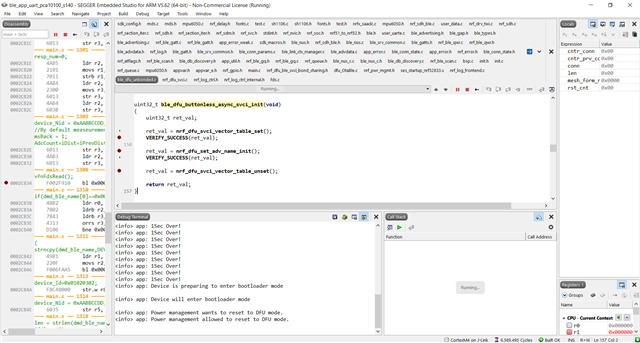
    I tried debugging my project but, In debug terminal there is nothing new information,

    please check the below picture.


    I kept break points in ble_dfu_buttonless_async_svci_init() function (you can see in above pic).

    All break points are hitting when debugging. Once I selected DFU, no break points are hitting.

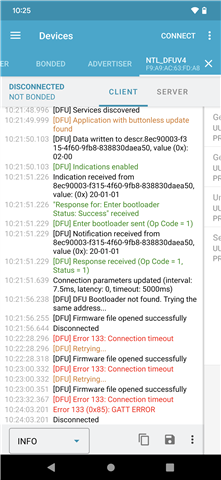
    please check the below screen shot related to the nRFConnect application of the Android app for more information 


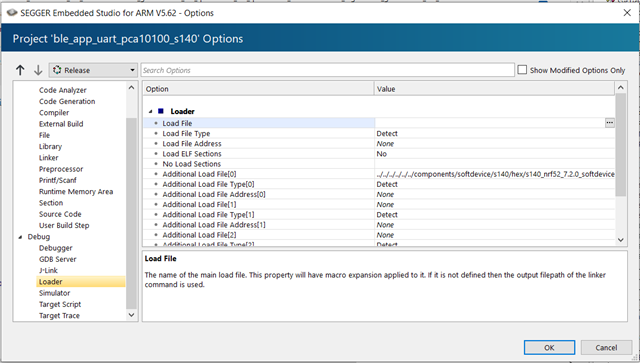
    And also I attached my project Loader setting here,

    It shows only a softdevice  as additional load file. Is here we need to add any bootloader related files  for debugging  

    Regards,

    Sudheer

  • Hello Sudheer,

    Can you please try to set a breakpoin in the bootloader project while using your custom board? Does that ever hit? Because it never prints anything to the log, but yet, the application starts up (the first time). So does the breakpoint in the main() function of your bootloader hit before the application starts? And does it start after the application has run, and you try to enter DFU mode?

    BR,

    Edvin

  • Hi Edvin,

    I need your help for  debugging boot loader project, 

    When I debug the Bootloader project with custom board, there is no application BLE advertisement on nRF connect app.

    how my application project will run while debugging the bootloader project. Here I don't have any idea about it.

    Is there any procedure for debugging simultaneously boot loader and application project, please let me know  

    I am using SES IDE

    Regards,

    Sudheer

Reply
  • Hi Edvin,

    I need your help for  debugging boot loader project, 

    When I debug the Bootloader project with custom board, there is no application BLE advertisement on nRF connect app.

    how my application project will run while debugging the bootloader project. Here I don't have any idea about it.

    Is there any procedure for debugging simultaneously boot loader and application project, please let me know  

    I am using SES IDE

    Regards,

    Sudheer

Children
  • Hi,

    I tried like this for debugging the boot loader project.

    1. open boot loader project, and loaded with the custom board in debug mode

    2. opened J-Flash lite and flashed softdevice

    3. then flashed application hex file with J-Flash lite.

    4. Pressed "Continuous Execution" button in bootloader project (which I loaded in the debug mode)

    After this checked for the BLE device name on nRF connect app. but I am unable to find the My device BLE application name

    please suggest me if the above process is correct or I need to follow any other process to do it.

    Regards,

    Sudheer

  • Hello Sudheer,

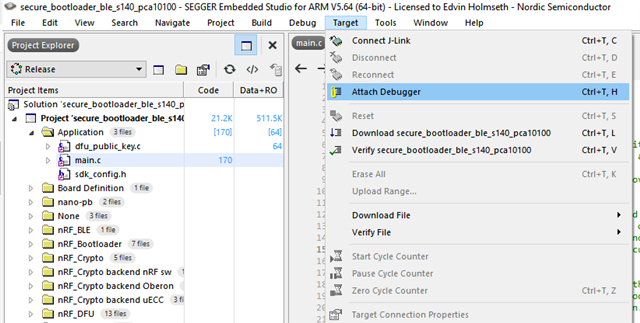
    How did you build your bootloader? Did you build it using SES? If so, can you try to flash the bootloader (and softdevice), and then click target -> attach debugger:

    BR,

    Edvin

  • Hi Edvin,

    How did you build your bootloader? Did you build it using SES?

    Yes

    and I debugged, but it seems to be not executing the application code.

    Here I attached the processes video what I did, please have look and let me know for more information.

    Regards,

    Sudheer

  • Before sending anything, please try to reset the device before you attach the debugger using "Target -> Attach debugger". 

    You can use nrfjprog to do so. In fact, you can use nrfjprog to program as well:

    Open a cmd window in SDK\examples\dfu\secure_bootloader\pca10100_s140_ble\ses, and use the following commands:

    nrfjprog -e
    nrfjprog --program
    nrfjprog --program ..\..\..\..\..\components\softdevice\s140\hex\s140_nrf52_7.2.0_softdevice.hex --verify
    nrfjprog --program Output\Release\Exe\secure_bootloader_ble_s140_pca10100.hex --verify
    nrfjprog --reset

    And then attach the debugger, not by pressing "Connect", but "Target" -> "Attach debugger":

    You can also try restarting by using this button:

    What happens if you reset the device and try to attach the debugger?

    Best regards,

    Edvin

Related