

fatal: unable to access 'github.com/.../': Could not resolve host: github.com.
I am getting above error while trying to clone the above repository.
Regards.
Jogen
fatal: unable to access 'github.com/.../': Could not resolve host: github.com.
I am getting above error while trying to clone the above repository.
Regards.
Jogen
pi@raspberrypi-ab1:~ $ git clone github.com/.../
Cloning into 'ot-br-posix'...
fatal: unable to access 'github.com/.../': Could not resolve host: github.com
pi@raspberrypi-ab1:~ $ git clone github.com/.../
Cloning into ot-br-posix...
fatal: unable to access github.com/.../ Could not resolve host: github.com
Maybe some of the tips here can help you:
Hi,
I refer to your webinar "Developing Matter Products with nRF Connect SDK" dated October18, 2021. https://webinars.nordicsemi.com/developing-matter-products-with-nrf-4
I also refer to video duration from 19:12 to 20:52.
Kindly refer to the error in the attached text.
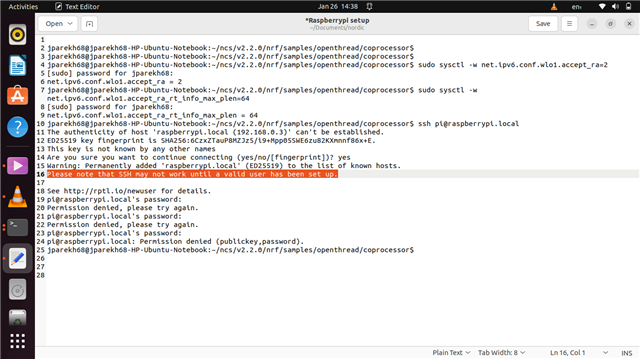
"Please note that SSH may not work until a valid user has been set up."
I am using Ubuntu Desktop. I created the MicroSD Raspberry card here on this Ubuntu machine. I did not get any prompt to generate a password.
As a consequence I am not able to SSH Raspberrypi.
Kindly help.
Hi,
I refer to your webinar "Developing Matter Products with nRF Connect SDK" dated October18, 2021. https://webinars.nordicsemi.com/developing-matter-products-with-nrf-4
I also refer to video duration from 19:12 to 20:52.
Kindly refer to the error in the attached text.
"Please note that SSH may not work until a valid user has been set up."
I am using Ubuntu Desktop. I created the MicroSD Raspberry card here on this Ubuntu machine. I did not get any prompt to generate a password.
As a consequence I am not able to SSH Raspberrypi.
Kindly help.
Hi,
See this guide here,
https://openthread.io/codelabs/openthread-border-router#1
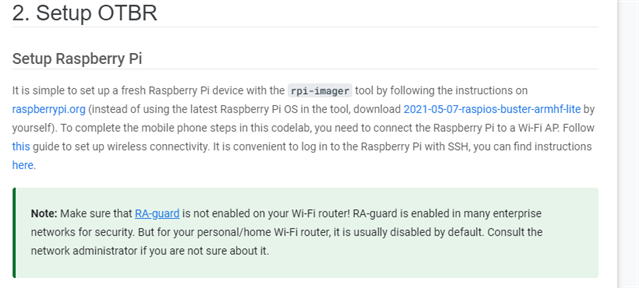
And this link here:
https://www.raspberrypi.com/documentation/computers/remote-access.html
Hi,
Thanks for the reply.
Guides are good but are not much of a help many a times.
The problem I referred to was solved by pressing CTRL +SHIFT + X key while on the rpi-imager window and then setting a password for the raspberrypi. and then run the "WRITE" on imager.
Thanks once again.
Regards.
Jogen
Hi,
I have been able to successfully Git Clone ot-br-posix repository.
However, facing problems with:
1. ./script/bootstrap
2. ./script/setup
Error Message: otbr-agent.service could not be found.
Logs of the above commands are attached.
Regards.
Jogen
pi@raspberrypi:~/ot-br-posix $ INFRA_IF_NAME=eth0 ./script/setup
+++ dirname ./script/setup
++ cd ./script/..
++ [[ ! -n '' ]]
++ grep -s 'BeagleBone Black' /sys/firmware/devicetree/base/model
++ case "${OSTYPE}" in
++ have_or_die lsb_release
++ have lsb_release
++ command -v lsb_release
+++ lsb_release -i
+++ cut -c17-
+++ tr '[:upper:]' '[:lower:]'
++ PLATFORM=raspbian
++ echo 'Current platform is raspbian'
Current platform is raspbian
++ with BORDER_ROUTING
++ local value
+++ printenv BORDER_ROUTING
++ value=
++ [[ -z '' ]]
++ [[ -f examples/platforms/raspbian/default ]]
+++ . examples/platforms/raspbian/default
++++ NAT64=1
++++ DNS64=1
++++ DHCPV6_PD=0
++++ NETWORK_MANAGER=0
++++ BACKBONE_ROUTER=1
++++ BORDER_ROUTING=1
++++ WEB_GUI=1
++++ REST_API=1
+++ eval echo '${BORDER_ROUTING-}'
++++ echo 1
++ value=1
++ [[ 1 == 1 ]]
++ with DHCPV6_PD
++ local value
+++ printenv DHCPV6_PD
++ value=
++ [[ -z '' ]]
++ [[ -f examples/platforms/raspbian/default ]]
+++ . examples/platforms/raspbian/default
++++ NAT64=1
++++ DNS64=1
++++ DHCPV6_PD=0
++++ NETWORK_MANAGER=0
++++ BACKBONE_ROUTER=1
++++ BORDER_ROUTING=1
++++ WEB_GUI=1
++++ REST_API=1
+++ eval echo '${DHCPV6_PD-}'
++++ echo 0
++ value=0
++ [[ 0 == 1 ]]
++ with BORDER_ROUTING
++ local value
+++ printenv BORDER_ROUTING
++ value=
++ [[ -z '' ]]
++ [[ -f examples/platforms/raspbian/default ]]
+++ . examples/platforms/raspbian/default
++++ NAT64=1
++++ DNS64=1
++++ DHCPV6_PD=0
++++ NETWORK_MANAGER=0
++++ BACKBONE_ROUTER=1
++++ BORDER_ROUTING=1
++++ WEB_GUI=1
++++ REST_API=1
+++ eval echo '${BORDER_ROUTING-}'
++++ echo 1
++ value=1
++ [[ 1 == 1 ]]
++ with NETWORK_MANAGER
++ local value
+++ printenv NETWORK_MANAGER
++ value=
++ [[ -z '' ]]
++ [[ -f examples/platforms/raspbian/default ]]
+++ . examples/platforms/raspbian/default
++++ NAT64=1
++++ DNS64=1
++++ DHCPV6_PD=0
++++ NETWORK_MANAGER=0
++++ BACKBONE_ROUTER=1
++++ BORDER_ROUTING=1
++++ WEB_GUI=1
++++ REST_API=1
+++ eval echo '${NETWORK_MANAGER-}'
++++ echo 0
++ value=0
++ [[ 0 == 1 ]]
++ STAGE_DIR=/home/pi/ot-br-posix/stage
++ BUILD_DIR=/home/pi/ot-br-posix/build
++ [[ -d /home/pi/ot-br-posix/stage ]]
++ [[ -d /home/pi/ot-br-posix/build ]]
++ export PATH=/home/pi/ot-br-posix/stage/usr/bin:/home/pi/ot-br-posix/stage/usr/sbin:/usr/local/sbin:/usr/local/bin:/usr/sbin:/usr/bin:/sbin:/bin:/usr/local/games:/usr/games
++ PATH=/home/pi/ot-br-posix/stage/usr/bin:/home/pi/ot-br-posix/stage/usr/sbin:/usr/local/sbin:/usr/local/bin:/usr/sbin:/usr/bin:/sbin:/bin:/usr/local/games:/usr/games
+++ basename ./script/setup
++ TASKNAME=setup
++ BEFORE_HOOK=examples/platforms/raspbian/before_setup
++ AFTER_HOOK=examples/platforms/raspbian/after_setup
++ [[ ! -f examples/platforms/raspbian/before_setup ]]
++ BEFORE_HOOK=/dev/null
++ [[ ! -f examples/platforms/raspbian/after_setup ]]
++ AFTER_HOOK=/dev/null
+ . script/_border_routing
++ readonly INFRA_IF_NAME=eth0
++ INFRA_IF_NAME=eth0
++ readonly SYSCTL_ACCEPT_RA_FILE=/etc/sysctl.d/60-otbr-accept-ra.conf
++ SYSCTL_ACCEPT_RA_FILE=/etc/sysctl.d/60-otbr-accept-ra.conf
++ readonly DHCPCD_CONF_FILE=/etc/dhcpcd.conf
++ DHCPCD_CONF_FILE=/etc/dhcpcd.conf
++ readonly DHCPCD_CONF_BACKUP_FILE=/etc/dhcpcd.conf.orig
++ DHCPCD_CONF_BACKUP_FILE=/etc/dhcpcd.conf.orig
+ . script/_otbr
++ readonly OTBR_TOP_BUILDDIR=/home/pi/ot-br-posix/build/otbr
++ OTBR_TOP_BUILDDIR=/home/pi/ot-br-posix/build/otbr
++ readonly OTBR_OPTIONS=
++ OTBR_OPTIONS=
++ readonly REFERENCE_DEVICE=0
++ REFERENCE_DEVICE=0
+ . script/_ipforward
++ SYSCTL_IP_FORWARD=/etc/sysctl.d/60-otbr-ip-forward.conf
+ . script/_nat64
++ TAYGA_DEFAULT=/etc/default/tayga
++ TAYGA_CONF=/etc/tayga.conf
++ TAYGA_IPV4_ADDR=192.168.255.1
++ TAYGA_IPV6_ADDR=fdaa:bb:1::1
++ TAYGA_TUN_V6_ADDR=fdaa:bb:1::2
++ NAT44_SERVICE=/etc/init.d/otbr-nat44
++ WLAN_IFNAMES=eth0
+ . script/_dns64
++ BIND_CONF_OPTIONS=/etc/bind/named.conf.options
++ NAT64_PREFIX=64:ff9b::/96
++ DNS64_NAMESERVER_ADDR=127.0.0.1
+++ echo 64:ff9b::/96
+++ tr '"/"' '"/"'
++ DNS64_CONF='dns64 64:ff9b::/96 { clients { thread; }; recursive-only yes; };'
++ without NAT64
++ with NAT64
++ local value
+++ printenv NAT64
++ value=
++ [[ -z '' ]]
++ [[ -f examples/platforms/raspbian/default ]]
+++ . examples/platforms/raspbian/default
++++ NAT64=1
++++ DNS64=1
++++ DHCPV6_PD=0
++++ NETWORK_MANAGER=0
++++ BACKBONE_ROUTER=1
++++ BORDER_ROUTING=1
++++ WEB_GUI=1
++++ REST_API=1
+++ eval echo '${NAT64-}'
++++ echo 1
++ value=1
++ [[ 1 == 1 ]]
++ test raspbian = ubuntu
++ test raspbian = beagleboneblack
++ test raspbian = raspbian
++ '[' raspbian = raspbian ']'
++ RESOLV_CONF_HEAD=/etc/resolv.conf.head
+ . script/_dhcpv6_pd
++ '[' raspbian = ubuntu ']'
++ WAN_INTERFACE=eth0
++ WLAN_INTERFACE=wlan0
++ WPAN_INTERFACE=wpan0
++ DHCPCD_CONF=/etc/dhcpcd.conf
++ DHCPCD_CONF_BACKUP=/etc/dhcpcd.conf.orig
++ NCP_STATE_NOTIFIER=/usr/sbin/ncp_state_notifier
++ NCP_STATE_DISPATCHER=/etc/ncp_state_notifier/dispatcher.d
++ NCP_STATE_NOTIFIER_SERVICE_NAME=ncp_state_notifier.service
++ NCP_STATE_NOTIFIER_SERVICE=/etc/systemd/system/ncp_state_notifier.service
++ DHCPCD_RELOADER=/etc/ncp_state_notifier/dispatcher.d/dhcpcd_reloader
++ without DHCPV6_PD
++ with DHCPV6_PD
++ local value
+++ printenv DHCPV6_PD
++ value=
++ [[ -z '' ]]
++ [[ -f examples/platforms/raspbian/default ]]
+++ . examples/platforms/raspbian/default
++++ NAT64=1
++++ DNS64=1
++++ DHCPV6_PD=0
++++ NETWORK_MANAGER=0
++++ BACKBONE_ROUTER=1
++++ BORDER_ROUTING=1
++++ WEB_GUI=1
++++ REST_API=1
+++ eval echo '${DHCPV6_PD-}'
++++ echo 0
++ value=0
++ [[ 0 == 1 ]]
+ . script/_network_manager
++ AP_CONN=BorderRouter-AP
++ ETH_CONN=BorderRouter-Eth
++ AP_HELPER_SCRIPT=/etc/NetworkManager/dispatcher.d/ap-helper
++ DHCPV6_HELPER_SCRIPT=/etc/NetworkManager/dispatcher.d/dhcpv6-helper
+ . script/_rt_tables
+ . script/_swapfile
++ SWAP_REQUIRED=false
++ SWAP_FILENAME=/swapfile
++ SWAP_BLOCK_SIZE=1M
++ SWAP_BLOCK_CNT=1024
+ . script/_sudo_extend
++ ETC_SUDOERS=/etc/sudoers
++ SUDO_EXTEND_TIME=false
++ SUDO_EXTEND_TIME_AMOUNT=120
+ . script/_disable_services
+ main
+ . /dev/null
+ extend_sudo_timeout
+ local _why
+ _why=Disabled
+ false
+ false
+ echo 'sudo-timeout: Not extending, Disabled'
sudo-timeout: Not extending, Disabled
+ setup_swapfile
+ false
+ echo 'Swapfile: not required'
Swapfile: not required
+ disable_services
+ case $PLATFORM in
+ echo 'Nothing to disable'
+ otbr_uninstall
+ have systemctl
+ command -v systemctl
+ sudo systemctl stop otbr-web
Failed to stop otbr-web.service: Unit otbr-web.service not loaded.
+ true
+ sudo systemctl stop otbr-agent
Failed to stop otbr-agent.service: Unit otbr-agent.service not loaded.
+ true
+ sudo systemctl disable otbr-web
Failed to disable unit: Unit file otbr-web.service does not exist.
+ true
+ sudo systemctl disable otbr-agent
Failed to disable unit: Unit file otbr-agent.service does not exist.
+ true
+ sudo systemctl is-enabled otbr-web
Failed to get unit file state for otbr-web.service: No such file or directory
+ sudo systemctl is-enabled otbr-agent
Failed to get unit file state for otbr-agent.service: No such file or directory
+ sudo killall otbr-web otbr-agent
otbr-web: no process found
otbr-agent: no process found
+ true
+ cd /home/pi/ot-br-posix/build/otbr
script/_otbr: line 47: cd: /home/pi/ot-br-posix/build/otbr: No such file or directory
+ have systemctl
+ command -v systemctl
+ sudo systemctl daemon-reload
+ border_routing_uninstall
+ with BORDER_ROUTING
+ local value
++ printenv BORDER_ROUTING
+ value=
+ [[ -z '' ]]
+ [[ -f examples/platforms/raspbian/default ]]
++ . examples/platforms/raspbian/default
+++ NAT64=1
+++ DNS64=1
+++ DHCPV6_PD=0
+++ NETWORK_MANAGER=0
+++ BACKBONE_ROUTER=1
+++ BORDER_ROUTING=1
+++ WEB_GUI=1
+++ REST_API=1
++ eval echo '${BORDER_ROUTING-}'
+++ echo 1
+ value=1
+ [[ 1 == 1 ]]
+ accept_ra_uninstall
+ test '!' -f /etc/sysctl.d/60-otbr-accept-ra.conf
+ dhcpcd_enable_ipv6
+ '[' -f /etc/dhcpcd.conf.orig ']'
+ network_manager_uninstall
+ with NETWORK_MANAGER
+ local value
++ printenv NETWORK_MANAGER
+ value=
+ [[ -z '' ]]
+ [[ -f examples/platforms/raspbian/default ]]
++ . examples/platforms/raspbian/default
+++ NAT64=1
+++ DNS64=1
+++ DHCPV6_PD=0
+++ NETWORK_MANAGER=0
+++ BACKBONE_ROUTER=1
+++ BORDER_ROUTING=1
+++ WEB_GUI=1
+++ REST_API=1
++ eval echo '${NETWORK_MANAGER-}'
+++ echo 0
+ value=0
+ [[ 0 == 1 ]]
+ return 0
+ dhcpv6_pd_uninstall
+ with DHCPV6_PD
+ local value
++ printenv DHCPV6_PD
+ value=
+ [[ -z '' ]]
+ [[ -f examples/platforms/raspbian/default ]]
++ . examples/platforms/raspbian/default
+++ NAT64=1
+++ DNS64=1
+++ DHCPV6_PD=0
+++ NETWORK_MANAGER=0
+++ BACKBONE_ROUTER=1
+++ BORDER_ROUTING=1
+++ WEB_GUI=1
+++ REST_API=1
++ eval echo '${DHCPV6_PD-}'
+++ echo 0
+ value=0
+ [[ 0 == 1 ]]
+ return 0
+ nat64_uninstall
+ with NAT64
+ local value
++ printenv NAT64
+ value=
+ [[ -z '' ]]
+ [[ -f examples/platforms/raspbian/default ]]
++ . examples/platforms/raspbian/default
+++ NAT64=1
+++ DNS64=1
+++ DHCPV6_PD=0
+++ NETWORK_MANAGER=0
+++ BACKBONE_ROUTER=1
+++ BORDER_ROUTING=1
+++ WEB_GUI=1
+++ REST_API=1
++ eval echo '${NAT64-}'
+++ echo 1
+ value=1
+ [[ 1 == 1 ]]
+ nat64_stop
+ with NAT64
+ local value
++ printenv NAT64
+ value=
+ [[ -z '' ]]
+ [[ -f examples/platforms/raspbian/default ]]
++ . examples/platforms/raspbian/default
+++ NAT64=1
+++ DNS64=1
+++ DHCPV6_PD=0
+++ NETWORK_MANAGER=0
+++ BACKBONE_ROUTER=1
+++ BORDER_ROUTING=1
+++ WEB_GUI=1
+++ REST_API=1
++ eval echo '${NAT64-}'
+++ echo 1
+ value=1
+ [[ 1 == 1 ]]
+ with DOCKER
+ local value
++ printenv DOCKER
+ value=
+ [[ -z '' ]]
+ [[ -f examples/platforms/raspbian/default ]]
++ . examples/platforms/raspbian/default
+++ NAT64=1
+++ DNS64=1
+++ DHCPV6_PD=0
+++ NETWORK_MANAGER=0
+++ BACKBONE_ROUTER=1
+++ BORDER_ROUTING=1
+++ WEB_GUI=1
+++ REST_API=1
++ eval echo '${DOCKER-}'
+++ echo
+ value=
+ [[ '' == 1 ]]
+ have systemctl
+ command -v systemctl
+ sudo systemctl stop tayga
Failed to stop tayga.service: Unit tayga.service not loaded.
+ true
+ sudo systemctl stop otbr-nat44
Failed to stop otbr-nat44.service: Unit otbr-nat44.service not loaded.
+ true
+ sudo sed -i 's/^RUN="yes"/RUN="no"/' /etc/default/tayga
sed: can't read /etc/default/tayga: No such file or directory
pi@raspberrypi:~/ot-br-posix $ sudo service otbr-agent status
Unit otbr-agent.service could not be found.
Hi,
Did you remember to check out the compatible commit id ?
cd ot-br-posix
git pull --unshallow
git checkout 0895ad5
Hi,
1. OTBR is successfully installed.
● otbr-agent.service - OpenThread Border Router Agent
     Loaded: loaded (/lib/systemd/system/otbr-agent.service; enabled; vendor preset: enabled)
     Active: activating (auto-restart) (Result: exit-code) since Tue 2023-01-31 22:58:12 GMT; 3s ago
    Process: 1469 ExecStartPre=service mdns start (code=exited, status=0/SUCCESS)
    Process: 1475 ExecStart=/usr/sbin/otbr-agent $OTBR_AGENT_OPTS (code=exited, status=2)
   Main PID: 1475 (code=exited, status=2)
        CPU: 73ms
~
~
~
~
~
~
~
~
~
~
~
~
~
~
~
~
~
~
~
~
~
~
~
~
~
~
~
~
~
~
lines 1-7/7 (END)
2. RCP Firmware successfully flashed on nRF52840 DK Board. See below: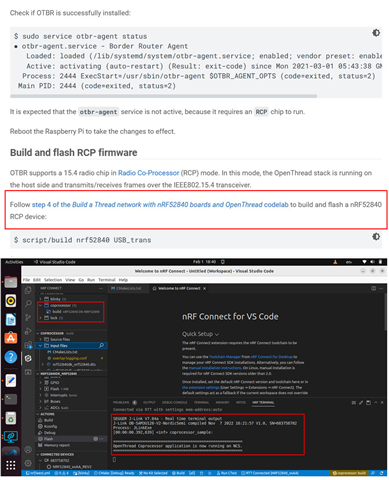
3. We are not able to figure out next steps from the Documentation as to way forward. Our objective is to form a Thread Network and run example "Lock" using Android Chiptool.
4. Our RCP Board is now connected to Raspberrypi.
Thanks.
Jogen

