Hi,
I am using SDK 2.2.0 and using NRF_LOG_DEFAULT_BACKENDS_INIT () throws 'undefined reference to `NRF_LOG_DEFAULT_BACKENDS_INIT''.
I have set CONFIG_LOG=y in prj.conf.
in my main src file I have
..
Hi,
I am using SDK 2.2.0 and using NRF_LOG_DEFAULT_BACKENDS_INIT () throws 'undefined reference to `NRF_LOG_DEFAULT_BACKENDS_INIT''.
I have set CONFIG_LOG=y in prj.conf.
in my main src file I have
..
Hi,
The NRF_LOG_DEFAULT_BACKENDS_INIT() macro was used to initialize the default logger backends in the nRF5 SDK (UART and/or RTT), but it does not exist in the nRF connect SDK. In this SDK, the logger module will be initialized automatically on startup when you build CONFIG_LOG=y. There is no need to initialize it from your application.
The logger backends are selected through these Kconfig symbols:
- CONFIG_LOG_BACKEND_RTT
- CONFIG_LOG_BACKEND_UART
Best regards,
Vidar
Thanks Vidar,
if I set CONFIG_LOG_BACKEND_UART, how can I see the log messages? I tried using putty on one of the JLINK UARTs and I can see there is a CLI. But I couldnt find a way to successfully get the printlk statements of any LOG_INF statements to this UART.
I also enabled CONFIG_LOG_PRINTK, but still no messages on the JLINK UART.
Cheers,
Kaushalya
Hi Kaushalya,
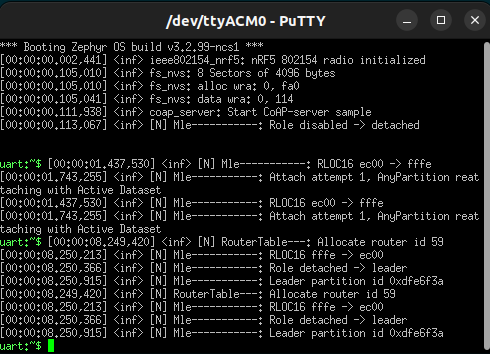
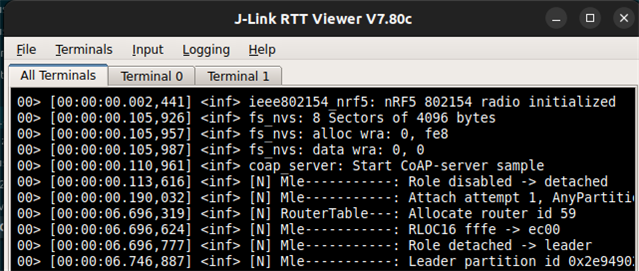
I tried the Openthread coap_server sample which has logging enabled over RTT and UART enabled by default (note: UART backend is enabled via the SHELL module in this application), but it worked fine for me. I did not make any configuration changes. Is this the sample you are using too?
UART log from Jlink vcom:

RTT

Cheers,
Vidar
Hi Vidar,
Thanks, the project is derived from CoAP server. It has some additions to it. I coudnt get it on UART. I managed to get it on NRF terminal, but it is not very consistent. What I did was as follows.
1. Click ' Start terminal with new configuration' in NRF terminal.
2. Select RTT
3. Copy paste nRF52840 DK serial number
4. Press 'Enter' twise
5. Select 'Automatic search'
6. Select device nRF52840_xxAA from the Segger J-Link Target device settings dialog box
Than sometimes I get log messages in NRF Terminal. But not everytime.
I am looking for a consistent way of getting either ptintk or LOG_xxx messages for debugging. I am wasting lot of time trying this.
Can you outline the steps to setup UART to get the log messages?
Cheers,
Kaushalya
Hi Kaushalya,
To help narrow down the problem, please try the original coap server sample to see if UART logging works then. Also, if you experience the same intermittent problems with RTT. You may also try to use Segger RTT Viewer instead of the nRF terminal.
Cheers,
Vidar