NRF_LOG_DEFAULT_BACKENDS_INIT throws a compile error

Hi,

I am using SDK 2.2.0 and using NRF_LOG_DEFAULT_BACKENDS_INIT () throws 'undefined reference to `NRF_LOG_DEFAULT_BACKENDS_INIT''. 

I have set CONFIG_LOG=y in prj.conf.

in my main src file I have 

#include <zephyr/logging/log.h>

..

LOG_MODULE_REGISTER(coap_server, CONFIG_COAP_SERVER_LOG_LEVEL);
I can see CONFIG_COAP_SERVER_LOG_LEVEL is defined as 4
What is the way to use logging in SDK 2.2.0?
Cheers,
Kaushalya
Parents
  • Hi,

    The NRF_LOG_DEFAULT_BACKENDS_INIT() macro was used to initialize the default logger backends in the nRF5 SDK (UART and/or RTT), but it does not exist in the nRF connect SDK. In this SDK, the logger module will be initialized automatically on startup when you build CONFIG_LOG=y. There is no need to initialize it from your application. 

    The logger backends are selected through these Kconfig symbols: 

     - CONFIG_LOG_BACKEND_RTT

     - CONFIG_LOG_BACKEND_UART

    Best regards,

    Vidar 

  • Thanks Vidar,

    if I set CONFIG_LOG_BACKEND_UART, how can I see the log messages? I tried using putty on one of the JLINK UARTs and I can see there is a CLI. But I couldnt find a way to successfully get the printlk statements of any LOG_INF statements to this UART. 

    I also enabled CONFIG_LOG_PRINTK, but still no messages on the JLINK UART.

    Cheers,

    Kaushalya

  • Hi Kaushalya,

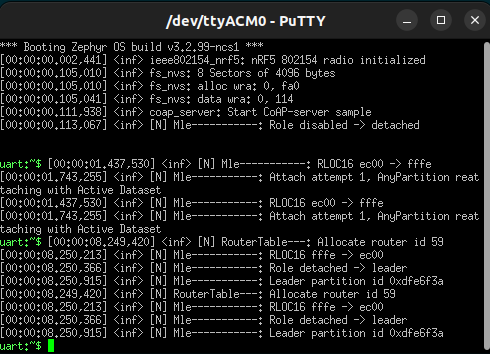
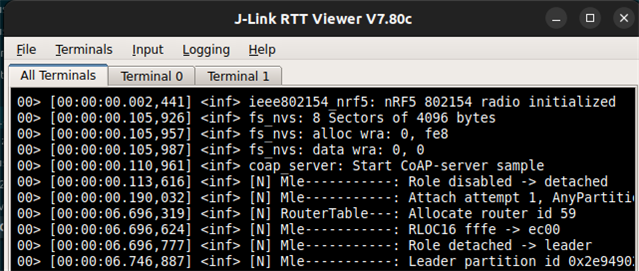
    I tried the Openthread coap_server sample which has logging enabled over RTT and UART enabled by default (note: UART backend is enabled via the SHELL module in this application), but it worked fine for me. I did not make any configuration changes. Is this the sample you are using too? 

    UART log from Jlink vcom:

    RTT

    Cheers,

    Vidar

  • Hi Vidar,

    Thanks, the project is derived from CoAP server. It has some additions to it. I coudnt get it on UART. I managed to get it on NRF terminal, but it is not very consistent. What I did was as follows.

    1. Click ' Start terminal with new configuration' in NRF terminal.

    2. Select RTT

    3. Copy paste nRF52840 DK serial number

    4. Press 'Enter' twise

    5. Select 'Automatic search'

    6. Select device nRF52840_xxAA from the Segger J-Link Target device settings dialog box

    Than sometimes I get log messages in NRF Terminal. But not everytime.

    I am looking for a consistent way of getting either ptintk or LOG_xxx messages for debugging. I am wasting lot of time trying this.

    Can you outline the steps to setup UART to get the log messages?

    Cheers,

    Kaushalya

Reply
  • Hi Vidar,

    Thanks, the project is derived from CoAP server. It has some additions to it. I coudnt get it on UART. I managed to get it on NRF terminal, but it is not very consistent. What I did was as follows.

    1. Click ' Start terminal with new configuration' in NRF terminal.

    2. Select RTT

    3. Copy paste nRF52840 DK serial number

    4. Press 'Enter' twise

    5. Select 'Automatic search'

    6. Select device nRF52840_xxAA from the Segger J-Link Target device settings dialog box

    Than sometimes I get log messages in NRF Terminal. But not everytime.

    I am looking for a consistent way of getting either ptintk or LOG_xxx messages for debugging. I am wasting lot of time trying this.

    Can you outline the steps to setup UART to get the log messages?

    Cheers,

    Kaushalya

Children
Related