Can't provision nRF52840 dev kit when running Mesh Light example

I'm learning to work with the nRF52840 chip, and ordered the development kit for testing. It arrived today; I flashed the Blinky example and it worked fine, flashed the Light application (nrf/samples/bluetooth/mesh/light) and it seemed to work; I opened the nRF Mesh app on Android (latest version) and could see the board, I tapped Identify and all the lights start flashing, hit Provision and it gave me the option for no OOB, pushing the button or inputting the number of LED flashes, but then it wouldn't get any further once I had verified OOB (or selected "No OOB").

The last line I would see in the app is "Sending Provisioning Data", then it would exit the provisioning screen and return to the Scanner for adding nodes, where I would see the same node I just attempted to provision. I tried all available OOB options, none of which made a difference (although all seemed to work correctly).

I haven't touched the application, I re-added the example from scratch to make sure. SDK v2.2.0, I'm working in Visual Studio Code.

Parents
  • Hello Isaac,

    So you do not see a  Pop-up saying "configuration complete". Instead you go straight to the Scanner menu. Is this something you could've repeated indefinitely?

    Could you try manually erasing the flash before flashing the sample and see if that makes any difference? You can for instance run "nrfjprog --recover".

    Are you seeing the same issue with another mesh samples?

    Regards,

    Elfving

  • Correct, there is no pop-up, it goes straight from "Sending provisioning data" to the Scanner menu. It repeats indefinitely as far as I can tell, I tried it a lot. Tried erasing/recovering and reprogramming, no difference. Potentially of note, the time it takes to go to the Scanner menu is not consistent, sometimes it's instant and sometimes it takes a couple of seconds.

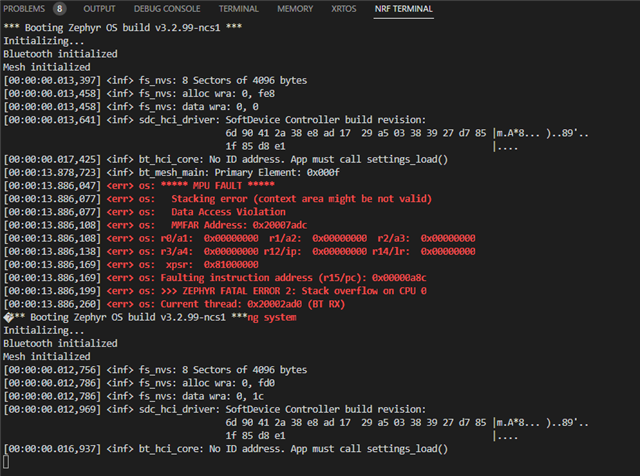
    I tried the Mesh Light Switch example as well, and while it did provision, I would get this error:


    Any attempt to eg add an app key or get composition data after this would result in an immediate disconnection

    Tried Mesh Chat example as well, same result as Light Switch. Going back to the Mesh Light example after trying the Switch and Chat examples did not change anything, it still failed to provision at all

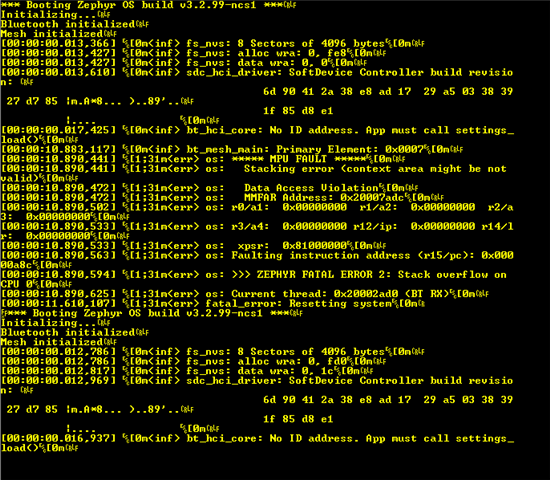
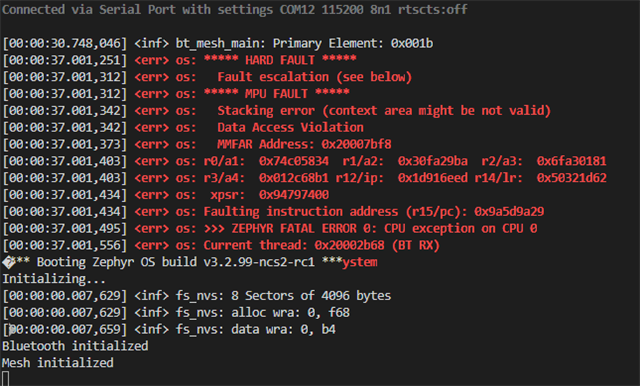
  • I thought first that it had issues configuring after being provisioned, but it seems as if it doesn't even finish provisioning. Could you check the log of the device when connecting it to a serial terminal? 

    And just to try this again, running something like "nrfjprog --eraseall"  before programming doesn't help?

    Could you also check if you are able to connect the phone to the DK with the peripheral uart sample?

    Regards,

    Elfving

  • Well I found out I'd been connecting to the wrong COM port (Should I be seeing 2 COM ports when I plug it in?), otherwise I would have seen this earlier. Strangely, I was unable to connect to the correct COM port using the NRF terminal, I had to open another serial monitor (RealTerm, in this case).

    Yes, I was able to connect to the peripheral uart example and send data without issue, but running "nrfprog --eraseall" didn't change anything for the Mesh

    Edit: unplugged the dk and plugged it back in, didn't change the Mesh errors but I was then able to use the nRF terminal instead of RealTerm:

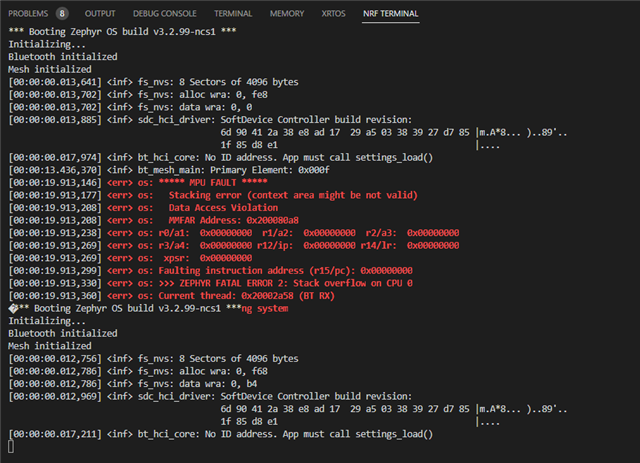
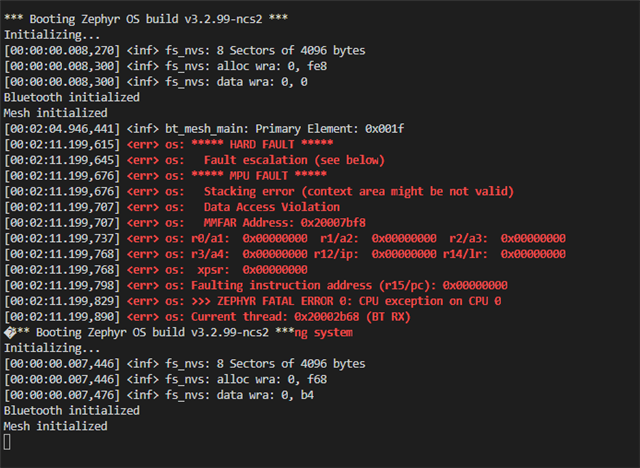
  • Now that I'm seeing the COM output, the same thing is happening for the other examples, it evidently just gets further before crashing sometimes - this is from the Light Switch example:

  • ZacMid007 said:
    Well I found out I'd been connecting to the wrong COM port (Should I be seeing 2 COM ports when I plug it in?)

    Ah okey that explains. And yeah, the two ports can be a bit confusing. It might be that you are using a newer DK (eg. v3.0) which uses the nRF5340 as a debugger. It would have two cores, and two COM ports.

    Just to make sure there is nothing wrong with the SDK could you try running this version I've built?7612.zephyr.hex

    Regards,

    Elfving

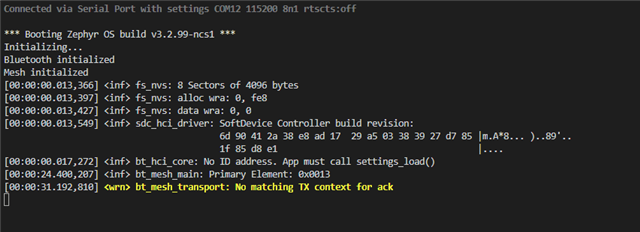
  • I flashed that version and it ran with no issue; I was able to provision the node without error and observed this output:

    I indeed am using a 3.0.0 DK; I tried re-flashing the Mesh Light Switch example I have after running your build and it still crashed

Reply Children
Related