The four official demo cli, client, sever and so on, which demo should I use to do development ah, and how should I modify it, please advise??
Hi
Please check out the Thread border router documentation we have here. Typically a border router solution is based on the Network co-processor along with a host side application on something more powerful with a (often Linx based) operative system.
The nRF Connect SDK does not provide a complete Thread Border Router solution. But for development purposes, you can use the OpenThread Border Router (OTBR) released by Google, an open-source Border Router implementation that you can set up either on your PC using Docker or on a Raspberry Pi.
Best regards,
Simon
HI
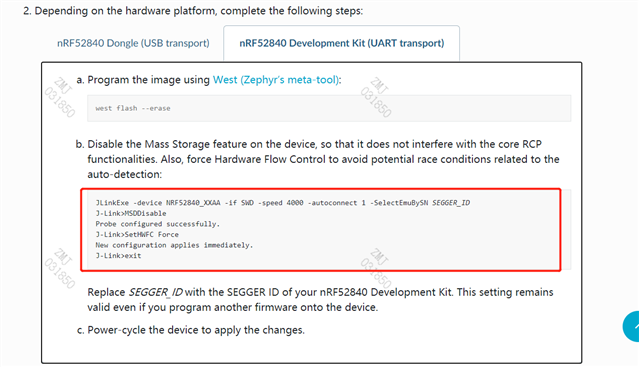
I want to know where to enter the configuration command how to open the input screen and enter the command?

thandks
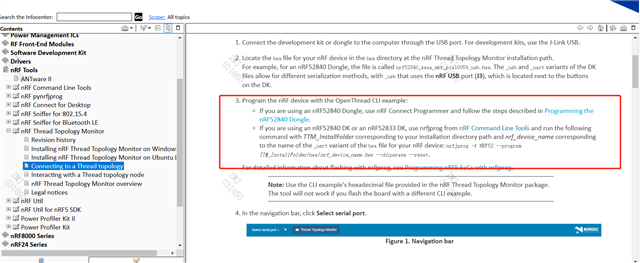
These instructions are so vague that I'm freaking out

After r a long time of research, is this a success as shown below?

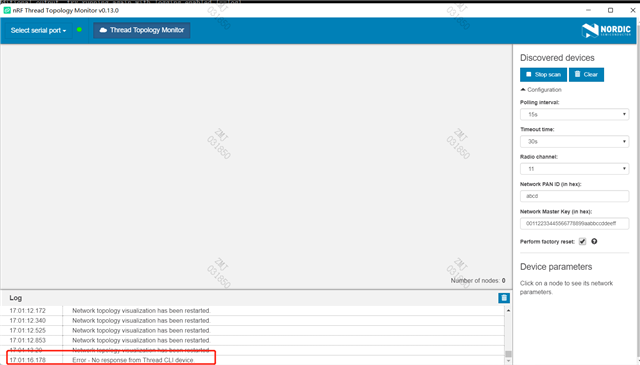
However, I opened the nrf thread topology monitor and found that the device could not be found. As shown in the figure below, I was about to crash. Please give me some advice

Hi
Any terminal program will do for these commands. For example the Command Prompt on your computer. To get started with Thread products I would strongly recommend checking out our webinar over on Youtube. Your latest reply does indeed seem to show a successful flash of your device.
What happens when you select a device in the nRF Thread Topology Monitor on your end for example?
Best regards,
Simon