NRF dongle not booting up after flashing

The firmware that i flashed onto it worked on others dongles but mine doesnt boot up or windows doesnt detect it or play the usb sound

  • Hi, 

    Are you using this nRF52840 Dongle? or provide by other vendors? 

    How do you program the dongle? and What firmware are you flashing?

    This tutorial  nRF52840 Dongle Programming Tutorial might help. 

    Regards,
    Amanda H.

  • I'm using the normal dongle nrf52840 trying to flash it through programmer as a steamvr dongle it replaces the bootloader with nothing I believe the issue is that I need bootloader.hex

  • Check the "Revert to production bootloader" section in that tutorial.

    -Amanda H. 

  • The  firmware im flashing does not have the bootloader region and when i flash it then the log is
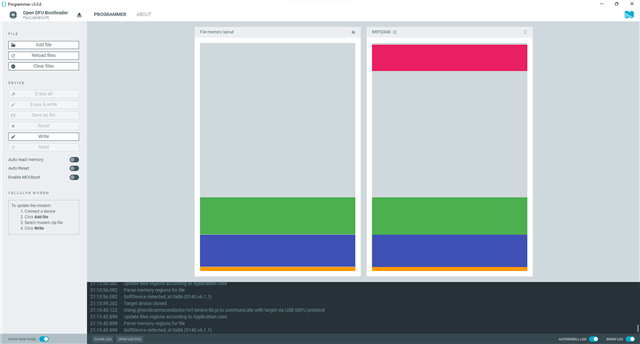


    21:12:54.620
    Using nrf-device-lib-js version: 0.5.0
    21:12:54.620
    Using nrf-device-lib version: 0.13.11
    21:12:54.620
    Using nrfjprog DLL version: 10.18.2
    21:12:54.621
    Using JLink version: JLink_V7.66a
    21:13:22.436
    Parsing HEX file: C:\Users\a\Downloads\NRF (1)\temp_app_stamped_p.hex
    21:13:22.451
    File was last modified at 7/20/2021, 11:28:27 PM
    21:13:22.568
    Update files regions according to Application core
    21:13:22.568
    Parse memory regions for file
    21:13:22.569
    SoftDevice detected, id 0xB6 (S140 v6.1.1)
    21:13:29.016
    Parsing HEX file: C:\Users\a\Desktop\graviton_bootloader_mbr_v1.0.1-[nRF5_SDK_15.0.1-1.alpha_f76d012].hex
    21:13:29.016
    File was last modified at 5/22/2018, 8:20:20 AM
    21:13:29.045
    Update files regions according to Application core
    21:13:29.045
    Parse memory regions for file
    21:13:29.045
    SoftDevice detected, id 0xB6 (S140 v6.1.1)
    21:13:32.792
    Update files regions according to Application core
    21:13:32.792
    Parse memory regions for file
    21:13:34.805
    Parsing HEX file: C:\Users\a\Desktop\graviton_bootloader_mbr_v1.0.1-[nRF5_SDK_15.0.1-1.alpha_f76d012].hex
    21:13:34.805
    File was last modified at 5/22/2018, 8:20:20 AM
    21:13:34.825
    Update files regions according to Application core
    21:13:34.825
    Parse memory regions for file
    21:13:38.620
    Parsing HEX file: C:\Users\a\Desktop\temp_app_stamped_p.hex
    21:13:38.620
    File was last modified at 7/20/2021, 11:28:27 PM
    21:13:38.717
    Update files regions according to Application core
    21:13:38.717
    Parse memory regions for file
    21:13:38.717
    SoftDevice detected, id 0xB6 (S140 v6.1.1)
    21:13:51.677
    Update files regions according to Application core
    21:13:51.677
    Parse memory regions for file
    21:13:51.677
    SoftDevice detected, id 0xB6 (S140 v6.1.1)
    21:13:55.288
    Using @nordicsemiconductor/nrf-device-lib-js to communicate with target via USB SDFU protocol
    21:13:56.082
    Update files regions according to Application core
    21:13:56.082
    Parse memory regions for file
    21:13:56.082
    SoftDevice detected, id 0xB6 (S140 v6.1.1)
    21:13:59.202
    Target device closed
    21:15:45.122
    Using @nordicsemiconductor/nrf-device-lib-js to communicate with target via USB SDFU protocol
    21:15:45.898
    Update files regions according to Application core
    21:15:45.898
    Parse memory regions for file
    21:15:45.898
    SoftDevice detected, id 0xB6 (S140 v6.1.1)
    21:16:06.784
    Does not need to be reloaded: C:\Users\a\Desktop\temp_app_stamped_p.hex
    21:16:06.785
    SdReq for SoftDevice is set as 0x00.
    21:16:06.786
    Hash is generated by SHA256
    21:16:06.787
    Hash is generated by SHA256
    21:16:06.790
    Performing DFU. This may take a few seconds
    21:16:06.833
    Opening serial port for SDFU programming: 0%
    21:16:07.260
    Opening serial port for SDFU programming: 100%
    21:16:07.382
    Uploading image through SDFU: 0%
    21:16:07.678
    Uploading image through SDFU: 100%
    21:16:16.507
    Waiting for serial port to be attached: 0%
    21:16:16.536
    Target device closed
    21:16:18.066
    Device was attached: 100%
    21:16:18.066
    Opening serial port for SDFU programming: 0%
    21:16:18.480
    Opening serial port for SDFU programming: 100%
    21:16:18.536
    Uploading image through SDFU: 0%
    21:16:18.820
    Uploading image through SDFU: 100%
    21:16:28.328
    All dfu images have been written to the target device
    21:16:31.329
    Failed to reconnect to device: Error: Timeout while waiting for device F6ACAB4B0AFE to be attached and enumerated
  • Hi, 

    The updated image seems only have SD+APP. If you want to update the bootloader, you can use the Open bootloader example project from the SDK. 

    -Amanda H.

Related