NRF dongle not booting up after flashing

The firmware that i flashed onto it worked on others dongles but mine doesnt boot up or windows doesnt detect it or play the usb sound

Parents Reply Children
  • Check the "Revert to production bootloader" section in that tutorial.

    -Amanda H. 

  • The  firmware im flashing does not have the bootloader region and when i flash it then the log is
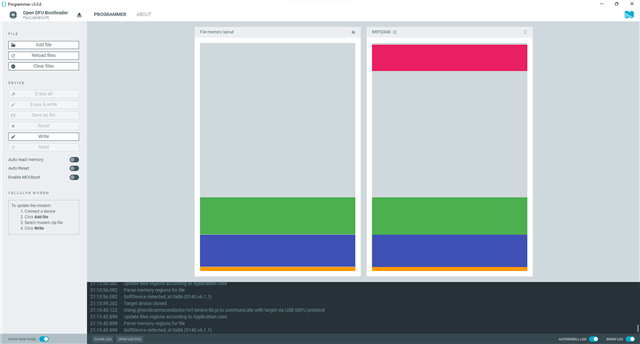


    21:12:54.620
    Using nrf-device-lib-js version: 0.5.0
    21:12:54.620
    Using nrf-device-lib version: 0.13.11
    21:12:54.620
    Using nrfjprog DLL version: 10.18.2
    21:12:54.621
    Using JLink version: JLink_V7.66a
    21:13:22.436
    Parsing HEX file: C:\Users\a\Downloads\NRF (1)\temp_app_stamped_p.hex
    21:13:22.451
    File was last modified at 7/20/2021, 11:28:27 PM
    21:13:22.568
    Update files regions according to Application core
    21:13:22.568
    Parse memory regions for file
    21:13:22.569
    SoftDevice detected, id 0xB6 (S140 v6.1.1)
    21:13:29.016
    Parsing HEX file: C:\Users\a\Desktop\graviton_bootloader_mbr_v1.0.1-[nRF5_SDK_15.0.1-1.alpha_f76d012].hex
    21:13:29.016
    File was last modified at 5/22/2018, 8:20:20 AM
    21:13:29.045
    Update files regions according to Application core
    21:13:29.045
    Parse memory regions for file
    21:13:29.045
    SoftDevice detected, id 0xB6 (S140 v6.1.1)
    21:13:32.792
    Update files regions according to Application core
    21:13:32.792
    Parse memory regions for file
    21:13:34.805
    Parsing HEX file: C:\Users\a\Desktop\graviton_bootloader_mbr_v1.0.1-[nRF5_SDK_15.0.1-1.alpha_f76d012].hex
    21:13:34.805
    File was last modified at 5/22/2018, 8:20:20 AM
    21:13:34.825
    Update files regions according to Application core
    21:13:34.825
    Parse memory regions for file
    21:13:38.620
    Parsing HEX file: C:\Users\a\Desktop\temp_app_stamped_p.hex
    21:13:38.620
    File was last modified at 7/20/2021, 11:28:27 PM
    21:13:38.717
    Update files regions according to Application core
    21:13:38.717
    Parse memory regions for file
    21:13:38.717
    SoftDevice detected, id 0xB6 (S140 v6.1.1)
    21:13:51.677
    Update files regions according to Application core
    21:13:51.677
    Parse memory regions for file
    21:13:51.677
    SoftDevice detected, id 0xB6 (S140 v6.1.1)
    21:13:55.288
    Using @nordicsemiconductor/nrf-device-lib-js to communicate with target via USB SDFU protocol
    21:13:56.082
    Update files regions according to Application core
    21:13:56.082
    Parse memory regions for file
    21:13:56.082
    SoftDevice detected, id 0xB6 (S140 v6.1.1)
    21:13:59.202
    Target device closed
    21:15:45.122
    Using @nordicsemiconductor/nrf-device-lib-js to communicate with target via USB SDFU protocol
    21:15:45.898
    Update files regions according to Application core
    21:15:45.898
    Parse memory regions for file
    21:15:45.898
    SoftDevice detected, id 0xB6 (S140 v6.1.1)
    21:16:06.784
    Does not need to be reloaded: C:\Users\a\Desktop\temp_app_stamped_p.hex
    21:16:06.785
    SdReq for SoftDevice is set as 0x00.
    21:16:06.786
    Hash is generated by SHA256
    21:16:06.787
    Hash is generated by SHA256
    21:16:06.790
    Performing DFU. This may take a few seconds
    21:16:06.833
    Opening serial port for SDFU programming: 0%
    21:16:07.260
    Opening serial port for SDFU programming: 100%
    21:16:07.382
    Uploading image through SDFU: 0%
    21:16:07.678
    Uploading image through SDFU: 100%
    21:16:16.507
    Waiting for serial port to be attached: 0%
    21:16:16.536
    Target device closed
    21:16:18.066
    Device was attached: 100%
    21:16:18.066
    Opening serial port for SDFU programming: 0%
    21:16:18.480
    Opening serial port for SDFU programming: 100%
    21:16:18.536
    Uploading image through SDFU: 0%
    21:16:18.820
    Uploading image through SDFU: 100%
    21:16:28.328
    All dfu images have been written to the target device
    21:16:31.329
    Failed to reconnect to device: Error: Timeout while waiting for device F6ACAB4B0AFE to be attached and enumerated
  • Hi, 

    The updated image seems only have SD+APP. If you want to update the bootloader, you can use the Open bootloader example project from the SDK. 

    -Amanda H.

  • It's the same as you did for the image with SD+APP. 

Related