Hello,
Is there a tutorial to add DFU MESH to an existing application?
Potentially integrating this DFU example into a project:
Hello,
Is there a tutorial to add DFU MESH to an existing application?
Potentially integrating this DFU example into a project:
Flashing Blinky works just fine, as I would like to add DFU to an existing application, I first decided to replace the Blinky binary with the DFU binary. So when I do a software update it'll reflash the DFU and I could test the reflashing.
I am able to recreate the zip using:
nrfutil dfu genpkg --application dfu_nrf52832_xxAA_s132_7.2.0.hex --company-id 0x00000059 --application-id 1 --application-version 2 --key-file private_key.txt --sd-req 0x00CB --mesh dfu_test.zip
and reflash it the regular way sending the zip over. However the response I get it this:
Terminal:
Flushing com-port...
Opened com-port
Starting DFU upgrade of type 4, SoftDevice size: 0, bootloader size: 0, application size: 205300
Sending DFU start packet, afterwards we wait for the flash on target to be initialized before continuing.
1: PC -> target: 0502aabbccdd
target -> PC: 0582aabbccdd
Got echo response
Sending DFU init packet
Sending ready packet
1: PC -> target: 1378fdff040f6320bf4659000000010002000000
target -> PC: 16a6045900000001000200000059000000010001000000
target -> PC: 1378fdff04000000000059000000010002000000
target -> PC: 03847800
1: PC -> target: 1378fdff040f6320bf4659000000010002000000
target -> PC: 1378fdff040f6320bf4659000000010002000000
target -> PC: 03847800
Sending start packet
1: PC -> target: 1478fcff00006320bf46ffffffff7dc8000040000c
target -> PC: 0ea30104590000000100020000000c
target -> PC: 1178feff0101010159000000010001000000
target -> PC: 1178feff0101010159000000010001000000
target -> PC: 03847884
2: PC -> target: 1478fcff00006320bf46ffffffff7dc8000040000c
target -> PC: 03847887
3: PC -> target: 1478fcff00006320bf46ffffffff7dc8000040000c
target -> PC: 03847887
4: PC -> target: 1478fcff00006320bf46ffffffff7dc8000040000c
target -> PC: 03847887
5: PC -> target: 1478fcff00006320bf46ffffffff7dc8000040000c
target -> PC: 03847887
6: PC -> target: 1478fcff00006320bf46ffffffff7dc8000040000c
target -> PC: 03847887
7: PC -> target: 1478fcff00006320bf46ffffffff7dc8000040000c
target -> PC: 03847887
8: PC -> target: 1478fcff00006320bf46ffffffff7dc8000040000c
target -> PC: 03847887
9: PC -> target: 1478fcff00006320bf46ffffffff7dc8000040000c
target -> PC: 03847887
10: PC -> target: 1478fcff00006320bf46ffffffff7dc8000040000c
target -> PC: 03847887


Failed to upgrade target. Error is: Device returned status code ERROR_INVALID_DATA (135) on a DFU data packet.

Possible causes:
- bootloader, SoftDevice or application on target does not match the requirements in the DFU package.
- baud rate or flow control is not the same as in the target bootloader.
- target is not in DFU mode. If using the SDK examples, press Button 4 and RESET and release both to enter DFU mode.
- if the error is ERROR_BUSY at the beginning of the DFU process,increase the value of PAGE_ERASE_TIME_MAX by few milliseconds.
Closing serial port...
RTT:
00> <t:          5>, main.c,  227, ----- Bluetooth Mesh DFU Example -----
00> <t:       8857>, nrf_mesh_dfu.c,  753, Version info: BL(ver, id): 0x01 0x01 SD: 0x0101
00> <t:       8864>, nrf_mesh_dfu.c,  755, Version info: APP company: 0x00000059 id: 0x0001 version: 0x00000001
00> <t:       8888>, serial_handler_prov.c,  267, Generating encryption keypair...
00> <t:      15059>, main.c,  233, Initialization complete!
00> <t:      21130>, main.c,  254, Enabling serial interface...
00> <t:      21136>, mesh_app_utils.c,   66, Device UUID (raw): 54A6E2A0FB5B4439B0587E2237798165
00> <t:      21142>, mesh_app_utils.c,   67, Device UUID : 54A6E2A0-FB5B-4439-B058-7E2237798165
00> <t:      21162>, nrf_mesh_dfu.c,  554,   RADIO TX! SLOT 0, count 15, interval: periodic, handle: FFFE
00> <t:      21171>, nrf_mesh_dfu.c,  593,   SERIAL TX (type: 65534)
00> <t:      21185>, main.c,  262, DFU example started!
00> <t:     286030>, nrf_mesh_dfu.c,  418,   New firmware!
00> <t:     286035>, main.c,   79, DFU type Application
00> <t:     286040>, main.c,  123, Requesting DFU transfer with bank at 0x00059000
00> <t:     286046>, nrf_mesh_dfu.c,  554,   RADIO TX! SLOT 0, count 3, interval: periodic, handle: FFFD
00> <t:     286054>, nrf_mesh_dfu.c,  565, Killing a TX slot prematurely (repeats done: 1).
00> <t:     286061>, nrf_mesh_dfu.c,  593,   SERIAL TX (type: 65533)
00> <t:     352308>, nrf_mesh_dfu.c,  554,   RADIO TX! SLOT 0, count 3, interval: periodic, handle: FFFD
00> <t:     352316>, nrf_mesh_dfu.c,  593,   SERIAL TX (type: 65533)
00> <t:     418519>, nrf_mesh_dfu.c,  411,   Abort event. Reason: 0xC
00> <t:     418528>, nrf_mesh_dfu.c,  554,   RADIO TX! SLOT 0, count 15, interval: periodic, handle: FFFE
00> <t:     418537>, nrf_mesh_dfu.c,  593,   SERIAL TX (type: 65534)
00> <t:     418544>, nrf_mesh_dfu.c,  554,   RADIO TX! SLOT 0, count 15, interval: periodic, handle: FFFE
00> <t:     418551>, nrf_mesh_dfu.c,  565, Killing a TX slot prematurely (repeats done: 0).
00> <t:     418558>, nrf_mesh_dfu.c,  593,   SERIAL TX (type: 65534)
Hi Shahin97,
I'm sorry but there are several things I am not clear in your description here.
I would also like to know a few info to know how familiar you are with understanding the feature:
Finally, please be informed that the nRF5 SDK for Mesh is in maintenance mode, and development of new project for it is not recommended.
Please consider the nRF Connect SDK (NCS). It is true that current version of NCS does not support DFU over Bluetooth Mesh. However, it currently supports DFU over BLE for Mesh device. While this solution is not over Mesh, it is also far faster.
Hieu
Your assumption makes sense. I will take a dive into this and see what could be wrong. I will try to figure it out within tomorrow.
I think it might be useful if I uploaded my files for you to test - Device nRF52-DK (nRF52832)
Github - https://github.com/ShahinHaque97-Corintech/nRF52832_DFU
Files contained are:
Blinky hex, Device Page, DFU hex, Bootloader, Soft device, Private Key
//-----------------------------------------
Using the private key, a public key is created
nrfutil keys --show-vk hex private_key.txt -
Verification key Qx: 39bc4f76a99c792a2c21f8571face882b83761b3b2838387c647115ef4d2ab70
Verification key Qy: 044b45c618b277a0f760929d920d0271f5b5f97afc15fc40851537b50945c09f
Device Page is created:{
"bootloader_config": {
"bootloader_id": 1,
"bootloader_version": 1,
"company_id": 89,
"application_id": 1,
"application_version": 1,
"public_key": "39bc4f76a99c792a2c21f8571face882b83761b3b2838387c647115ef4d2ab70044b45c618b277a0f760929d920d0271f5b5f97afc15fc40851537b50945c09f"
}
}
Flashed onto the MCU:nrfjprog --program s132_nrf52_7.2.0_softdevice.hex --chiperase --verify
nrfjprog --program mesh_bootloader_serial_gccarmemb_nrf52832_xxAA.hex --verify
nrfjprog --program dfu_nrf52832_xxAA_s132_7.2.0.hex --verify
nrfjprog --program device_page_nrf52832_xxAA_s132_7.2.0.hex --verify
nrfjprog --reset
Device is now ready to accept new updates, with matching company_id, application_id and a higher application_version.
Creating the Blinky zip, Note hex 59 is decimal 89:
nrfutil dfu genpkg --application blinky_nrf52832_xxAA_s132_7.2.0.hex --company-id 0x00000059 --application-id 1 --application-version 2 --key-file private_key.txt --sd-req 0x0101 --mesh dfu_blinky.zip
Upload to MCU
nrfutil --verbose dfu serial -pkg dfu_blinky.zip -p COM16 -b 115200 -fc --mesh
// **** This Works **** //
//--------------------------------------------------------------------------------------------
I would like to see if the device can be reflashed over and over again and so I cannot use the Blinky example as it does not contain a DFU routine. instead of integrating DFU into an existing application, it would be easier to reflash the DFU example for this test.
Recreating the Update Zip:
nrfutil dfu genpkg --application dfu_nrf52832_xxAA_s132_7.2.0.hex --company-id 0x00000059 --application-id 1 --application-version 2 --key-file private_key.txt --sd-req 0x0101 --mesh dfu_DFU.zip
Upload to MCU
nrfutil --verbose dfu serial -pkg dfu_DFU.zip -p COM16 -b 115200 -fc --mesh
// **** This fails**** //
Terminal:
Flushing com-port...
Opened com-port
Starting DFU upgrade of type 4, SoftDevice size: 0, bootloader size: 0, application size: 205300
Sending DFU start packet, afterwards we wait for the flash on target to be initialized before continuing.
1: PC -> target: 0502aabbccdd
target -> PC: 0582aabbccdd
Got echo response
Sending DFU init packet
Sending ready packet
1: PC -> target: 1378fdff040f3688371059000000010002000000
target -> PC: 16a6045900000001000200000059000000010001000000
target -> PC: 1378fdff04000000000059000000010002000000
target -> PC: 03847800
1: PC -> target: 1378fdff040f3688371059000000010002000000
target -> PC: 1378fdff040f3688371059000000010002000000
target -> PC: 03847800
Sending start packet
1: PC -> target: 1478fcff000036883710ffffffff7dc8000040000c
target -> PC: 0ea30104590000000100020000000c
target -> PC: 1178feff0101010159000000010001000000
target -> PC: 1178feff0101010159000000010001000000
target -> PC: 03847884
2: PC -> target: 1478fcff000036883710ffffffff7dc8000040000c
target -> PC: 03847887
3: PC -> target: 1478fcff000036883710ffffffff7dc8000040000c
target -> PC: 03847887
4: PC -> target: 1478fcff000036883710ffffffff7dc8000040000c
target -> PC: 03847887
5: PC -> target: 1478fcff000036883710ffffffff7dc8000040000c
target -> PC: 03847887
6: PC -> target: 1478fcff000036883710ffffffff7dc8000040000c
target -> PC: 03847887
7: PC -> target: 1478fcff000036883710ffffffff7dc8000040000c
target -> PC: 03847887
8: PC -> target: 1478fcff000036883710ffffffff7dc8000040000c
target -> PC: 03847887
9: PC -> target: 1478fcff000036883710ffffffff7dc8000040000c
target -> PC: 03847887
10: PC -> target: 1478fcff000036883710ffffffff7dc8000040000c
target -> PC: 03847887


Failed to upgrade target. Error is: Device returned status code ERROR_INVALID_DATA (135) on a DFU data packet.

Possible causes:
- bootloader, SoftDevice or application on target does not match the requirements in the DFU package.
- baud rate or flow control is not the same as in the target bootloader.
- target is not in DFU mode. If using the SDK examples, press Button 4 and RESET and release both to enter DFU mode.
- if the error is ERROR_BUSY at the beginning of the DFU process,increase the value of PAGE_ERASE_TIME_MAX by few milliseconds.
Closing serial port...
RTT:
00> <t:          5>, main.c,  227, ----- Bluetooth Mesh DFU Example -----
00> <t:       8848>, nrf_mesh_dfu.c,  753, Version info: BL(ver, id): 0x01 0x01 SD: 0x0101
00> <t:       8855>, nrf_mesh_dfu.c,  755, Version info: APP company: 0x00000059 id: 0x0001 version: 0x00000001
00> <t:       8897>, serial_handler_prov.c,  267, Generating encryption keypair...
00> <t:      14964>, main.c,  233, Initialization complete!
00> <t:      21029>, main.c,  254, Enabling serial interface...
00> <t:      21035>, mesh_app_utils.c,   66, Device UUID (raw): 7FCD918FF4054D1CA602A4E4ECED7735
00> <t:      21041>, mesh_app_utils.c,   67, Device UUID : 7FCD918F-F405-4D1C-A602-A4E4ECED7735
00> <t:      21060>, nrf_mesh_dfu.c,  554,   RADIO TX! SLOT 0, count 15, interval: periodic, handle: FFFE
00> <t:      21069>, nrf_mesh_dfu.c,  593,   SERIAL TX (type: 65534)
00> <t:      21081>, main.c,  262, DFU example started!
00> <t:    4838111>, nrf_mesh_dfu.c,  418,   New firmware!
00> <t:    4838116>, main.c,   79, DFU type Application
00> <t:    4838121>, main.c,  123, Requesting DFU transfer with bank at 0x00059000
00> <t:    4838128>, nrf_mesh_dfu.c,  554,   RADIO TX! SLOT 0, count 3, interval: periodic, handle: FFFD
00> <t:    4838137>, nrf_mesh_dfu.c,  593,   SERIAL TX (type: 65533)
00> <t:    4905405>, nrf_mesh_dfu.c,  554,   RADIO TX! SLOT 0, count 3, interval: periodic, handle: FFFD
00> <t:    4905413>, nrf_mesh_dfu.c,  593,   SERIAL TX (type: 65533)
00> <t:    4971630>, nrf_mesh_dfu.c,  411,   Abort event. Reason: 0xC
00> <t:    4971640>, nrf_mesh_dfu.c,  554,   RADIO TX! SLOT 0, count 15, interval: periodic, handle: FFFE
00> <t:    4971648>, nrf_mesh_dfu.c,  593,   SERIAL TX (type: 65534)
00> <t:    4971655>, nrf_mesh_dfu.c,  554,   RADIO TX! SLOT 0, count 15, interval: periodic, handle: FFFE
00> <t:    4971663>, nrf_mesh_dfu.c,  565, Killing a TX slot prematurely (repeats done: 0).
00> <t:    4971670>, nrf_mesh_dfu.c,  593,   SERIAL TX (type: 65534)
I can confirm that with the wrong application_id it is progressing further because it is relaying:
00> <t:          5>, main.c,  227, ----- Bluetooth Mesh DFU Example -----
00> <t:       8848>, nrf_mesh_dfu.c,  753, Version info: BL(ver, id): 0x01 0x01 SD: 0x0101
00> <t:       8855>, nrf_mesh_dfu.c,  755, Version info: APP company: 0x00000059 id: 0x0001 version: 0x00000001
00> <t:       8897>, serial_handler_prov.c,  267, Generating encryption keypair...
00> <t:      14964>, main.c,  233, Initialization complete!
00> <t:      21029>, main.c,  254, Enabling serial interface...
00> <t:      21035>, mesh_app_utils.c,   66, Device UUID (raw): 7FCD918FF4054D1CA602A4E4ECED7735
00> <t:      21041>, mesh_app_utils.c,   67, Device UUID : 7FCD918F-F405-4D1C-A602-A4E4ECED7735
00> <t:      21060>, nrf_mesh_dfu.c,  554,   RADIO TX! SLOT 0, count 15, interval: periodic, handle: FFFE
00> <t:      21069>, nrf_mesh_dfu.c,  593,   SERIAL TX (type: 65534)
00> <t:      21081>, main.c,  262, DFU example started!
00> <t:    4838111>, nrf_mesh_dfu.c,  418,   New firmware!
00> <t:    4838116>, main.c,   79, DFU type Application
00> <t:    4838121>, main.c,  123, Requesting DFU transfer with bank at 0x00059000
00> <t:    4838128>, nrf_mesh_dfu.c,  554,   RADIO TX! SLOT 0, count 3, interval: periodic, handle: FFFD
00> <t:    4838137>, nrf_mesh_dfu.c,  593,   SERIAL TX (type: 65533)
00> <t:    4905405>, nrf_mesh_dfu.c,  554,   RADIO TX! SLOT 0, count 3, interval: periodic, handle: FFFD
00> <t:    4905413>, nrf_mesh_dfu.c,  593,   SERIAL TX (type: 65533)
00> <t:    4971630>, nrf_mesh_dfu.c,  411,   Abort event. Reason: 0xC
00> <t:    4971640>, nrf_mesh_dfu.c,  554,   RADIO TX! SLOT 0, count 15, interval: periodic, handle: FFFE
00> <t:    4971648>, nrf_mesh_dfu.c,  593,   SERIAL TX (type: 65534)
00> <t:    4971655>, nrf_mesh_dfu.c,  554,   RADIO TX! SLOT 0, count 15, interval: periodic, handle: FFFE
00> <t:    4971663>, nrf_mesh_dfu.c,  565, Killing a TX slot prematurely (repeats done: 0).
00> <t:    4971670>, nrf_mesh_dfu.c,  593,   SERIAL TX (type: 65534)
00> <t:          5>, main.c,  227, ----- Bluetooth Mesh DFU Example -----
00> <t:       8772>, nrf_mesh_dfu.c,  753, Version info: BL(ver, id): 0x01 0x01 SD: 0x0101
00> <t:       8779>, nrf_mesh_dfu.c,  755, Version info: APP company: 0x00000059 id: 0x0001 version: 0x00000001
00> <t:       8803>, serial_handler_prov.c,  267, Generating encryption keypair...
00> <t:      14936>, main.c,  233, Initialization complete!
00> <t:      21000>, main.c,  254, Enabling serial interface...
00> <t:      21006>, mesh_app_utils.c,   66, Device UUID (raw): 7FCD918FF4054D1CA602A4E4ECED7735
00> <t:      21012>, mesh_app_utils.c,   67, Device UUID : 7FCD918F-F405-4D1C-A602-A4E4ECED7735
00> <t:      21033>, nrf_mesh_dfu.c,  554,   RADIO TX! SLOT 0, count 15, interval: periodic, handle: FFFE
00> <t:      21041>, nrf_mesh_dfu.c,  593,   SERIAL TX (type: 65534)
00> <t:      21055>, main.c,  262, DFU example started!
00> <t:     116955>, nrf_mesh_dfu.c,  418,   New firmware!
00> <t:     116960>, main.c,   79, DFU type Application
00> <t:     116965>, main.c,  148, Starting relay
My assumption is that it is due to flash size as the example runs in dual bank
Thank you for the files and detailed information. It doesn't look like I can finish this today, and I am off tomorrow, so I will resume to this on Thursday. I will update you latest by the end of Friday Feb 24.
Thank you for the files and detailed information. It doesn't look like I can finish this today, and I am off tomorrow, so I will resume to this on Thursday. I will update you latest by the end of Friday Feb 24.
Hi, just a quick update. I have been looking into it but met some difficulties with the setup. I will continue with it and update you when got to run some test.
Hi, I set things up yesterday. Because I don't have a nRF52832 with me, I could not use your project files.
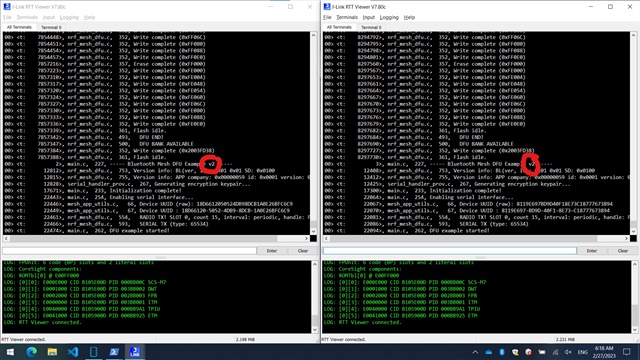
I instead built the DFU example for the nRF52840, with one small modification to a log line to show "v1" and "v2" to differentiate between the original firmware and the DFU firmware.
What I found is that the setup works just fine. Screenshot of my result is attached below.
I reviewed nrf_mesh_dfu.c and your log, and found that "Abort event. Reason: 0xC" indicates NRF_MESH_DFU_END_ERROR_BANK_IN_BOOTLOADER_AREA.
Your assumption about the flash size should be correct. I checked the hex files you provided, and see that the application is about 205kB (0x0002_6000 to 0x0005_81F3), while the free space between the application and the next region is only ~130.5kB (0x0005_81F4 to 0x0007_8000).
Are you attempting with an unmodified DFU example?
It seems strange to me that the example could not work, since it is supposed to be really barebone.
There are a few things we can try here:
- Build the DFU Example with Release build configuration
- Use a different SoftDevice with smaller footprint. This will require updating the DFU Example project setup.
I am working from home and won't have access to a nRF52832 device for the next few days. For the next steps, could you try the options above and let me know the result?