nRF9160 large difference in connection duration

Dir Sir/Madam,

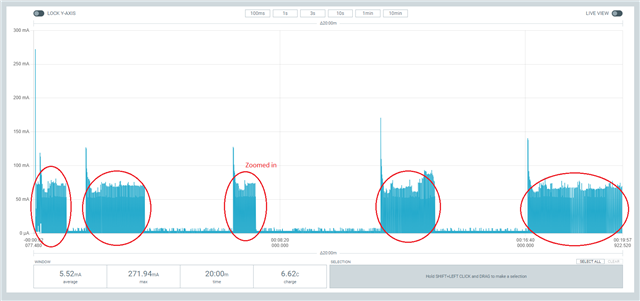
I let the UDP example run for 20 minutes.
I changed the example to make a second connection after 90 seconds and then every 5 minutes.
Every time it connects it sends 38 bytes of data.
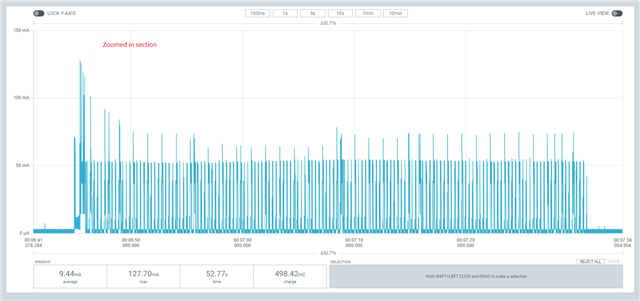
Why is the acivity duration / power consumption so different each time the device connects?
Is the RRC inactivity timer not constant?
Does it depent on the SIM/network provider?
[2023-03-03 17:18:23.667] I: Trace thread ready
[2023-03-03 17:18:23.677] I: Trace level override: 2
[2023-03-03 17:18:23.678] *** Booting Zephyr OS build v3.2.99-ncs1 ***
[2023-03-03 17:18:23.682] UDP sample has started
[2023-03-03 17:18:32.906] LTE cell changed: Cell ID: 1175162, Tracking area: 563
[2023-03-03 17:18:32.948] RRC mode: Connected
[2023-03-03 17:18:35.824] Network registration status: Connected - roaming
[2023-03-03 17:18:35.828] 
[2023-03-03 17:18:35.829] PSM parameter update: TAU: 3600, Active time: 0
[2023-03-03 17:18:35.834] Transmitting UDP/IP payload of 38 bytes to the IP address 8.8.8.8, port number 2469
[2023-03-03 17:19:26.304] RRC mode: Idle
[2023-03-03 17:19:26.306] 
[2023-03-03 17:20:05.841] Transmitting UDP/IP payload of 38 bytes to the IP address 8.8.8.8, port number 2469
[2023-03-03 17:20:06.418] RRC mode: Connected
[2023-03-03 17:22:05.753] RRC mode: Idle
[2023-03-03 17:22:05.755] 
[2023-03-03 17:25:05.848] Transmitting UDP/IP payload of 38 bytes to the IP address 8.8.8.8, port number 2469
[2023-03-03 17:25:06.420] RRC mode: Connected
[2023-03-03 17:25:51.800] RRC mode: Idle
[2023-03-03 17:25:51.803] 
[2023-03-03 17:30:05.857] Transmitting UDP/IP payload of 38 bytes to the IP address 8.8.8.8, port number 2469
[2023-03-03 17:30:06.429] RRC mode: Connected
[2023-03-03 17:31:57.018] RRC mode: Idle
[2023-03-03 17:31:57.019] 
[2023-03-03 17:35:05.866] Transmitting UDP/IP payload of 38 bytes to the IP address 8.8.8.8, port number 2469
[2023-03-03 17:35:06.438] RRC mode: Connected
[2023-03-03 17:38:55.939] RRC mode: Idle
[2023-03-03 17:38:55.940] 

trace-2023-03-03T16-18-16.890Z.bin

trace-2023-03-03T16-18-16.890Z.pcapng

modified udp example.zip

Development setup:
nRF9160DK PCA10090 1.1.0
Power profiler II pca61100 1.0.1
Modem firmware: mfw_nrf9160_1.3.4.zip
NRF Connect SDK V2.2.0
Telenor SIM card (roaming)
Windows 11

With best regards,

Willem

Parents Reply Children
  • > Are all these incoming TCP IP-messages necessary?

    Do you use the right database for the mfw 1.3.4 and the capture therefore shows the real messages?

    The TCP stuff is sure not necessary. In my opinion it should not be forwarded from the provider to the modem at all. But from the "cellular network", this are messages, which keeps the modem in RRC connected and so it enters the sleep mode delayed.

    That TCP stuff is not originated from the modem (at least, I see only incoming messages, which are then answered).

    There are three ways to go:

    - ask your provider, why such TCP sync messages are forwarded to your modem and which other choices are offered.

    - Switch of the modem with CFUN=0 and on again with CFUN=1. Switching every 5 Minutes you need also to check with your provider, if this is allowed. Not that your device gets blocked by the provider for too many registrations.

    - enable RAI for "no response" (4, just one outgoing message). But once you want the receive an answer back, "one response" (3) will be required and if you check the times in the capture, then this may fail because of the unintended TCP traffic.

    My conclusion:

    Ask you provider about the TCP message and the available network options.

  • "Autoselect Trace DB" was enabled, so the correct database should be selected
    I repeated the trace with "Select Trace DB" "mfw_nrf9160_1.3.4_trace-db.json"
    The Wireshark capture still shows TCP IP messages, so think it are the real messages?

    trace-2023-03-06T09-19-01.043Z.pcapng

    I use LTE-M to use minimal power.
    Is it correct that I can't use RAI with LTE-M?
    Is there another solution for LTE-M?

    I will also ask the provider.

  • > The Wireshark capture still shows TCP IP messages, so think it are the real messages?

    Yep, then ask your network provider.

    > I use LTE-M to use minimal power.

    In my experience, LTE-M PSM without RAI is not better than NB-IoT PSM with RAI (100mC vs. 80mC with about 10s RRC activity timer).

    > Is it correct that I can't use RAI with LTE-M?

    AFAIK that depends on your provider and the modem support. I've seen someone wrote to use AS RAI for LTE-M (see nRF9160 - AT RAI ), but I never managed to used it successful for now.

Related