

Dir Sir/Madam,
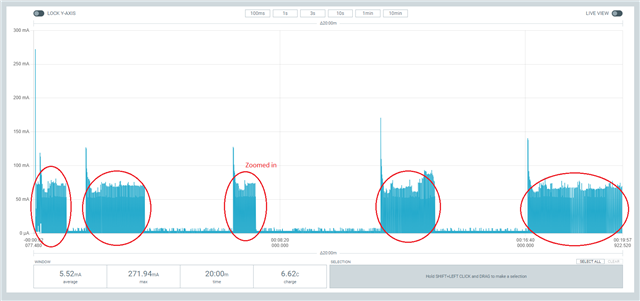
I let the UDP example run for 20 minutes.
I changed the example to make a second connection after 90 seconds and then every 5 minutes.
Every time it connects it sends 38 bytes of data.
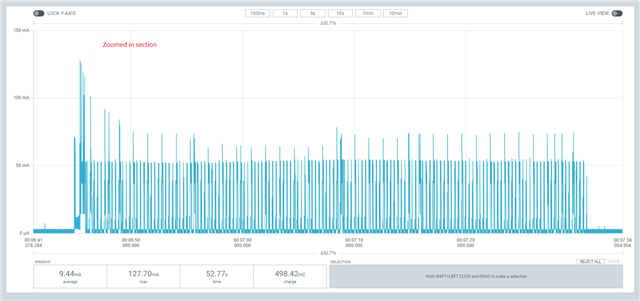
Why is the acivity duration / power consumption so different each time the device connects?
Is the RRC inactivity timer not constant?
Does it depent on the SIM/network provider?
[2023-03-03 17:18:23.667] I: Trace thread ready
[2023-03-03 17:18:23.677] I: Trace level override: 2
[2023-03-03 17:18:23.678] *** Booting Zephyr OS build v3.2.99-ncs1 ***
[2023-03-03 17:18:23.682] UDP sample has started
[2023-03-03 17:18:32.906] LTE cell changed: Cell ID: 1175162, Tracking area: 563
[2023-03-03 17:18:32.948] RRC mode: Connected
[2023-03-03 17:18:35.824] Network registration status: Connected - roaming
[2023-03-03 17:18:35.828]
[2023-03-03 17:18:35.829] PSM parameter update: TAU: 3600, Active time: 0
[2023-03-03 17:18:35.834] Transmitting UDP/IP payload of 38 bytes to the IP address 8.8.8.8, port number 2469
[2023-03-03 17:19:26.304] RRC mode: Idle
[2023-03-03 17:19:26.306]
[2023-03-03 17:20:05.841] Transmitting UDP/IP payload of 38 bytes to the IP address 8.8.8.8, port number 2469
[2023-03-03 17:20:06.418] RRC mode: Connected
[2023-03-03 17:22:05.753] RRC mode: Idle
[2023-03-03 17:22:05.755]
[2023-03-03 17:25:05.848] Transmitting UDP/IP payload of 38 bytes to the IP address 8.8.8.8, port number 2469
[2023-03-03 17:25:06.420] RRC mode: Connected
[2023-03-03 17:25:51.800] RRC mode: Idle
[2023-03-03 17:25:51.803]
[2023-03-03 17:30:05.857] Transmitting UDP/IP payload of 38 bytes to the IP address 8.8.8.8, port number 2469
[2023-03-03 17:30:06.429] RRC mode: Connected
[2023-03-03 17:31:57.018] RRC mode: Idle
[2023-03-03 17:31:57.019]
[2023-03-03 17:35:05.866] Transmitting UDP/IP payload of 38 bytes to the IP address 8.8.8.8, port number 2469
[2023-03-03 17:35:06.438] RRC mode: Connected
[2023-03-03 17:38:55.939] RRC mode: Idle
[2023-03-03 17:38:55.940]
trace-2023-03-03T16-18-16.890Z.bin
trace-2023-03-03T16-18-16.890Z.pcapng
Development setup:
nRF9160DK PCA10090 1.1.0
Power profiler II pca61100 1.0.1
Modem firmware: mfw_nrf9160_1.3.4.zip
NRF Connect SDK V2.2.0
Telenor SIM card (roaming)
Windows 11
With best regards,
Willem


