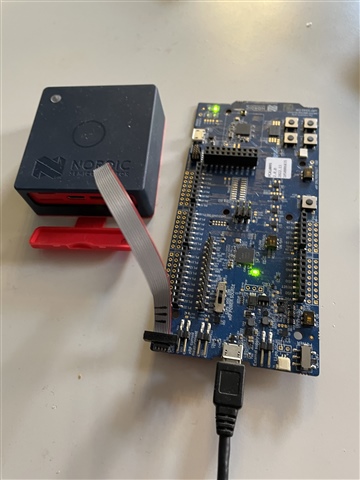
Programming Thingy:53 with Bluetooth Mesh sensor_server example

I have successfully built the Bluetooth Mesh sensor_server example, using the thingy53_nrf5340_cpuspp_ns build configuration.

But when I come to try and program the Thingy:53, it does not appear in the Connected Devices list, when connected to an nRF5340-DK board with a standard 10-pin cable (I used one from a STLink-V3). The RGB LED on the Thingy:53 illuminates on power up and cycles through the three colours a couple of times before going out, as it does when not connected via the 10-pin cable. When the Thingy:53 is connected via the 10-pin cable to the nRF5340-DK, the LEDs on the latter are not illuminated and neither appear in the Connected Devices list.

When I unplug and replug the USB cable to the nRF5340-DK board without the Thingy:53 connected, then the nRF5340-DK is detected and does appear in the Connected Devices list.

What else do I need to do for the Thingy:53 to be detected please?

I am using nRF Connect SDK v2.3.0 on Windows 11.

Parents
  • Hello,

    But when I come to try and program the Thingy:53, it does not appear in the Connected Devices list, when connected to an nRF5340-DK board with a standard 10-pin cable

    So when using the DK as an external programmer, the Thingy does not show up, but does the 5340DK still show up? I believe that is the way it is supposed to be, the DK is simply claiming it is the programmer/debugger on the DK, not what SoC it is necessarily programming. 

    When the Thingy:53 is connected via the 10-pin cable to the nRF5340-DK, the LEDs on the latter are not illuminated and neither appear in the Connected Devices list.

    By this, do you mean that the DK doesn't show up as a device?

    Regards,

    Elfving

  • Hi Elfving,

    Neither the nRF5340-DK nor the Thingy:53 appear in the VS Code Connected Devices list when connected via the USB cable to the PC with the Thingy:53 connected to the nRF5340-DK with the 10-pin cable.

    The nRF5340-DK only appears in the Connected Devices list when it is connected via the USB cable to the PC without the 10-pin cable connected.

    I am referring to these articles:

    https://infocenter.nordicsemi.com/topic/ug_nrf5340_dk/UG/dk/hw_debug_out.html

    https://developer.nordicsemi.com/nRF_Connect_SDK/doc/latest/nrf/working_with_nrf/nrf53/thingy53.html

    https://developer.nordicsemi.com/nRF_Connect_SDK/doc/latest/nrf/samples/bluetooth/mesh/sensor_server/README.html#bluetooth-mesh-sensor-server

    Kind regards,

    Al

  • Hi Elfving,

    With the switch in the centre VDD position, I confirm that the nRF5340-DK does appear on the Connected Devices list with the Thingy:53 connected to it via the 10-pin cable. Regardless of whether I connect via USB with the Thingy:53 already connected via the 10-pin cable, or connect it to the nRF5340-DK when it is already connected to USB, the Thingy:53 does not appear in the list of Connected Devices. Cycling the power switch on the Thingy:53 also has no effect.


    The list of Connected Devices shows the following:

    1050006835 (nRF5340-DK serial number)

         NRF5340_xxAA_ENGD

         VCOM1 COM26

         VCOM0 COM27

         RTT

    If I attempt to flash the sensor_server project that is built for Thingy:53 I get an error saying it can’t connect to a debugger.

    What else do I need to do please? Do I need to erase any application running on the nRF5340-DK first?

    Kind regards,

    Al

  • Hi Elfving,

    With the switch in the centre VDD position, I confirm that the nRF5340-DK does appear on the Connected Devices list with the Thingy:53 connected to it via the 10-pin cable. Regardless of whether I connect via USB with the Thingy:53 already connected via the 10-pin cable, or connect it to the nRF5340-DK when it is already connected to USB, the Thingy:53 does not appear in the list of Connected Devices. Cycling the power switch on the Thingy:53 also has no effect.


    The list of Connected Devices shows the following:

    1050006835 (nRF5340-DK serial number)

         NRF5340_xxAA_ENGD

         VCOM1 COM26

         VCOM0 COM27

         RTT

    If I attempt to flash the sensor_server project that is built for Thingy:53 I get an error saying it can’t connect to a debugger.

    What else do I need to do please? Do I need to erase any application running on the nRF5340-DK first?

    I tried erasing the DK by clicking on the ellipsis (…)  to the right of the serial number, but I get a messge saying:

    ‘Error erasing device, See the Output tab for details.’

    But nothing is displayed on the Output tab.

    Kind regards,

    Al

  • Hello again

    alwalker said:
    Do I need to erase any application running on the nRF5340-DK first?

    That isn't necessary. I actually prefer having a default Blinky application running on it, just to confirm that I haven't accidentally flashed the wrong SoC.

    alwalker said:
    With the switch in the centre VDD position, I confirm that the nRF5340-DK does appear on the Connected Devices list with the Thingy:53 connected to it via the 10-pin cable

    Great! The center VDD position is the default. The USB option is refering the "nRF USB" on the other side of the DK, that would just power the nRF, and I don't think the Li-Po option would work for programming either.

    So, it should just show one device in the "connected devices" list, as it is referring to interface MCUs of the DK, not the SoCs on them. Currently there is just one interface MCU connected, the one on the DK.

    alwalker said:
    If I attempt to flash the sensor_server project that is built for Thingy:53 I get an error saying it can’t connect to a debugger.

    So this is our next issue. Can you make sure that the thingy has power, by for instance connecting it to a usb C? And could you also make sure that it is powered on by flipping its switch to "I" ?

    Regards, and have a good weekend!

    Elfving

  • Hi Elfving,

    I think I've made some progress. When I don't have the Thingy:53 switched on, In the list of Connected Devices, I see:

    1050006835 (nRF5340-DK serial number)

         VCOM1 COM26

         VCOM0 COM27

         RTT

    But when I switch it on, then I see an additional entry:

    1050006835 (nRF5340-DK serial number)

         NRF5340_xxAA_ENGD

         VCOM1 COM26

         VCOM0 COM27

         RTT

    Which I assume is the nRF5340 in the Thingy:53, so I select that for flashing. After failing the first time due to the readback protection, doing the --recover action then allowed it to be programmed correctly.

    So now I think I have both an nRF52DK programmed with the sensor_client application and the Thingy:53 programmed with the sensor_server application, but then running the nRF Mesh application on my iPad, no Proxy is found. Do you have any suggestions please?

    I note that neither the nRF52DK nor the Thingy:53 show any power on indication.

    Kind regards,

    Al

  • alwalker said:

    But when I switch it on, then I see an additional entry:

    I find it a bit strange how didn't see that the entire time, but no I don't think that is the Thingy per se. How are you selecting it for flashing? For some more details on this process, see here.

    Could you flash something to the Thingy that you can confirm works, like a Blinky?

    Regards,

    Elfving

Reply Children
  • Hi Elfving,

    I successfully built and flashed the basic blinky application to the Thingy:53 by selecting  NRF5340_xxAA_ENGD in Connected Devices. So this is how the thingy:53 appears.

    The red LED on the Thingy:53 now blinks on and off approximately once per second.

    So I think the issue is not that this entry wasn't appearing before, but rather that it wasn't  obviously identifying itself as the Thingy:53.

    So now that I've proven that it's possible to program the Thingy:53, and that I have both the sensor_server and sensor_client sample applications running on the Thingy:53 and nRF52DK respectively, how can I use these to build a Bluetooth Mesh (with the addition of more Thingy:53 modules) with the nRF Mesh application please?

    Kind regards,

    Al

  • alwalker said:

    The red LED on the Thingy:53 now blinks on and off approximately once per second.

    Great! I believe I disagree with you when it comes how the Thingy appears there and what it takes to flash it, but as long as it works for you its fine. (For instance, I believe you'll also see the same thing on connected devices with the Thingy disconnected. And you'll also be able to flash the Thingy by selecting eg. RTT. Its the DK serial number your selecting). 

    alwalker said:
    how can I use these to build a Bluetooth Mesh (with the addition of more Thingy:53 modules) with the nRF Mesh application please?

    What you need to do now is provision and configure these devices. To get an understanding of how this works it might be easiest to start of with a sample that only requires one node, like the mesh light, but the sensor servers should work fine as well. The steps to test them our outlined in their documentation. Could you let me know if you have issues with a specific point in that list?

    Regards,

    Elfving

  • Hi Elfving,

    Thanks, I do not see NRF5340_xxAA_ENGD on the Connected Devices list when the Thingy:53 is switched off and/or disconnected from the nRF5340DK. Can I suggest that you might confirm with your development team  how they expect the Thingy:53 to appear in this situation, and also to check using the same hardware setup?

    I will review the Bluetooth mesh documentation and let you know if I have any issues.

    Kind regards,

    Al

Related