Unable to connect nrf9160 https-client over NB-IOT

Hello,

I am trying to create a socket and create a https request over NB-IOT. We started with the nrf9160 https-client sample, and changed the prefered and connection mode from LTE-M to NB-IOT.
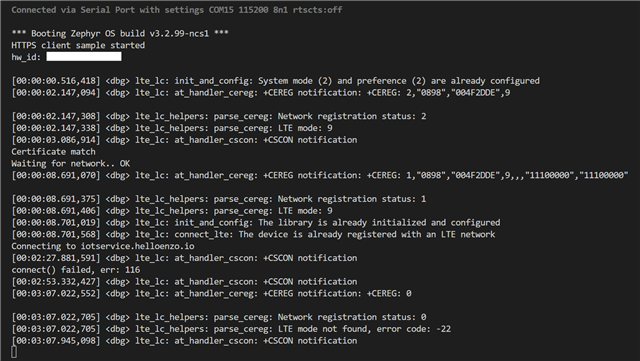

We are located in Germany, and are connecting though a O2 telefonica sim, not the included iBasis one that comes with DK. We know the O2 sim can connect and send data over NB-IOT here as we have previously used the same sim with the SIM7020 modem.

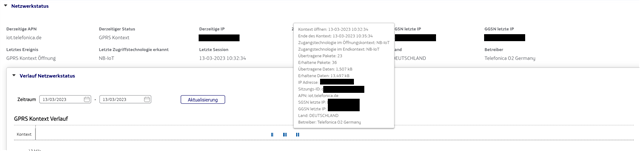
The device when unset to the default, or set to LTE-M can connect and make the request fine. But when changed to NB-IOT the connection still occurs (as seen in the sim dashboard on O2's management system, kite platform).
I am adding the following lines near the startup of the program along with making changes in the proj.config. I have also enabled LTE link controller logging as the issue is occurring on the opening socket command, not the connect command.

proj.config

CONFIG_LTE_NETWORK_MODE_NBIOT=y

CONFIG_LOG=y
CONFIG_LTE_LINK_CONTROL_LOG_LEVEL_DBG=y

Near the start of the main function in main.c

lte_lc_offline();
lte_lc_system_mode_set(LTE_LC_SYSTEM_MODE_NBIOT, LTE_LC_SYSTEM_MODE_PREFER_NBIOT);
lte_lc_init();
lte_lc_normal();
lte_lc_connect();


The modem firmware has also been manually updated to the most recent on the website (version 1.3.4), although the DK was purchased recently, so I doubt it even had the incompatible firmware.

Could NB-IOT not support https, and an example with http work? Would testing over AT commands provide more information using the AT client sample and LTE link monitor (is there a example of AT commands somewhere to make a http/https request)? Or is there any sample code or example the makes GET/POST requests as looking though the forum or github yields no examples.

Regards,
Sawaiz

Parents
  • Hello,

    I have some updates from testing. I installed the serial modem client and ran some testing with AT commands and was able to make a http request over NB-IOT. I did not figure out how to make https commands though that.

    Doing some more testing, it turned out the response was ~2300 characters which was causing problems. 

    We are able to make a connection over NB-IOT to httpbin.org/ip with the https-client example (although it takes ~10-30s for the 62 bytes to be sent. But it does not work with our own server. Although everything responds quickly, both our server and httpbin, when we set it back to LTE-M.

    Our guess is the lower bandwidth of NB-IOT isn't suited for https connections and we need to test this over http. I haven't found any example code, or what lines I can comment out to make the https-client example connect over http instead. Is there any example code or suggestion for testing http connections?

    Regards,
    Sawaiz

  • sawaiz said:
    Is there any example code or suggestion for testing http connections?

    I couldn't find any test samples for http specifically. If there are any tests, you would most probably find them under nrf/tests in the NCS repository.

    sawaiz said:
    Our guess is the lower bandwidth of NB-IOT isn't suited for https connections and we need to test this over http.

    This is true. Using any TCP based protocol is not recommended, because of the lower bandwidth of NB-IoT. Instead, you should consider using a UDP based protocol like CoAP.

Reply
  • sawaiz said:
    Is there any example code or suggestion for testing http connections?

    I couldn't find any test samples for http specifically. If there are any tests, you would most probably find them under nrf/tests in the NCS repository.

    sawaiz said:
    Our guess is the lower bandwidth of NB-IOT isn't suited for https connections and we need to test this over http.

    This is true. Using any TCP based protocol is not recommended, because of the lower bandwidth of NB-IoT. Instead, you should consider using a UDP based protocol like CoAP.

Children
No Data
Related