nrf9160 DK SIM card not connecting to device nor LTE network

Hello,

I am currently attempting to finish the getting started aspect of the nrf9160-DK and am having a few problems. I have no problem flashing the MFW and hex files onto the device via nrf connect. However, my problems start when I access nrfCloud. Whenever I am told to activate the SIM card, it goes through perfectly fine and activates. When I attempt to activate the device, the screenshot below shows the message in red. LED 3 blinks for a while then transfers to LED 2 blinking (to which I cannot find the significance of). I'd then go to check what is going on with the SIM card to which it then shows the message "Not connected to any device". I've already updated it with the latest firmware and hex files. I even made sure that the coverage is accessible in my area and tried using the legacy asset tracker v2 file. Is there something I am doing wrong?
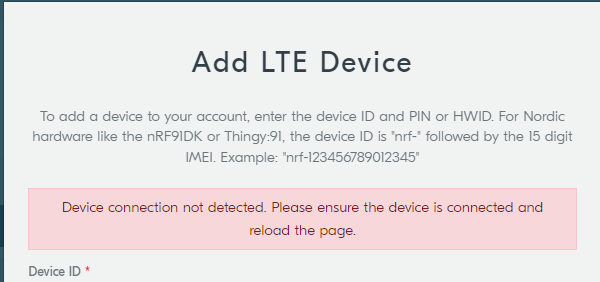
Screenshot 1  

  • Hello, can you please connect your board to your computer and open the LTE Link Monitor from the nRF Connect for Desktop application. From here please provide the output log after running for about 15 - 20 minutes.

    Thank you, 

    Kind regards,
    Øyvind

  • Hello,

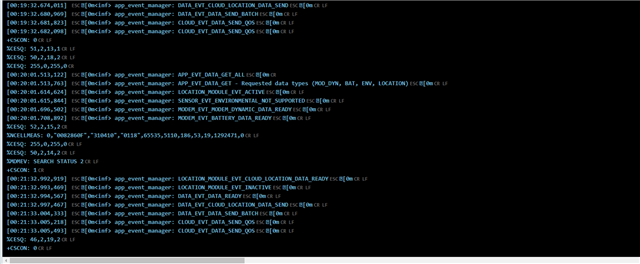
    The screenshot below is the most recent activity after letting it run for at least 20 minutes.

  • Thanks, can you please provide the log file itself from LTE Link Monitor, this is found under "Open Log File". 

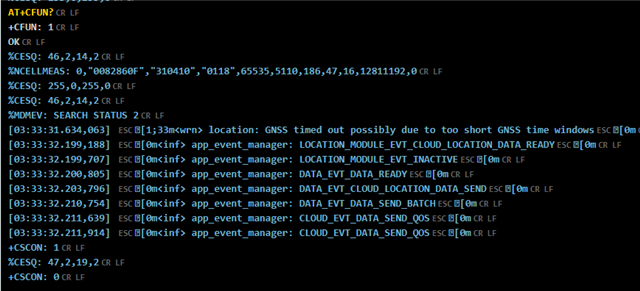
    Also, can you run the AT command "AT+CFUN?" from the command line in the LTE Link Monitor? Where it states "type AT command here" Should provide more information on what the current status is.

    Thanks. 

    -Øyvind

  • I've attached the entire file below. I still have it running in the background just in case its status changes. Also, the AT+CFUN? gave me a numerical value of 1. 


    nrf9160DK-log.txt

  • Thanks for providing this log! This gave us it answer to why your device does not connect. 

    First of all, what modem fw and application fw did you program on your device? Are you using our precompiled package for the nRF9160DK?

    2023-03-22T13:13:36.752Z DEBUG modem << %CESQ: 56,2,13,1
    2023-03-22T13:13:37.076Z DEBUG modem << [00:00:13.886,566] [0m<inf> app_event_manager: MODEM_EVT_LTE_CELL_UPDATE[0m
    2023-03-22T13:13:37.375Z DEBUG modem << +CEREG: 2,"6400","01881403",7,0,15
    2023-03-22T13:13:38.621Z DEBUG modem << +CSCON: 0
    2023-03-22T13:13:38.664Z DEBUG modem << %CESQ: 255,0,255,0
    2023-03-22T13:13:38.748Z DEBUG modem << +CEREG: 2
    2023-03-22T13:13:38.948Z DEBUG modem << %CESQ: 50,2,16,2
    2023-03-22T13:13:38.957Z DEBUG modem << +CEREG: 2,"0118","0082860F",7
    2023-03-22T13:13:39.754Z DEBUG modem << [00:00:16.565,124] [0m<inf> app_event_manager: MODEM_EVT_LTE_CELL_UPDATE[0m
    2023-03-22T13:13:39.793Z DEBUG modem << [00:00:16.766,998] [0m<inf> app_event_manager: MODEM_EVT_LTE_CELL_UPDATE[0m
    2023-03-22T13:13:39.858Z DEBUG modem << +CSCON: 1
    2023-03-22T13:13:39.966Z DEBUG modem << +CEREG: 2,"0118","0082860F",7,0,11
    2023-03-22T13:13:40.060Z DEBUG modem << %CESQ: 52,2,22,3
    2023-03-22T13:13:41.061Z DEBUG modem << %CESQ: 46,2,18,2
    2023-03-22T13:13:41.255Z DEBUG modem << +CSCON: 0
    2023-03-22T13:13:41.298Z DEBUG modem << %CESQ: 255,0,255,0
    2023-03-22T13:13:41.346Z DEBUG modem << %CESQ: 51,2,17,2
    2023-03-22T13:13:41.390Z DEBUG modem << +CEREG: 2,"56E6","02156404",7
    2023-03-22T13:13:41.620Z DEBUG modem << +CSCON: 1
    2023-03-22T13:13:41.713Z DEBUG modem << +CEREG: 2,"56E6","02156404",7,0,11

    From the CEREG response we can see that your SIM is rejected in the beginning. In this case it is cause #15 and cause #11. Looking at document 3GPP TS 24.301 Annex A, we find the following descriptions of the causes:

    Cause #15 – No suitable cells in tracking area
    This EMM cause is sent to the UE if it requests service, or if the network initiates a detach request, in a tracking
    area where the UE, by subscription, is not allowed to operate, but when it should find another allowed tracking
    area or location area in the same PLMN or an equivalent PLMN.
    NOTE 3: Cause #15 and cause #12 differ in the fact that cause #12 does not trigger the UE to search for another
    allowed tracking area on the same PLMN.

    Cause #11 – PLMN not allowed
    This EMM cause is sent to the UE if it requests service, or if the network initiates a detach request, in a PLMN
    where the UE, by subscription or due to operator determined barring, is not allowed to operate.

    Then shortly after it is connected to the network roaming, apparently to AT&T network (PLMN 310410). And seemingly connected to nRF Cloud sending data. 

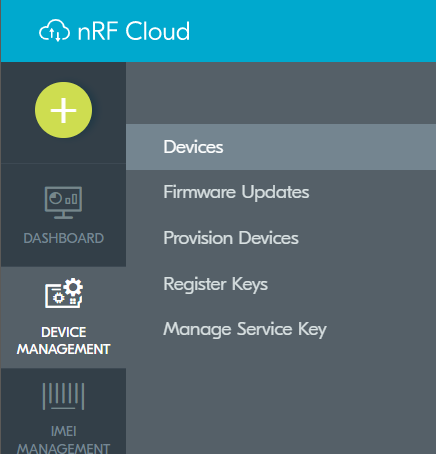
    Is your device visible under Device Management -> Devices in nRF Cloud?


    Also, have you updated the certificates on your device?


    If the above does not help then we need to do more debugging. 

    Program the \nrf9160dk_fw_2023-03-02_8f26142b\img_app_bl\debug\nrf9160dk_serial_lte_modem_debug_2023-03-02_8f26142b.hex from the precompiled package for nRF9160DK.

    Then open the LTE Link Monitor and type in the following commands. Your device should prompt CFUN=0 when connected to LTE Link Monitor at first.

    AT%XSYSTEMMODE=1,1,1,0
    AT+CEREG=5
    AT+CFUN=1
    AT+CFUN?
    AT#XPING="www.google.com",45,5000,5,1000

Related