Beware that this post is related to an SDK in maintenance mode
More Info: Consider nRF Connect SDK for new designs

Out of range catastrophe

Hello everyone!

This thread is similar to Indoor BLE Range Improvements , as same system is used. There we discuss about S140 Soft Device scheduling conflict and here we want to talk about problem caused by device out of range. 

Background 

We are in development phase for indoor household appliances with many wireless connected entities. There is a requirement to support following topology: 8 battery powered devices and single mains powered device. As the target environment is indoor and low rate of data exchange (low bandwidth) is needed, we agree to test out BLE5 LE CODED PHY (S=8, 125kbit/s) aka. LongRange, using Minew MS88SF3 module that features nRF52840 chipset.

So, we prepare a simple mock-up test application to check out how the system will behave in real-life scenarios. Test application was very simple, central BLE device scans continuously and stops after all 8 connections are established. Peripheral BLE devices advertise when not in connection. With such approach system shall always converge to have all devices connected, as if one device gets disconnected advertising/scanning shall re-started and the drop connections should re-establish. Every second 64 bytes of dummy data were exchange between central and peripheral device based on server-initiate update (notification type). Tx power for advertising and connection was set to 8dBm. Connection interval was set to 1500ms, SlaveLatency to 2 and Supervision Timeout to 15000ms. Well, it works perfectly on a desk! 

BLE settings
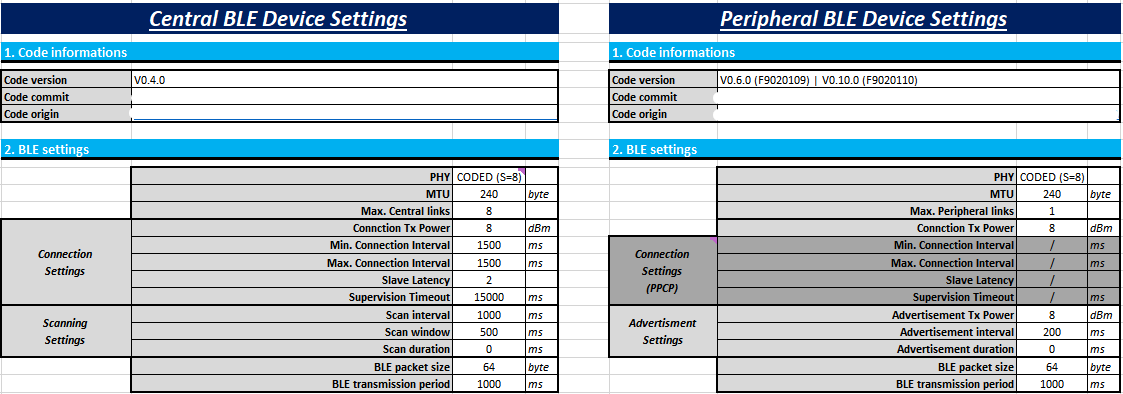
Platform description:

  • IC:               nRF52840
  • Module:       Minew MS88SF3
  • SDK:            nRF5_SDK_17.1.0_ddde560
  • Softdevice:  s140_nrf52_7.2.0 
  • IDE:             SEGGER Embedded Studio for ARM Release 7.10a Build 2022121504.52072
  • OS:              Windows 10

"Out of range" problem

We done a couple of test and found out that:

  • If we take Device A (one of the 8 peripheral devices, all in connection) out of range, it disconnects. If then moved back to range, it connects back without any problems - NORMAL EXPECTED OPERATION,
  • If we take Device A (one of the 8 peripheral devices, all in connection) out of range, it disconnects. If we then move Device B (one of the 8 peripheral devices, all beside Device A in connection) out of range, it disconnects. Then Device B does not re-connect when moved back to range. Only after moving Device A back to range, both Devices A & B gets re-connected. It is like Device A is blocking Device B from re-connectiong, regardless Device B is in range! - ABNORMAL OPERATION,
  • We observe that only first disconnected device (due to out of range) blocks other from re-connecting. Moving first disconnected device back to range triggers all other devices to re-connect,
  • We suspect that Device A (goes out of range first) block Device B in context of advertisement, as both devices are peripheral. But that is not the case as we done separate tests to eliminate that possibility, where the first disconnected device did not start advertising at disconnection. Same effect was observed, other devices did not re-connect and thus conclude that advertisement do not play role in that effect, meaning that the problem lives on Central device.
  • If we disable data transmission on Central Device and Device A and repeat point 2., Device B gets re-connected when moved back to range. In that test case Device A did not blocked Device B from re-connection.

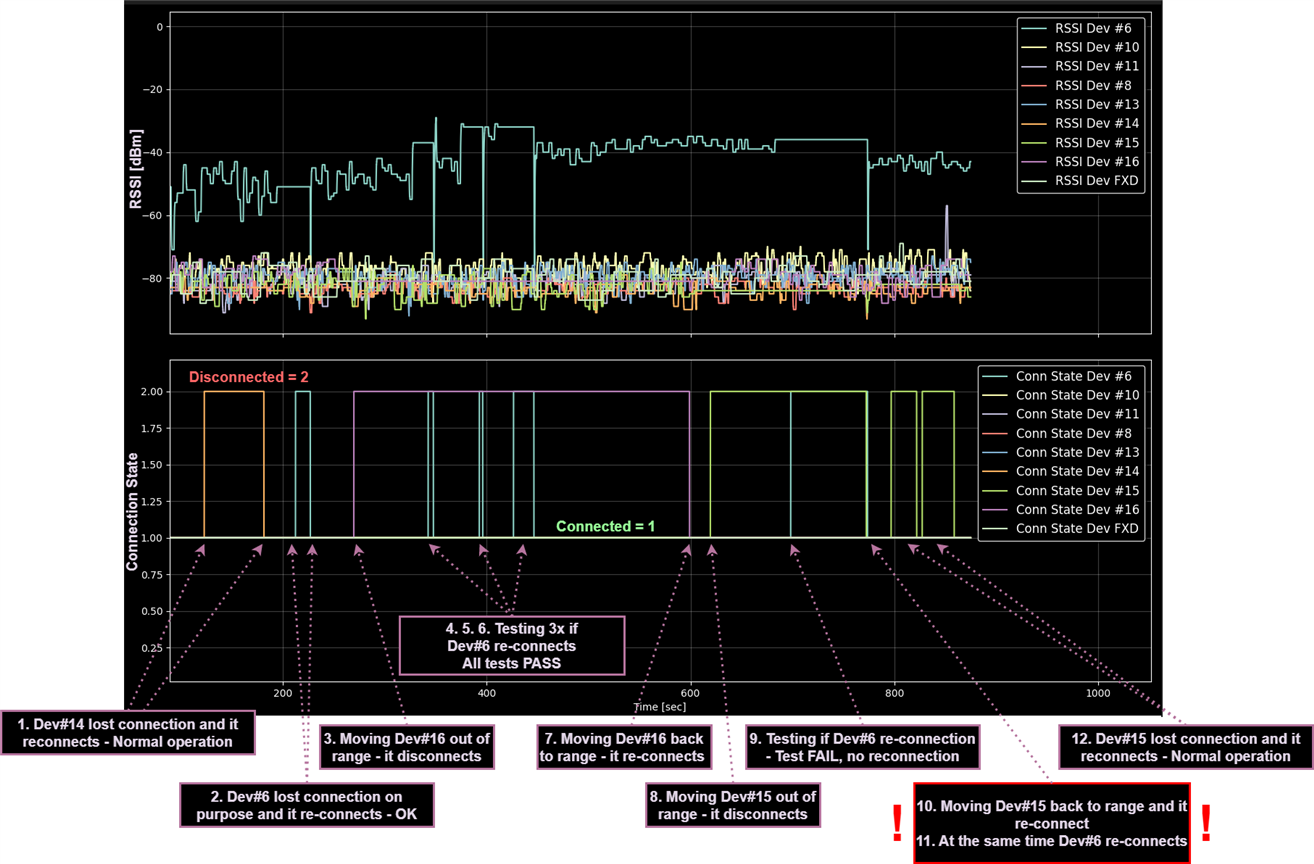
We done a couple of tests addressing "blocking problem" and there was a consistent outcome. Following picture shows the above described problem on real test mock-up system with 9 peripheral devices. For that test we disable data transmiting for Central device, Dev#6 and Dev#16. During that test following events takes place:

1. Dev#14 lost connection (not on purpose, might cause moving people around it, closing doors) and was automatically reconnected back - Not expected, but NO PROBLEM!
2. Dev#6 lost connection on purpose, to test that central device is working OK. Reconnected OK!
3. Dev#16 was moved out of range and gets disconnected - OK, expected!
4. Dev#6 remove battery to test if will reconnect on putting battery back - OK, RECONNECTS!
5. Repeate point 4. - RECONNECTS!
6. Repeate point 4. - RECONNECTS! --> Consistent reconnection-OK!
7. Moving Dev#16 back to range and device reconnects! It disconnects and reconnect 2x due to moving the device! - OK, expected!
8. Moving Dev#15 out of range. That device do not have tx disabled. Device disconnects. - OK, expected!
9. Repate point 4. - DOESN'T RECONNECTS! ABNORMAL BEHAVIOUR!
10. Moving Dev#15 back to range. It connects back! - OK, expected for Dev#15 to re-connect!
11. Dev#6 connect back right after Dev#15 reconnects! STRANGE BEHAVIOUR, as it Dev#15 blocked Dev#6 from re-connecting!
12. Dev#15 lost connection (not on purpose, might cause moving people around it, closing doors) and was automatically reconnected back. - Not expected, but NO PROBLEM!

All events are shown on the picture:
Therefore, following questions arise:

  1. Why does the Device A block Device B from re-connection as described at point 2. (As said, we think it is a Central Device issue)? What is the rational explanation for that?
  2. Why is there a different behaviour between point 2. & 3.? As transmission is the only difference it must be the source of problems, or?!
  3. How can we mitigate that "blocking problem", where Device A blocks Device B from re-connection within a valid range?
  4. Do you receive any similar reported problems? If so, how do they solve it?

Thank you for all the help!

BR, Žiga


Parents
  • Hi again

    I must say we're quite stumped at this, but wanted to let you know that we're still looking into this on our end as well.

    Just to clarify a few things here. Is it device A that takes up to 4 minutes to reconnect when it is moved back into range of the central device? For it to take up to 4 minutes, the only thing that makes sense to us is if it is right on the edge of the range it can be detected, but in the 4 minute window you report here there also seem to be a connection loss in the meantime. So it seems like there are something happening in the meantime here. Are you able to provide a sniffer trace here as well. Usually, the debug log isn't all that reliable in terms of timing events, and these are just the times the device reports these events to the debugger.

    To answer your questions:

    1. Most likely due to multiple failed connection requests/responses and retries, as well as this link loss that seems to appear in the midst of the connection here, as well as "Scanning Started" over again. So I'm guessing that it's just at the edge of the range where it's able to be detected.

    2. This is most likely due to failed connection requests and retries as well as advertisements not being picked up by the central when very far away.

    3. Without knowing the details of the range between them and seeing a sniffer log, I don't see anything breaking the Bluetooth specification.

    4. I will need a sniffer log capturing this behavior before commenting on what you could do to mitigate this issue I'm afraid.

    Best regards,

    Simon

Reply
  • Hi again

    I must say we're quite stumped at this, but wanted to let you know that we're still looking into this on our end as well.

    Just to clarify a few things here. Is it device A that takes up to 4 minutes to reconnect when it is moved back into range of the central device? For it to take up to 4 minutes, the only thing that makes sense to us is if it is right on the edge of the range it can be detected, but in the 4 minute window you report here there also seem to be a connection loss in the meantime. So it seems like there are something happening in the meantime here. Are you able to provide a sniffer trace here as well. Usually, the debug log isn't all that reliable in terms of timing events, and these are just the times the device reports these events to the debugger.

    To answer your questions:

    1. Most likely due to multiple failed connection requests/responses and retries, as well as this link loss that seems to appear in the midst of the connection here, as well as "Scanning Started" over again. So I'm guessing that it's just at the edge of the range where it's able to be detected.

    2. This is most likely due to failed connection requests and retries as well as advertisements not being picked up by the central when very far away.

    3. Without knowing the details of the range between them and seeing a sniffer log, I don't see anything breaking the Bluetooth specification.

    4. I will need a sniffer log capturing this behavior before commenting on what you could do to mitigate this issue I'm afraid.

    Best regards,

    Simon

Children
  • Hi Simonr,

    I must say we're quite stumped at this, but wanted to let you know that we're still looking into this on our end as well.

    Please, don't give up on me! Smiley

    Just to clarify a few things here. Is it device A that takes up to 4 minutes to reconnect when it is moved back into range of the central device?

    Yes, device A is on a range limit. 

    Are you able to provide a sniffer trace here as well. Usually, the debug log isn't all that reliable in terms of timing events, and these are just the times the device reports these events to the debugger.

    I'll prepare sniffed files during that week. It is a bit difficult to reproduce such a scenario as there are many factors influencing the system but will do my best to capture that event.

    1. Most likely due to multiple failed connection requests/responses and retries, as well as this link loss that seems to appear in the midst of the connection here, as well as "Scanning Started" over again. So I'm guessing that it's just at the edge of the range where it's able to be detected.

    That makes perfect sense, as the device causing the problems is at the very limit of the range.


    Meanwhile I added also RSSI value to debug print beside "Connectable advertising report from FC:B4:D7:B8:28:4B". Debug message now looks like that, for example: "Connectable advertising report from FC:B4:D7:B8:28:4B with RSSI: -93 dBm". What I found out is that connection establishment with received signal strength higher than -90dBm is OK. Connection is established right away.

    So, I added additional RSSI check to advertisement report event handler before initiating connection. See the code below:

    ////////////////////////////////////////////////////////////////////////////////
    /**
    *		BLE on advertisement report event handler 
    *   
    * @note     This function is being executed in main BLE stack callback!
    *
    * @param[in] 	p_ble_evt   - Pointer to BLE event informations
    * @return 		void
    */
    ////////////////////////////////////////////////////////////////////////////////
    static inline void ble_c_evt_on_adv_report(ble_evt_t const * p_ble_evt)
    {
        static  uint8_t             man_data[32]    = { 0 };
                uint16_t            man_data_len    = 0;
                 ble_c_obs_data_t   observer_data   = { 0 };
    
        // Get advertisment info
        const ble_gap_evt_adv_report_t * const p_adv_report = &( p_ble_evt->evt.gap_evt.params.adv_report );
    
        // Get advertisement type
        const ble_gap_adv_report_type_t * const p_adv_type = &( p_adv_report->type );
    
        // Get advertisement data and lenght
        const uint8_t * p_adv_data      = p_adv_report->data.p_data;
        const uint16_t  adv_data_len    = p_adv_report->data.len;
    
        // Advertisment status OK
        if ( BLE_GAP_ADV_DATA_STATUS_COMPLETE == p_adv_type->status )
        {
            // Get manufacturer data
            if ( eBLE_C_OK == ble_c_get_manufacturer_data( p_adv_data, adv_data_len, (uint8_t*) &man_data, &man_data_len ))
            {
                // Advertisment request for connection
                if ( 1U == p_adv_type->connectable )
                {
                    BLE_C_DBG_PRINT( "Connectable advertising report from %02X:%02X:%02X:%02X:%02X:%02X with RSSI: %i dBm", p_adv_report->peer_addr.addr[5], p_adv_report->peer_addr.addr[4], p_adv_report->peer_addr.addr[3],
                                                                                                          p_adv_report->peer_addr.addr[2], p_adv_report->peer_addr.addr[1], p_adv_report->peer_addr.addr[0],
                                                                                                          p_adv_report->rssi );
    
                    // Is this device already connected
                    //if ( false == ble_c_check_dev_conn( p_adv_report->peer_addr.addr ))
                    {                      
                        // Check for magic request
                        //if ( true == ble_c_check_magic_request( man_data, man_data_len ))
    
                        // TEST: Only for testing purposes!!! Remove later on!!!
                        if ( p_adv_report->rssi > -90 )
                        {
                            BLE_C_DBG_PRINT( "Connection initiated..." );
    
                            // Continue scanning
                            (void) sd_ble_gap_scan_start( NULL, &g_ble_c.scan_data );
    
                            // Stop scanning before connection
                            (void) sd_ble_gap_scan_stop();
    
                            // Connect to peer device
                            if ( NRF_SUCCESS != sd_ble_gap_connect( &p_adv_report->peer_addr, &g_ble_c.scan_params, &g_ble_c.conn_params, BLE_C_CONN_CFG_TAG ))
                            {
                                BLE_C_DBG_PRINT( "Attept to connect failed!" );
                            }
                        }
                    }
                }
    
                // Advertisement only broadcast
                else
                {
                    BLE_C_DBG_PRINT( "Broadcasting advertising report!" );
    
                    // Assemble observer data packet
                    observer_data.rssi = p_adv_report->rssi;
                    observer_data.size = man_data_len;
                    memcpy( &observer_data.data, &man_data, man_data_len );
                    memcpy( &observer_data.mac, p_adv_report->peer_addr.addr, sizeof( observer_data.mac ));
                
                    // Put data to observer data
                    if ( eRING_BUFFER_OK != ring_buffer_add( g_ble_c.observer_buf, (ble_c_obs_data_t*) &observer_data ))
                    {
                        // Buffer overflow!
                        BLE_C_DBG_PRINT( "Observer buffer overflow! Increse buffer size via \"BLE_C_OBSERVER_BUF_SIZE\" macro!");
                    }
                }
            }
        }
    
        // Continue scanning
        (void) sd_ble_gap_scan_start( NULL, &g_ble_c.scan_data );
    }

    This is just playing around as I have no other clue how to fix the problem. So far, that filtering technique seems to be working ok, but I'm not confident to use that in production software. On the other hand, it also reduce the working distance of the BLE. What is your opinion on that "solution"?

    I will provide you with wanted sniffed file in couple of days.

    Thank you!

    BR, Žiga

  • I think I got it! But there is still a lot to be tested before celebration Slight smile

    PROBLEM

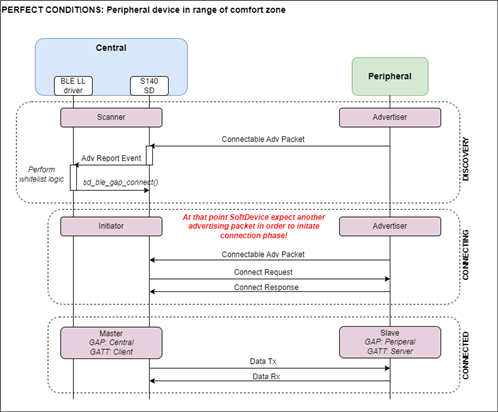
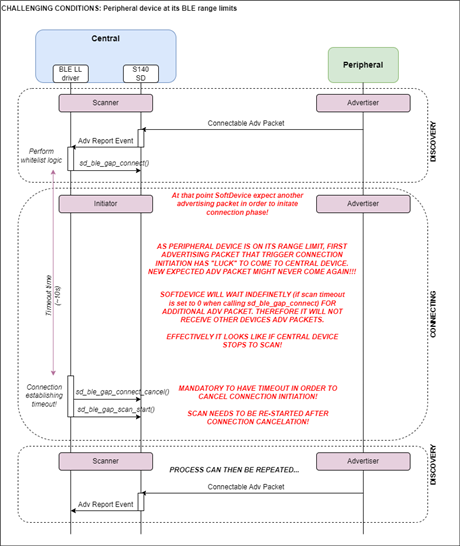
    WHAT: Central device did not end connection initiation procedure, no timeout was implemented! Calling "sd_ble_gap_connect" with scan timeout of 0 will never timeouted!

    WHY: After calling "sd_ble_gap_connect" additional advertising packet needs to be received before SD start to send connection request to peer device. In case of DevB adv packets were received very reliable and connection establishment was done immediately. In case of DevA that was on rangle limit its adv packet come very offset and very randomly. So between first and second adv packet it might pass couple of minutes or it might take indefinetly. Central was therefore blocked waiting for that second adv packet. And from outside it looked like it stop to scan. (Here I was misdirected...)

    SOLUTION: Implemented timeout for connection initiation (when first calling "sd_ble_gap_connect") and at timeout event calling "sd_ble_gap_connect_cancel". 

    In picture below there is a sequence diagram of described scenarious for both devices:


    Similar issues were discussed on several Nordic Dev Zone post, but unfortunatelly I wasn't come across them before:

    1. https://devzone.nordicsemi.com/f/nordic-q-a/63088/it-is-possible-to-set-a-timeout-between-sd_ble_gap_connect-till-ble_gap_evt_connected-event 

    2. https://devzone.nordicsemi.com/f/nordic-q-a/99516/sd_ble_gap_connect-times-out-but-ble_gap_evt_timeout-never-fires 

    3. https://devzone.nordicsemi.com/f/nordic-q-a/10386/sd_ble_gap_connect-timeout-in-s120-central 

    What do you think of that?


    BR, Žiga

Related