nrf Connect SDK Issues with west.yml workspaces in VS Code

I am trying to add s2opc to my project. But everytime i try to open the complete Workspace in VSCode, the nrf Connect extension, just does nothing.

How to reproduce. Take the blinky example, make it a git repo, create a west.yml file looking like this:

manifest:
  remotes:
    - name: ncs
      url-base: https://github.com/nrfconnect

  projects:
    - name: nrf
      remote: ncs
      repo-path: sdk-nrf
      revision: v2.7.0
      import: true

    - name: s2opc
      groups:
        - s2opc
      path: deps/modules/lib/s2opc
      revision: master
      url: [email protected]:systerel/S2OPC.git


  self:
    path: app


Now do a west init -m <git clone url>
West update, west zephyr export, pip install all the required requirements etc...

If i now open the app folder or the overarching folder containing the nrf sdk and zephyr, the VSCode extension just spins indefinetly. Sometimes it works, by just opening the app folder, but then it still fails to compile, something that is easily reproducable on the command line.

Parents
  • Currently this has escalated quite a bit.
    I did the following:
    Completely removed VSCode from ubuntu 22.04 WSL, deleted the .vscode-server folder and anything i could find vscode related. And reinstalled vscode did not help.
    deleted the wsl image completely, reinstalled. Removed vscode from windows, deleted the nrf sdk from windows, reinstalled vscode on windows, installed the toolchain and sdk using vscode.

    Open VSCode in wsl install the nrf extension pack.

    The problem is now the extension never finishes loading. I am unable to debug it even, can not even generate support information.
    i reinstalled the prerequisites for ubuntu again. Installed the toolchain, installed the nrf dep package the udev rules.
    Nothing changed.

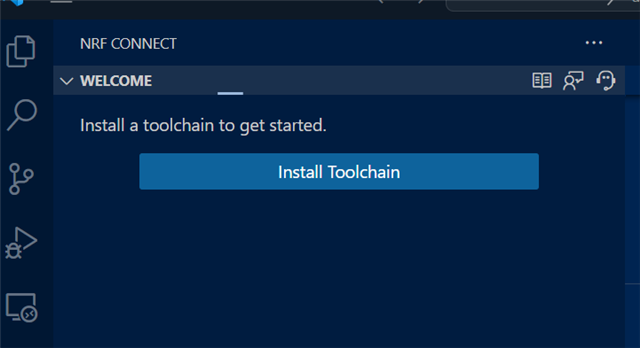
    The extension is loading, but i can't install the toolchain anymore.

    Right now something in my vscode or nrf installation seems to be broken. Its irrelevant which folder i open or what project is beeing used, i am unable to install the nrf toolchain using vscode. Open for debugging tipps in that regard.

Reply
  • Currently this has escalated quite a bit.
    I did the following:
    Completely removed VSCode from ubuntu 22.04 WSL, deleted the .vscode-server folder and anything i could find vscode related. And reinstalled vscode did not help.
    deleted the wsl image completely, reinstalled. Removed vscode from windows, deleted the nrf sdk from windows, reinstalled vscode on windows, installed the toolchain and sdk using vscode.

    Open VSCode in wsl install the nrf extension pack.

    The problem is now the extension never finishes loading. I am unable to debug it even, can not even generate support information.
    i reinstalled the prerequisites for ubuntu again. Installed the toolchain, installed the nrf dep package the udev rules.
    Nothing changed.

    The extension is loading, but i can't install the toolchain anymore.

    Right now something in my vscode or nrf installation seems to be broken. Its irrelevant which folder i open or what project is beeing used, i am unable to install the nrf toolchain using vscode. Open for debugging tipps in that regard.

Children
Related