Fixing the "known issue" Partitioning limitation with MCUboot swap move

The subject issue is documented here as "NCSDK-20567: Partitioning limitation with MCUboot swap move":
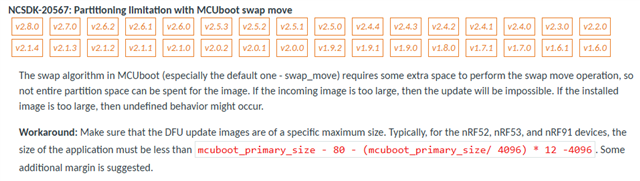

This issue has been open for while. 

These two DevZone tickets refer to this issue and mention the impact is that you can use only around 95% of the flash space:
1. https://devzone.nordicsemi.com/f/nordic-q-a/112343/mcuboot-image-in-the-primary-slot-is-not-valid-unable-to-find-bootable-image

2. https://devzone.nordicsemi.com/f/nordic-q-a/107599/mcuboot-sign-image-possible-wrong-slot-size/475558

Here are my questions:

1. In the Workaround description, there is a formula to calculate the approximate size limitation. What CONFIG item is referred to for mcuboot_primary_size?  I am not able to figure out how to use that equation to result in a value of approximately 95% of the "Region Size" for the application image indicated in the build log.

2. Why is "additional" margin suggested?  Can that margin be quantified?

3. Are there still plans to fix this?  A lot of internal flash space seems to be wasted due to this issue.

4. When the fix is available, do you think the fix can be patched by us to an earlier NCS version, such as NCS 2.6?

Parents
  • Hi  , thank you so much for your help with all of this. Just wanted to share where we ended up, in case anyone else is on the same path:

    We ended up adding a script to our build pipeline that calculates our flash usage of the maximum firmware-upgradeable image given the trailer size, etc.


    As discussed above, the west build reports flash usage of the primary partition, but staying below 100% alone doesn't ensure firmware upgradeability - because of the necessary space for the trailer and image swap page.


    So our new script takes that extra space into account, and analyzes files from the build/ directory in order to tell us the percentage used of the maximum firmware-upgradeable image size.


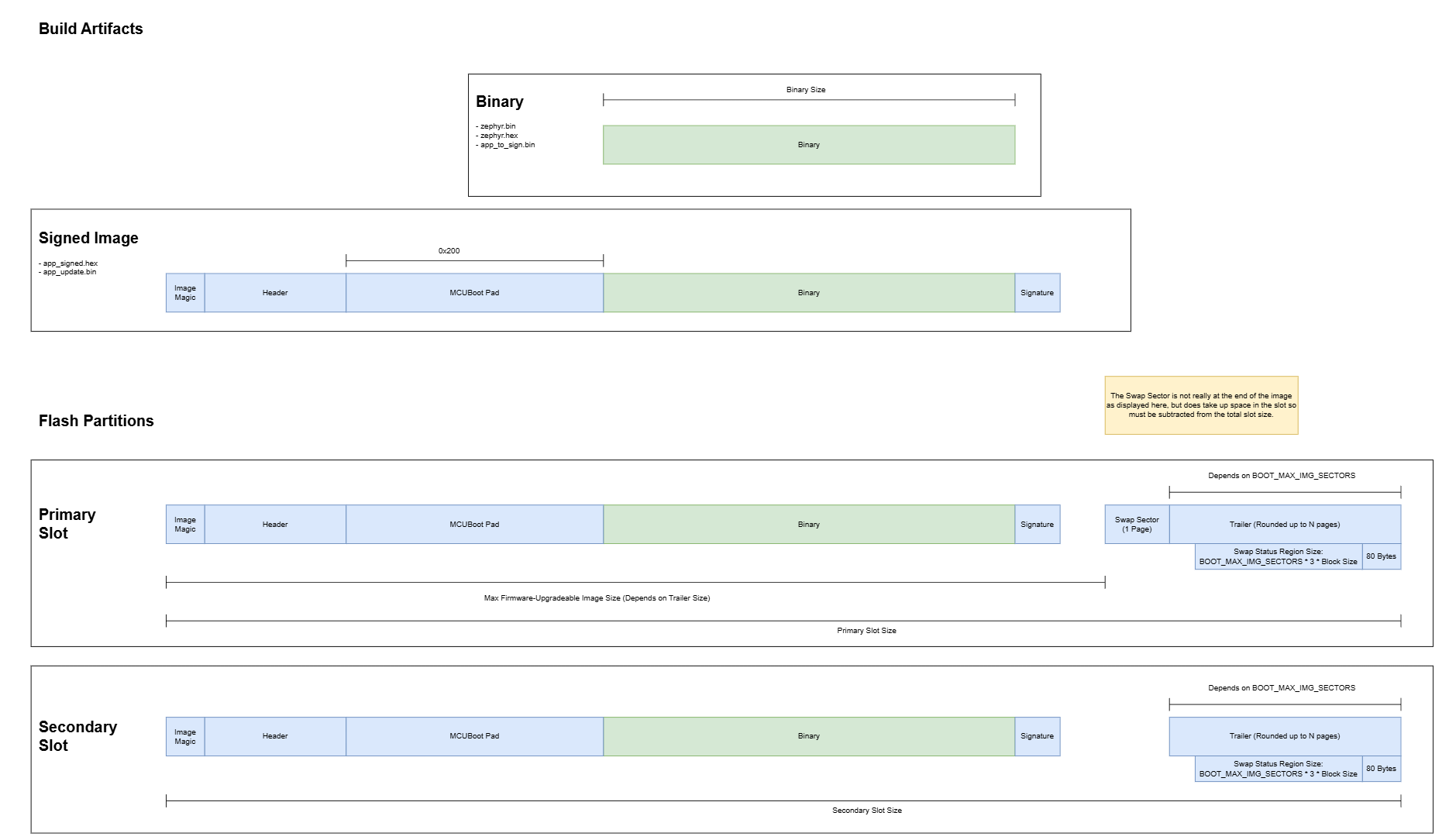
    Here is our final "Build Artifacts" diagram for “Swap Using Move Without Scratch” based on NCS v2.6.x:


    And here are the key calculations we use in our script for the app image:


    Maximum Image Size Calculations


    Block Size: 4 Bytes (nRF5340 write block size)

    Page Size: 4096 Bytes (nRF5340 page erase/write size)


    BOOT_MAX_IMG_SECTORS: This is the max number of "sectors" necessary for mcuboot to manage our image slots. Recommended to include some padding. If unnecessarily large, will use unnecessary RAM and slow the bootloader down (more time to zero out the RAM).

    BOOT_MAX_IMG_SECTORS >= ceil [ ( largest image slot size ) / ( page size ) ]


    Swap Status Region Size: Part of the trailer. Depends on BOOT_MAX_IMG_SECTORS and which swap method you are using. For swap with move, we need 3 states - each in a discrete write block. mcuboot/docs/design.md at 268968f8e4a834ea3825d98439e4c321de0c6a78 · mcu-tools/mcuboot

    Swap Status Region Size = BOOT_MAX_IMG_SECTORS * Block Size * s

    s (number of states for swap move without scratch) = 3


    Trailer Size: Part of the slot, this is the part of the slot that MCUBoot uses to keep track of the upgrade swap. Rounded up to the nearest page, where Page Size is 4096 bytes (determined by nRF5340 hardware).

    Raw Trailer Size = ( Swap Status Region ) + 80 bytes

    Raw Trailer Size = ( BOOT_MAX_IMG_SECTORS * Block Size ) * 3 + 80

    Trailer Size = round up to Page Size ( Raw Trailer Size )


    Maximum Upgradeable Image Size: Primary slot size (internal flash) for a firmware upgradeable image. Per below, +1 Page because we need a page as temporary scratch for the swap. See here: https://docs.nordicsemi.com/bundle/ncs-latest/page/mcuboot/design.html#swap_using_move_without_using_scratch

    Maximum Image Size = ( N - 1 ) * Sector Size - Trailer Size

    Sector Size = Page Size = 4096

    Trailer Size = nearest page[ BOOT_MAX_IMG_SECTORS * Block Size * s + 80 ]

    N = floor( Primary Slot Size / Page Size ) = number of full pages in primary slot

    Maximum Image Size = ( N - 1 ) * Page Size - Trailer Size

    Primary Slot Flash Usage = 100 * Image Size / Maximum Image Size

    This can also be rearranged/described as:

    Necessary Primary Slot Size for a Given App Image:

    Primary Slot Size >= App Image Size + Trailer Size + 1 Move Page (Swap Sector Page)


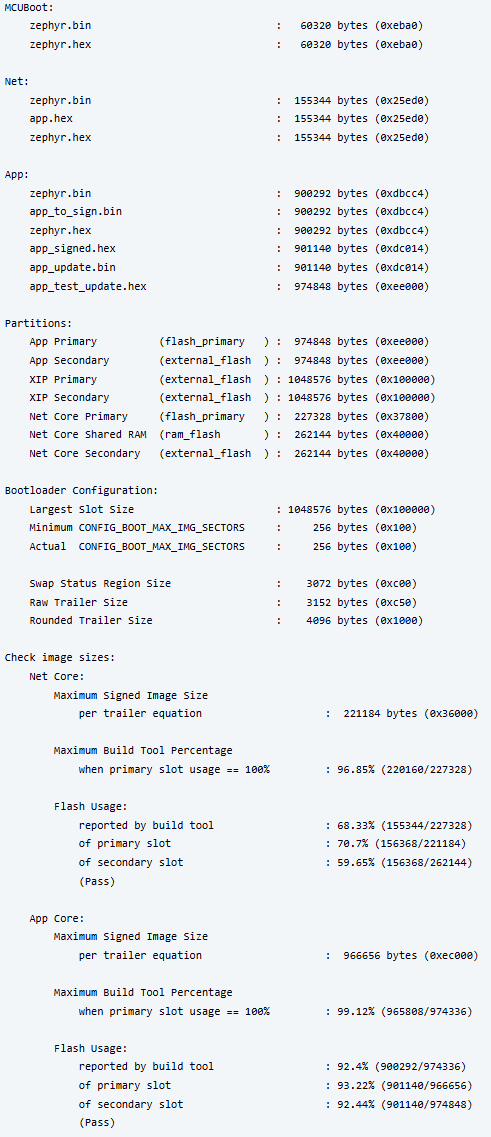
    And if you're curious, here's an example of our script's output at the end of a build:

Reply
  • Hi  , thank you so much for your help with all of this. Just wanted to share where we ended up, in case anyone else is on the same path:

    We ended up adding a script to our build pipeline that calculates our flash usage of the maximum firmware-upgradeable image given the trailer size, etc.


    As discussed above, the west build reports flash usage of the primary partition, but staying below 100% alone doesn't ensure firmware upgradeability - because of the necessary space for the trailer and image swap page.


    So our new script takes that extra space into account, and analyzes files from the build/ directory in order to tell us the percentage used of the maximum firmware-upgradeable image size.


    Here is our final "Build Artifacts" diagram for “Swap Using Move Without Scratch” based on NCS v2.6.x:


    And here are the key calculations we use in our script for the app image:


    Maximum Image Size Calculations


    Block Size: 4 Bytes (nRF5340 write block size)

    Page Size: 4096 Bytes (nRF5340 page erase/write size)


    BOOT_MAX_IMG_SECTORS: This is the max number of "sectors" necessary for mcuboot to manage our image slots. Recommended to include some padding. If unnecessarily large, will use unnecessary RAM and slow the bootloader down (more time to zero out the RAM).

    BOOT_MAX_IMG_SECTORS >= ceil [ ( largest image slot size ) / ( page size ) ]


    Swap Status Region Size: Part of the trailer. Depends on BOOT_MAX_IMG_SECTORS and which swap method you are using. For swap with move, we need 3 states - each in a discrete write block. mcuboot/docs/design.md at 268968f8e4a834ea3825d98439e4c321de0c6a78 · mcu-tools/mcuboot

    Swap Status Region Size = BOOT_MAX_IMG_SECTORS * Block Size * s

    s (number of states for swap move without scratch) = 3


    Trailer Size: Part of the slot, this is the part of the slot that MCUBoot uses to keep track of the upgrade swap. Rounded up to the nearest page, where Page Size is 4096 bytes (determined by nRF5340 hardware).

    Raw Trailer Size = ( Swap Status Region ) + 80 bytes

    Raw Trailer Size = ( BOOT_MAX_IMG_SECTORS * Block Size ) * 3 + 80

    Trailer Size = round up to Page Size ( Raw Trailer Size )


    Maximum Upgradeable Image Size: Primary slot size (internal flash) for a firmware upgradeable image. Per below, +1 Page because we need a page as temporary scratch for the swap. See here: https://docs.nordicsemi.com/bundle/ncs-latest/page/mcuboot/design.html#swap_using_move_without_using_scratch

    Maximum Image Size = ( N - 1 ) * Sector Size - Trailer Size

    Sector Size = Page Size = 4096

    Trailer Size = nearest page[ BOOT_MAX_IMG_SECTORS * Block Size * s + 80 ]

    N = floor( Primary Slot Size / Page Size ) = number of full pages in primary slot

    Maximum Image Size = ( N - 1 ) * Page Size - Trailer Size

    Primary Slot Flash Usage = 100 * Image Size / Maximum Image Size

    This can also be rearranged/described as:

    Necessary Primary Slot Size for a Given App Image:

    Primary Slot Size >= App Image Size + Trailer Size + 1 Move Page (Swap Sector Page)


    And if you're curious, here's an example of our script's output at the end of a build:

Children
No Data
Related