

I've got a custom board fitted with an nRF52832. Am running NCS v2.6.0. Operation involves:
1. Being in System On idle with all peripherals disabled to keep current to a minimum. Spends most of its time in this state
2. Gets "woken up" either by a GPIO trigger, or a k_timer() trigger.
That all functions as expected, and I'm just looking at current draw in the two different states using my PPK2, so I can get an idea of battery life. Thing is, I am getting WILDLY different results (relatively speaking) based on the supply voltage I set within the Power Profiler.
Here are three screen shots of it in idle mode.
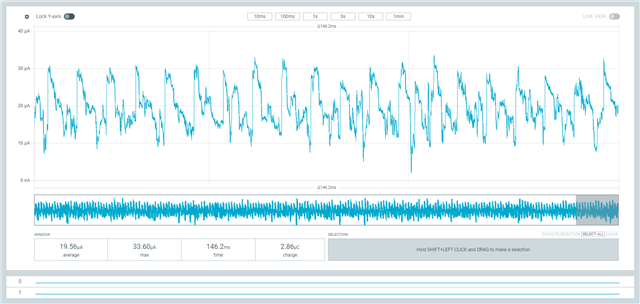
The first is with the voltage set to 3100mV (represents a fully charged battery in our application). Average current is nearly 20uA, and shows significant spikes of activity about every ~ 7msec.
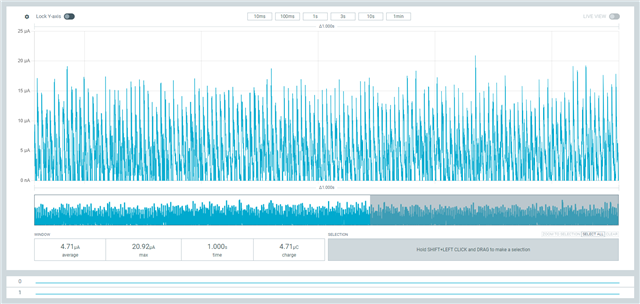
The second is with the voltage set to 2900mV, which represents a slightly discharged battery. Average current is now down around 5uA
The third is with the voltage set to 2000mV. This is basically a fully flat battery, but the nRF52 will happily work at this level (its spec'd down to 1.8V I believe)
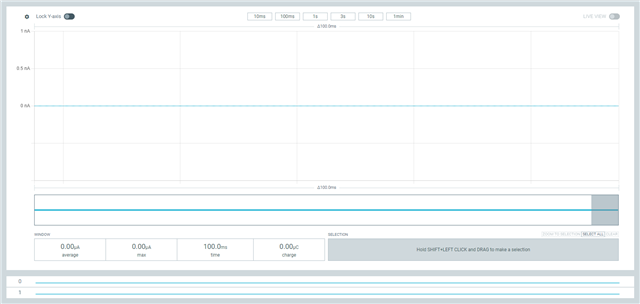
From the looks of this, the idle current is basically 0nA!!
I've done these measurements with the PPK2 both as a Source meter, and set the voltage levels within the Power Profiler, as well as with an external (variable) voltage source, with the PPK2 set up in Ampere meter mode. And the results are basically the same. I can confirm my device is actually coming out of System On idle, as I can see the larger current draw during this mode, and I can see it appear when I do a scan with my Bluetooth sniffer.
My question is - is the nRF52832 idle current THAT sensitive to VDD level? From the looks of it, operating it at VDD > 3.0V draws much more current that operating it at VDD = 2.8V.
And if that is the case, any explanation as to why?
The input voltage doesn't seem to have any real impact on the current during normal operation.
Cheers,
Mike


