nRF Connect for VS Code deletes west-managed repository when "uninstall SDK" is clicked

1. Create nRF Connect SDK-based Zephyr freestanding application and work on it for a while but don't push git to any remote.

2. Convert project to Zephyr workspace application managed by west tool, managing nRF SDK this way.

3. Open project in VS Code with nRF Connect SDK, plugin correctly identifies west-managed application, building works etc.

4. Play with SDK versions and carelessly click Uninstall SDK from nRF Connect SDK VS Code plugin gui.

5. Watch your entire west workspace (with SDK but first and foremost all of your code) deleted from filesystem.

I managed to recover all of my code except one .doc from filesystem, but let this post serve as dire warming - never ever let nRF Connect SDK VS Code plugin manage your SDKs and toolchains. Do everything using nrfutil/west.

When SDK is part of west workspace, VS Code plugin should be forbidden from deleting it, this UI options should not be available at all.

Parents
  • Hello,

    Thank you for reporting.

    I think most users prefer to keep their applications outside the root folder of the SDK. If you do that, you don't risk it being deleted if you update the NCS repository.

    I will forward your report internally.

    Best regards,

    Edvin

  • Forgot to paste my directory layout:

    My west workspace dir:

    +- .west
    |   +- config
    +- Docs/
    +- external/
    +- Firmware/
    +- ReferenceClientApp/
    +- west.yml

    Contents of .west/config:

    [manifest]
    path = .
    file = west.yml
    group-filter = +babblesim
    
    [zephyr]
    base = external/zephyr

    Contents of west.yml:

    manifest:
      remotes:
        - name: nrf
          url-base: https://github.com/nrfconnect
      projects:
        - name: sdk-nrf
          remote: nrf
          path: nrf
          revision: v3.0.2
          import:
            path-prefix: external
          clone-depth: 1
    

    I don't think I am keeping application inside of SDK root folder, am I?

    Yet, everything here - entire west worksapce got deleted, not just external dir with SDK.

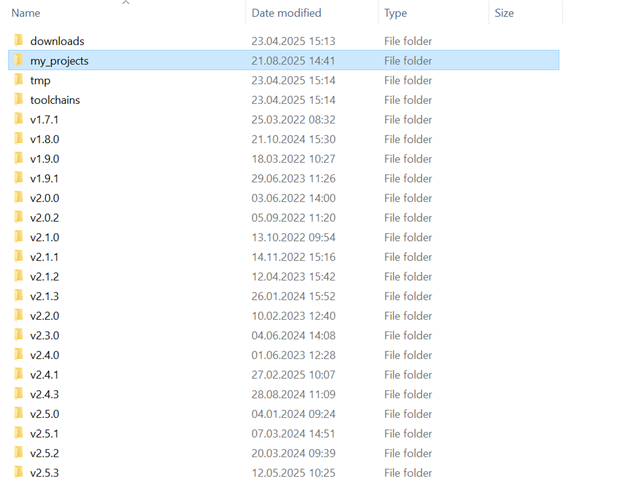
  • I am sorry, but I am not sure. I have it like this:

    Where all the applications that I work on are inside the "my_projects" folder. 

    I am not sure, from your west.yml or .west/config where your application is stored, relative to the SDK itself.

    Best regards,

    Edvin

  • Application is in Firmware dir, which is on the same level as external dir where SDK is fetched by west. Yet, for whatever reason, "SDK uninstall" instead of maybe removing something in external dir, deleted everything on the same level as west.yml.

    On your screenshort I don't know where west.yml is located so I cannot comment.

    If your SDK is not west-managed, then clearly your situation is different. There is no problem with freestanding app.

Reply
  • Application is in Firmware dir, which is on the same level as external dir where SDK is fetched by west. Yet, for whatever reason, "SDK uninstall" instead of maybe removing something in external dir, deleted everything on the same level as west.yml.

    On your screenshort I don't know where west.yml is located so I cannot comment.

    If your SDK is not west-managed, then clearly your situation is different. There is no problem with freestanding app.

Children
  • Oh, I see. i thought you said that it was deleting the SDK folder, but you are saying it actually deleted the folder containing the west.yml. Then I understand why it is frustrating (and unexpected) that deleting the SDK deleted your application. Thank you for clarifying.

    reavertm said:
    If your SDK is not west-managed, then clearly your situation is different.

    Indeed. My west.yml files are inside their respective NCS version folders: "v2.0.0", "v2.1.0", etc.

    I will report this internally, and see if there is a better way to do this.

    Best regards,

    Edvin

Related