Hi,
Have you tried on a different computer?
Best regards,
Benjamin
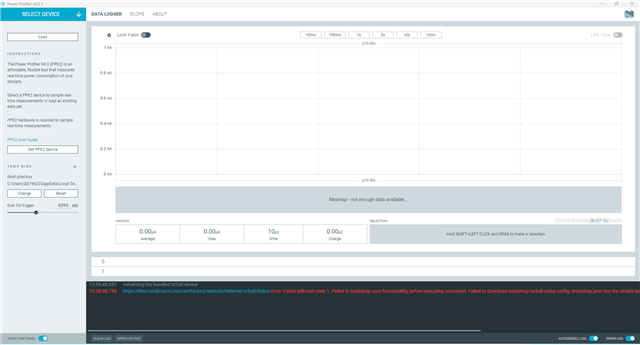
My old PC is Win10, PPK2 works well, my new PC installed Win11 version 23H2, PPK2 could not works, always shows "The system cannot find the path specified. (os error 3)"
Are your computer able to download the file from https://files.nordicsemi.com/artifactory/swtools/external/nrfutil/packages/nrfutil/nrfutil-x86_64-pc-windows-msvc-8.0.0.tar.gz directly in the web browser?
yes, i have downloaded the file from https://files.nordicsemi.com/artifactory/swtools/external/nrfutil/packages/nrfutil/nrfutil-x86_64-pc-windows-msvc-8.0.0.tar.gz directly in the web browser?, but the problem still exist,
2025-09-09T03:24:13.094Z INFO Initialising nrfutil module: device
2025-09-09T03:24:13.129Z DEBUG Application data folder: C:\Users\yan.ceng\AppData\Roaming\nrfconnect\pc-nrfconnect-ppk
2025-09-09T03:24:13.188Z DEBUG Sending event "ppk: running nrfutil device"
2025-09-09T03:24:13.188Z DEBUG App pc-nrfconnect-ppk v4.0.0 (official)
2025-09-09T03:24:13.188Z DEBUG App path: C:\Users\yan.ceng\.nrfconnect-apps\node_modules\pc-nrfconnect-ppk
2025-09-09T03:24:13.188Z DEBUG nRFConnect 5.0.0, required by the app is (>=4.4.1)
2025-09-09T03:24:13.188Z DEBUG nRFConnect path: C:\Users\yan.ceng\AppData\Local\Programs\nrfconnect\resources\app.asar
2025-09-09T03:24:13.188Z DEBUG HomeDir: C:\Users\yan.ceng
2025-09-09T03:24:13.188Z DEBUG TmpDir: C:\Users\yan.ceng\AppData\Local\Temp
2025-09-09T03:24:14.693Z DEBUG Sending event "ppk: running nrfutil device"
2025-09-09T03:25:42.020Z ERROR Error: Failed with exit code 1.
Could not update package registry
Caused by:
0: failed to fetch `github.com/.../nrfutil-package-index`
1: failed to send request: 操作超时
; class=Os (2).
2025-09-09T03:25:42.020Z ERROR Error while updated nrfutil core
2025-09-09T03:25:42.042Z DEBUG Sending event "ppk: running nrfutil device"
2025-09-09T03:25:42.052Z DEBUG Sending event "ppk: running nrfutil device"
2025-09-09T03:25:42.177Z INFO Using nrfutil-device core version: 7.7.1
2025-09-09T03:25:43.247Z INFO Device Connected SN:000601022398
2025-09-09T03:25:43.248Z INFO Getting serialport options from persistent store 000601022398.pc-nrfconnect-ppk
2025-09-09T03:25:43.249Z DEBUG Sending event "ppk: device connected"
2025-09-09T03:25:43.249Z INFO Device Connected SN:EB3C6961A90F
2025-09-09T03:25:43.250Z INFO Getting serialport options from persistent store EB3C6961A90F.pc-nrfconnect-ppk
2025-09-09T03:25:43.251Z DEBUG Sending event "ppk: device connected"
2025-09-09T03:25:43.251Z INFO Device Connected SN:null
2025-09-09T03:25:43.252Z DEBUG Sending event "ppk: device connected"
2025-09-09T03:25:43.529Z INFO Using nrfutil-device version: 2.1.1
2025-09-09T03:25:43.529Z INFO Using nrf-device-lib version: 0.17.5
2025-09-09T03:25:43.529Z INFO Using nrfjprog DLL version: 10.24.0
2025-09-09T03:25:43.529Z INFO Using JLink version: JLink_V8.18
2025-09-09T03:25:43.529Z WARN Installed JLink version does not match the expected version (JLink_V7.94e)
sorry, actuallly the error log does not affect the PPK recognition, now the ppk can be recognized , thanks!!!
I'm glad to hear that!