PPK could not be recognized

My new PC could not find PPK in the power profile menu, even I installed different version nRF connect desktop or different Power Profile versions. I always could not find my hardware setting menu. 
Error indication: 
12:56:58.758
https://files.nordicsemi.com/artifactory/swtools/external/nrfutil/index/Error: Failed with exit code 1. Failed to bootstrap core functionality before executing command. Failed to download bootstrap tarball using config: bootstrap.json See the details below for further information on the error. Caused by: The system cannot find the path specified. (os error 3)
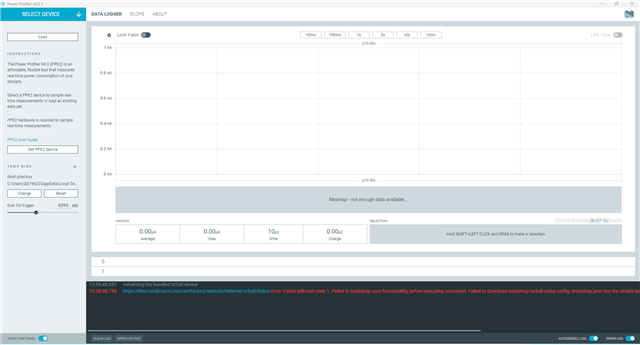
Could not find PPK2 setting menu in my Win11
Parents Reply Children
  • yes, i have downloaded the file from https://files.nordicsemi.com/artifactory/swtools/external/nrfutil/packages/nrfutil/nrfutil-x86_64-pc-windows-msvc-8.0.0.tar.gz directly in the web browser?,  but the problem still exist, 

    2025-09-09T03:24:13.094Z INFO Initialising nrfutil module: device
    2025-09-09T03:24:13.129Z DEBUG Application data folder: C:\Users\yan.ceng\AppData\Roaming\nrfconnect\pc-nrfconnect-ppk
    2025-09-09T03:24:13.188Z DEBUG Sending event "ppk: running nrfutil device"
    2025-09-09T03:24:13.188Z DEBUG App pc-nrfconnect-ppk v4.0.0 (official)
    2025-09-09T03:24:13.188Z DEBUG App path: C:\Users\yan.ceng\.nrfconnect-apps\node_modules\pc-nrfconnect-ppk
    2025-09-09T03:24:13.188Z DEBUG nRFConnect 5.0.0, required by the app is (>=4.4.1)
    2025-09-09T03:24:13.188Z DEBUG nRFConnect path: C:\Users\yan.ceng\AppData\Local\Programs\nrfconnect\resources\app.asar
    2025-09-09T03:24:13.188Z DEBUG HomeDir: C:\Users\yan.ceng
    2025-09-09T03:24:13.188Z DEBUG TmpDir: C:\Users\yan.ceng\AppData\Local\Temp
    2025-09-09T03:24:14.693Z DEBUG Sending event "ppk: running nrfutil device"
    2025-09-09T03:25:42.020Z ERROR Error: Failed with exit code 1.
    Could not update package registry

    Caused by:
    0: failed to fetch `github.com/.../nrfutil-package-index`
    1: failed to send request: 操作超时
    ; class=Os (2).
    2025-09-09T03:25:42.020Z ERROR Error while updated nrfutil core
    2025-09-09T03:25:42.042Z DEBUG Sending event "ppk: running nrfutil device"
    2025-09-09T03:25:42.042Z DEBUG Sending event "ppk: running nrfutil device"
    2025-09-09T03:25:42.052Z DEBUG Sending event "ppk: running nrfutil device"
    2025-09-09T03:25:42.177Z INFO Using nrfutil-device core version: 7.7.1
    2025-09-09T03:25:43.247Z INFO Device Connected SN:000601022398
    2025-09-09T03:25:43.248Z INFO Getting serialport options from persistent store 000601022398.pc-nrfconnect-ppk
    2025-09-09T03:25:43.249Z DEBUG Sending event "ppk: device connected"
    2025-09-09T03:25:43.249Z INFO Device Connected SN:EB3C6961A90F
    2025-09-09T03:25:43.250Z INFO Getting serialport options from persistent store EB3C6961A90F.pc-nrfconnect-ppk
    2025-09-09T03:25:43.251Z DEBUG Sending event "ppk: device connected"
    2025-09-09T03:25:43.251Z INFO Device Connected SN:null
    2025-09-09T03:25:43.252Z DEBUG Sending event "ppk: device connected"
    2025-09-09T03:25:43.529Z INFO Using nrfutil-device version: 2.1.1
    2025-09-09T03:25:43.529Z INFO Using nrf-device-lib version: 0.17.5
    2025-09-09T03:25:43.529Z INFO Using nrfjprog DLL version: 10.24.0
    2025-09-09T03:25:43.529Z INFO Using JLink version: JLink_V8.18
    2025-09-09T03:25:43.529Z WARN Installed JLink version does not match the expected version (JLink_V7.94e)

  • sorry, actuallly the error log does not affect the PPK recognition, now the ppk can be recognized , thanks!!!

  • 16:04:02.031
    Initialising the bundled nrfutil device
    16:04:21.543
    Successfully installed nrfutil device version: 2.10.2
    16:04:24.239
    Using the bundled core version for nrfutil device: 8.0.0
    16:04:25.045
    Using nrfutil-device version: 2.10.2
    16:04:25.045
    Using nrf-device-lib version: 0.17.71
    16:04:25.045
    Using nrf-probe version: 0.38.0
    16:04:25.045
    Using JLink version: JLink_V8.18
    16:04:26.296
    Getting serial port options from the persistent store for C9FCEFCA6DB1.pc-nrfconnect-ppk
    16:04:26.297
    Device connected with the serial number C9FCEFCA6DB1
    16:05:08.299
    Selecting device with the serial number C9FCEFCA6DB1
    16:05:11.135
    Selected device with the serial number C9FCEFCA6DB1
    16:05:13.489
    Connected to the device with the serial number C9FCEFCA6DB1 and family: Unknown
    16:05:13.773
    PPK started
    16:05:13.773
    PPK opened
    16:05:20.009
    DUT ON
    Today I install PPK2 in my old win10 PC and update it in old PC, then install PPK2 in my new PC, it works well now, happy to see it. 
Related
