WIFI SCAN cannot build by using nrf9160

Hi Team,

I would like to interface the nrf9160 with nrf7001 by using the SPI. While building the WIFI-Scan example by using SDK 3.1.1. Even by using WIFI-shell example these both are the cannot able to build. Please guide me step by step how can we use these example for the nrf9160.

Thanks and Regards,

Jagadish M

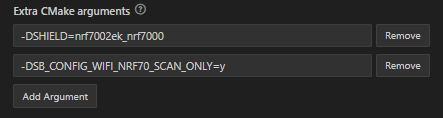
  • I was able to reproduce the issue with your settings, which are wrong. If you have a nRF7002EK shield you need to add shield to the build configuration, please see my screenshot here

    You must add the following:

    Let me know how that works for you.

    Kind regards,
    Øyvind

  • I can build the project, can you please me the pin configuration for this example. Please find the below logs. 

    *** Booting nRF Connect SDK v3.1.0-6c6e5b32496e ***
    *** Using Zephyr OS v4.1.99-1612683d4010 ***
    [00:00:00.321,197] <inf> wifi_nrf_bus: SPIM spi@b000: freq = 8 MHz
    [00:00:00.321,258] <inf> wifi_nrf_bus: SPIM spi@b000: latency = 0
    [00:00:00.333,557] <err> wifi_nrf_bus: RPU wakeup write ACK failed even after 10ms
    [00:00:00.333,557] <err> wifi_nrf_bus: Error: RDSR2 failed
    [00:00:00.333,587] <err> wifi_nrf: zep_shim_bus_qspi_dev_add: RPU enable failed with error -1
    [00:00:00.333,679] <err> wifi_nrf: nrf_wifi_bus_qspi_dev_add: nrf_wifi_osal_bus_qspi_dev_add failed
    [00:00:00.333,770] <err> wifi_nrf: nrf_wifi_bal_dev_add: Bus dev_add failed
    [00:00:00.333,862] <err> wifi_nrf: nrf_wifi_sys_hal_dev_add: nrf_wifi_bal_dev_add failed
    [00:00:00.334,014] <err> wifi_nrf: nrf_wifi_sys_fmac_dev_add: nrf_wifi_sys_hal_dev_add failed
    [00:00:00.334,075] <err> wifi_nrf: nrf_wifi_fmac_dev_add_zep: nrf_wifi_fmac_dev_add failed
    [00:00:00.334,106] <err> wifi_nrf: nrf_wifi_if_start_zep: nrf_wifi_fmac_dev_add_zep failed
    Starting nrf9160dk with CPU frequency: 64 MHz
    [00:00:01.847,076] <err> wifi_nrf: nrf_wifi_if_stop_zep: rpu_ctx_zep is NULL
    [00:00:01.849,853] <inf> wifi_nrf_bus: SPIM spi@b000: freq = 8 MHz
    [00:00:01.849,884] <inf> wifi_nrf_bus: SPIM spi@b000: latency = 0
    [00:00:01.862,182] <err> wifi_nrf_bus: RPU wakeup write ACK failed even after 10ms
    [00:00:01.862,182] <err> wifi_nrf_bus: Error: RDSR2 failed
    [00:00:01.862,213] <err> wifi_nrf: zep_shim_bus_qspi_dev_add: RPU enable failed with error -1
    [00:00:01.862,304] <err> wifi_nrf: nrf_wifi_bus_qspi_dev_add: nrf_wifi_osal_bus_qspi_dev_add failed
    [00:00:01.862,396] <err> wifi_nrf: nrf_wifi_bal_dev_add: Bus dev_add failed
    [00:00:01.862,487] <err> wifi_nrf: nrf_wifi_sys_hal_dev_add: nrf_wifi_bal_dev_add failed
    [00:00:01.862,640] <err> wifi_nrf: nrf_wifi_sys_fmac_dev_add: nrf_wifi_sys_hal_dev_add failed
    [00:00:01.862,701] <err> wifi_nrf: nrf_wifi_fmac_dev_add_zep: nrf_wifi_fmac_dev_add failed
    [00:00:01.862,731] <err> wifi_nrf: nrf_wifi_if_start_zep: nrf_wifi_fmac_dev_add_zep failed
    [00:00:01.862,823] <inf> scan: OTP not programmed, proceeding with local MAC: F6:CE:36:00:00:01
    [00:00:01.862,854] <err> wifi_nrf: nrf_wifi_disp_scan_zep: Interface not UP

    Thanks and Regards,

    Jagadish M

  • Hello Jagadish,

    Those log lines are all symptoms of the same root problem: the nRF7002 is not responding over the SPI/QSPI bus, so the Wi‑Fi driver cannot bring the radio (“RPU”) up, and the network interface never reaches UP state.

    Line by line, in plain language:

    1. wifi_nrf_bus: SPIM spi@b000: freq = 8 MHz
      wifi_nrf_bus: SPIM spi@b000: latency = 0
      

      The Wi‑Fi driver has configured the SPI peripheral (spi@b000) and is about to talk to the nRF7002.

    2. RPU wakeup write ACK failed even after 10ms
      Error: RDSR2 failed
      
      • The host writes a “wake‑up” command to the nRF7002 and waits for an ACK. None arrives within 10 ms.
      • Then it tries to read the RDSR2 status register over QSPI/SPI (this uses the qspi_RDSR2 helper in the bus layer), and that read also fails, so the driver prints RDSR2 failed.[qspi_if]

      From multiple DevZone cases, this almost always indicates a hardware / low‑level connection problem:

      • wrong or unstable power (VBAT / VDDIO too low or not sequenced correctly)
      • SPI/QSPI lines not wired as expected (MOSI/MISO/CLK/CS, reset, BUCKEN, IOVDD)
      • shield/board not seated or bad cable, etc.[nrf54 custom RDSR2][RDSR2 Nucleo case]
    3. zep_shim_bus_qspi_dev_add: RPU enable failed with error -1
      nrf_wifi_bus_qspi_dev_add: nrf_wifi_osal_bus_qspi_dev_add failed
      nrf_wifi_bal_dev_add: Bus dev_add failed
      nrf_wifi_sys_hal_dev_add: nrf_wifi_bal_dev_add failed
      nrf_wifi_sys_fmac_dev_add: nrf_wifi_sys_hal_dev_add failed
      nrf_wifi_fmac_dev_add_zep: nrf_wifi_fmac_dev_add failed
      nrf_wifi_if_start_zep: nrf_wifi_fmac_dev_add_zep failed
      

      These are just the failure cascading up the stack:

      • Bus layer cannot enable the RPU (because SPI transactions to it fail).
      • BAL, HAL, and FMAC layers then all fail to add the Wi‑Fi device.
      • The Zephyr shim (*_if_start_zep) concludes that starting the Wi‑Fi interface has failed.
    4. nrf_wifi_if_stop_zep: rpu_ctx_zep is NULL
      

      A later attempt to stop the interface finds that there is no valid RPU context, because initialization never succeeded. This is a follow‑on error, not a separate problem.

    5. scan: OTP not programmed, proceeding with local MAC: F6:CE:36:00:00:01
      

      This just means the MAC address is not programmed in OTP, so the sample falls back to a locally defined MAC address. This is expected/harmless when OTP is blank and is exactly the “alternative method” described in the MAC address docs: you can supply a MAC at runtime instead of OTP.[MAC alternative]

    6. wifi_nrf_disp_scan_zep: Interface not UP
      scan: Scan request failed
      

      Because the RPU never came up, the network interface never reached UP state, so any wifi scan call fails with “Interface not UP”. This is just the symptom of the earlier bus/RDSR2 failure.


    What to look at

    Based on similar DevZone reports, debugging should focus on:

    • Powering of the nRF7002 (VBAT, VDDIO, BUCKEN / PWRIOVDD) – make sure levels and sequencing match the datasheet.[OTP/power description]
    • SPI wiring and pin configuration – verify signals and devicetree match the actual board. RDSR2 failures are typically traced to wiring or power issues.[RDSR2 Nucleo case][3.3 V fix]

    Once the RDSR2 / wake‑up errors disappear, the later “Interface not UP” and scan failures should also go away.

    Below is a template nrf9160dk_nrf9160_ns.overlay that follows the patterns from the official nRF7002 EK / custom‑board examples and the SPI usage you shared. You must still adapt GPIO numbers and pins to your actual wiring, but the structure and bindings are correct.

    / {
    	/* Wi‑Fi interface node and selection */
    	nordic_wlan0: nordic_wlan0 {
    		compatible = "nordic,wlan0";
    		status = "okay";
    	};
    
    	chosen {
    		zephyr,wifi = &nordic_wlan0;
    	};
    
    	/* Optional TX power ceiling node, adjust or remove as needed */
    	nrf70_tx_power_ceiling: nrf70_tx_power_ceiling_node {
    		status = "okay";
    		compatible = "nordic,nrf700x-tx-power-ceiling";
    		max-pwr-2g-dsss      = <0x54>;
    		max-pwr-2g-mcs0      = <0x40>;
    		max-pwr-2g-mcs7      = <0x40>;
    		max-pwr-5g-low-mcs0  = <0x34>;
    		max-pwr-5g-low-mcs7  = <0x34>;
    		max-pwr-5g-mid-mcs0  = <0x34>;
    		max-pwr-5g-mid-mcs7  = <0x34>;
    		max-pwr-5g-high-mcs0 = <0x30>;
    		max-pwr-5g-high-mcs7 = <0x30>;
    	};
    };
    
    /*
     * Example: nRF7002 on SPI (change to the SPI instance and pins you actually use).
     * Pattern taken from nRF9160 + nRF70 custom‑board example.[nrf9160+nrf70 DT](https://devzone.nordicsemi.com/f/nordic-q-a/115535/nrf7000-device-tree-file-for-custom-nrf9160-board)
     */
    &spi3 {
    	status = "okay";
    
    	pinctrl-0 = <&spi3_default>;
    	pinctrl-1 = <&spi3_sleep>;
    	pinctrl-names = "default", "sleep";
    
    	/* Chip‑select line to nRF7002 */
    	cs-gpios = <&gpio0 13 GPIO_ACTIVE_LOW>;
    
    	nrf700x: nrf7002@0 {
    		compatible = "nordic,nrf700x-spi";
    		status = "okay";
    		reg = <0>;
    		/* Adjust max frequency to your layout, 8 MHz used in ref. design */
    		spi-max-frequency = <DT_FREQ_M(8)>;
    
    		/* Power‑control and IRQ lines – adjust GPIOs to your board */
    		iovdd-ctrl-gpios = <&gpio0 7  (GPIO_ACTIVE_HIGH | GPIO_PULL_DOWN)>;
    		bucken-gpios     = <&gpio0 16 (GPIO_ACTIVE_HIGH | GPIO_PULL_DOWN)>;
    		host-irq-gpios   = <&gpio0 10 GPIO_ACTIVE_HIGH>;
    	};
    };
    
    /*
     * SPI pin configuration (SCK/MISO/MOSI) – change to the actual port/pin
     * mapping you use between nRF9160 and nRF7002.[spi pinctrl](https://devzone.nordicsemi.com/f/nordic-q-a/115535/nrf7000-device-tree-file-for-custom-nrf9160-board)
     */
    &pinctrl {
    	spi3_default: spi3_default {
    		group1 {
    			psels = <NRF_PSEL(SPIM_SCK,  0, 12)>,
    				<NRF_PSEL(SPIM_MISO, 0, 14)>,
    				<NRF_PSEL(SPIM_MOSI, 0, 15)>;
    			/* Stronger drive can help with longer lines */
    			nordic,drive-mode = <NRF_DRIVE_H0H1>;
    		};
    	};
    
    	spi3_sleep: spi3_sleep {
    		group1 {
    			psels = <NRF_PSEL(SPIM_SCK,  0, 12)>,
    				<NRF_PSEL(SPIM_MISO, 0, 14)>,
    				<NRF_PSEL(SPIM_MOSI, 0, 15)>;
    			low-power-enable;
    		};
    	};
    };

    Notes on adapting it

    • If you are not using spi3 on nRF9160, replace &spi3, spi3_default, spi3_sleep and the pin numbers with the SPI instance/pins you wired, following the same pattern used in the SPI exercises and guides.SPI overlay patternDevicetree overlays
    • Ensure CONFIG_SPI=y is set in prj.conf so the SPI driver is enabled.SPI driver enable
    • If you are using an nRF7002 EK on an nRF9160 DK, Nordic also provides ready‑made shield overlays you can copy/compare against, e.g. boards/shields/nrf7002ek/boards/nrf9160dk_nrf9160_ns.overlay.EK guide
Related