We have a Thingy:91 (nRF9160) that we use for various LTE-M / NB-IoT network debugging.
Until recently I was able to see both RRC and NAS messages in both "Cellular Monitor" app and when set to pipe directly to Wireshark. However, since rencently I can no longer see any NAS messages. 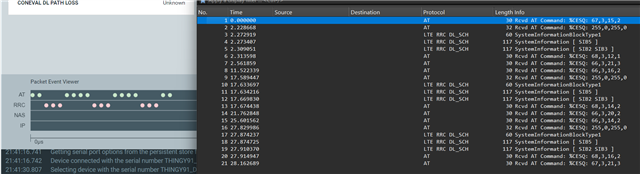
Reading various docs (AT command reference and searching Nordics online) on using AT%XMODEMTRACE, I tried several of the documented trace settings. For example, in the manual you say to use:
AT%XMODEMTRACE=<oper>[,<set_id>
So I tried:
AT%XMODEMTRACE=1,2
That didn't change anything.
The manual:
# %XMODEMTRACE=<oper>[,<set_id>[,<bitmap_id>,<bitmap>]]
# <oper>
#    0 – Deactivate traces.
#    1 – Activate predefined trace set.
#    2 – Activate trace bitmap. To be used only on request by Nordic customer support.
#    3 – Read trace bitmap. To be used only on request by Nordic customer support.
# <set_id>
#    1 – Coredump only.
#    2 – Long-Term Evolution (LTE), Internet Protocol (IP), GNSS, and coredump.
#    3 – Reserved for future use.
#    4 – IP only.
#    5 – LTE and IP.
So I tried several others, thinking the bit-map was messed up.
Googling for exotic and novel <operations>, and <bitmaps>, I also tried:
AT%XMODEMTRACE=1,20
AT%XMODEMTRACE=1,21
They also didn't enable NAS. (I.e. They did seemingly nothing.)
So then I also checked the yet undocumented <bitmaps>:
AT%XMODEMTRACE=3,2,0    # %XMODEMTRACE: "00000000000000000000F0403F0004"
AT%XMODEMTRACE=3,2,1    # %XMODEMTRACE:  "00"
AT%XMODEMTRACE=3,2,2    # %XMODEMTRACE: "9DFFFF00"
AT%XMODEMTRACE=3,2,3    # %XMODEMTRACE: "FDB7F4967E9177B7CFFD4947E77BFEC930BB09DCABD1777F77EFDE75F7DF5BF7BBB71B"
AT%XMODEMTRACE=3,2,4    # %XMODEMTRACE: "0F"
What all those <sets> are representing?
What part is enabling more trace detail for the LTE/NAS/RRC/L1 ?
PS. I was also checking your DevAcademy, and nothing there is mentioning this.