can't find board nrf52833dk_nrf5283 in bluetooth DTM sample

Hello,

I have a project in Visual studio code and Nrf connect.

MCU is a NRF 52833.

For the certicications, the lab request me the DTM mode.

I tried the use the Sample - Direct-test-mode Firmware

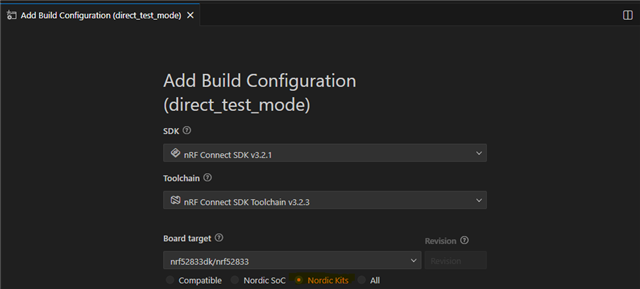
However I'm not able to find eht board "nrf52833dk_nrf5283" in the NCS folder.

I tried to install several SDKs (2.2.0 / 2.3.0 / 2.4.2 / 2.7.0 / 2.9.2 / 3.2.4 ) but none includes the 833 board. I can find and compile with the 840, but no options for the 833.

Please can sombody help me ? I need to use and compile the DTM for the 52833.

Thanks in advance

Parents
  • Hi,

    If you choose Nordic Kits you can build for nRF52833dk like this:

    But I assume you are not using direction finding, so you need to disable it by either adding to app.overlay:

    &radio {
    	/delete-property/ dfe-supported;
    };

    Or build as described here: 
    https://docs.nordicsemi.com/bundle/ncs-latest/page/nrf/samples/bluetooth/direct_test_mode/README.html#disabling_direction_finding_feature 

    Kenneth

  • hello, thanks for your reply, however, with the Nordic Kit selection, (and not the Compatible), impossible to compile the code...

    I can compile selecting the nRF52840 only...

    how to get just a simple code for DTM for the 833 ?

    Also don't you have example with the USB communication ?

    I can't understant how all people using nrf devices have to certificate them then every body have to use the DTM too... nothing is proposed for this ? I mean PC software - USB control and DTM for most nrf devices ?

    So in my case, I need to create a new board to use with the DTM as the 52833 is not available...right ?

  • interesting, but I m sorry, I m not a specialist about this, and again, the example is only for the 52840. 

    Now I m totally lost how to provide a PCB with the only simple requested commands.

    What will be the simplest way ? radio test or DTM ?

    also, I tried long time to compile the DTM exanple for a 52833. Now it is compiling, but no TxD messages outputs.

    (It's now complicate... I remember several years ago with Keil it was really easier)

    direct_test_modeCMO.zip 

    Here is my code, what do I wrong ?

  • You are not writing what version of nRF Connect SDK you are working on, but please follow the description I provided initially. I would claim 99% of applications are not doing direction finding, so please disable it as suggested in the DTM documentation for the specific nRF Connect SDK you are working on or by following the description I provided initially.

    That said, I recommend using radio test for the purpose (not DTM). I can see from the description you provided it's written "a Direct Test Mode", it's not written "the Direct Test Mode". "a Direct Test Mode" can be the suggested radio test I already linked to:
    https://docs.nordicsemi.com/bundle/ncs-latest/page/nrf/samples/peripheral/radio_test/README.html 

    Kenneth

  • Ok I will try to use this one. 

    About the BLE version, as sephyr don't have specific stacks (s132, etc) as before in nordic, my application configuration is att the minimum. (4.1 I think) coz I m only configuring the minimum in my prj.conf: 

    #BLE config
    CONFIG_BT=y
    CONFIG_BT_PERIPHERAL=y
    CONFIG_BT_DEVICE_NAME="XXX"
    CONFIG_BT_DEVICE_APPEARANCE=833
    CONFIG_BT_MAX_CONN=1
    CONFIG_BT_MAX_PAIRED=1

    # Enable the NUS service
    CONFIG_BT_NUS=y

    # Enable bonding
    CONFIG_BT_SETTINGS=y
    Then No Direction finding, long range or advanced features.
    The application was also done on SDK 2.2.0, I will need to use it also for the test firmware for certifications.
    It seems so complicate to have a working simple test FW...
    I will try again...
  • Hi again,

    unfortunatly, it is still not working...

    I compiled the radio_test on sdk_2.7.0, with the nrf52833dk/nrf52833.

    It is building.

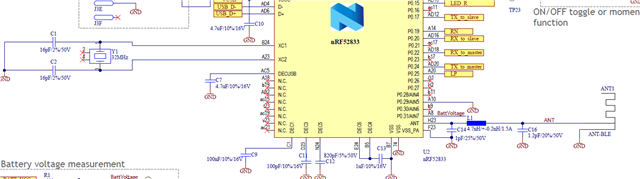
    1- as I use my specific PCB and not the DK, I need to change the UART to pin 22(Rx) and 24(Tx).

    Assuming the control line is the uart0, I did it in the overlay : 

    /* overlay-dt.dts */

    &uart0 {
        status = "okay";
        tx-pin = <24>;
        rx-pin = <22>;
        current-speed = <115200>;
    };

    &radio {
        /delete-property/ dfe-supported;
    };
    and activated in prj.conf:
    CONFIG_UART_CONSOLE=y
    CONFIG_SERIAL=y
    CONFIG_UART_INTERRUPT_DRIVEN=y
    CONFIG_UART_ASYNC_API=y  # souvent nécessaire pour TX sur pins non-standard


    However Nothing wirking on the pin 22 and 24.
    2- can you tell me, in this code, there are 2 configured UART ?  one for control and another for debug ?
     where is printed the  "printk("Starting Radio Test example\n");" ? and on which UART my I send and receive commands ?
    Sorry about all my questions, but I really need the FW test, as the certification LAB is waiting on it...
    BR
  • Do you have external 32kHz crystal in your design? If not also set:

    CONFIG_CLOCK_CONTROL_NRF_K32SRC_XTAL=n
    CONFIG_CLOCK_CONTROL_NRF_K32SRC_RC=y

    christopheMon said:
    and activated in prj.conf:
    CONFIG_UART_CONSOLE=y
    CONFIG_SERIAL=y
    CONFIG_UART_INTERRUPT_DRIVEN=y
    CONFIG_UART_ASYNC_API=y  # souvent nécessaire pour TX sur pins non-standard

    Default settings should work.

    Kenneth

Reply
  • Do you have external 32kHz crystal in your design? If not also set:

    CONFIG_CLOCK_CONTROL_NRF_K32SRC_XTAL=n
    CONFIG_CLOCK_CONTROL_NRF_K32SRC_RC=y

    christopheMon said:
    and activated in prj.conf:
    CONFIG_UART_CONSOLE=y
    CONFIG_SERIAL=y
    CONFIG_UART_INTERRUPT_DRIVEN=y
    CONFIG_UART_ASYNC_API=y  # souvent nécessaire pour TX sur pins non-standard

    Default settings should work.

    Kenneth

Children
  • that's right, I don't have the 32k, only have the 32M

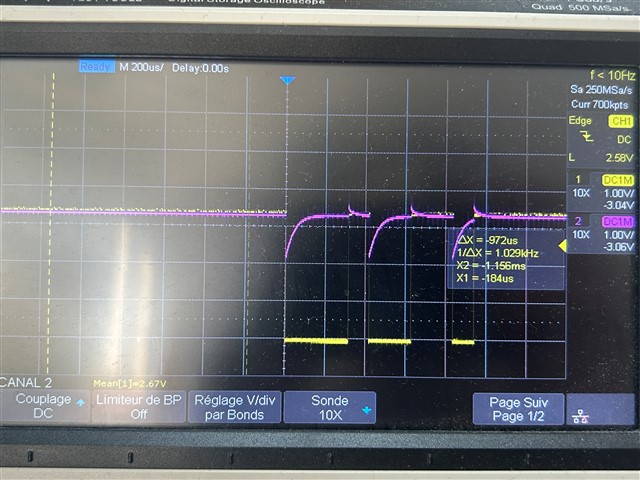
    However It still don't work, see the pin voltage on the scope, yellow is the Tx from computer (MCU P0.22), sending a single char and purple is the MCU TxD P0.24 (= Computer RxD). Level of MCU TxD is not good ... and not working..

    How can I debug it ?

  • Do you have a DK for comparison? then you can just connect a wire between p0.22-p0.08 and p0.24-p0.06 to test the setup on a DK, the wires will connect the pins to the UART of the DK, and you can for instance open a virtual comport on the PC for testing.

    Kenneth

  • Also, you can't set the pins like you have done, you need to use pin control, e.g.

    &pinctrl {
    	uart0_default: uart0_default {
    		group1 {
    			psels = <NRF_PSEL(UART_TX, 0, 24)>;
    		};
    		group2 {
    			psels = <NRF_PSEL(UART_RX, 0, 22)>;				
    			bias-pull-up;
    		};
    	};
    
    	uart0_sleep: uart0_sleep {
    		group1 {
    			psels = <NRF_PSEL(UART_TX, 0, 24)>,
    				<NRF_PSEL(UART_RX, 0, 22)>;				
    			low-power-enable;
    		};
    	};
    };

    And keep pinctrl-0 = <&uart0_default>; and pinctrl-1 = <&uart0_sleep>; in &uart0.

    Kenneth

  • I just ordered a DK, I only have our custom PCBs. And connecting the pin 6 or 8 is impossible on my PCB as it is a QFN 73...

  • My overlay is now as : 

    /* overlay-dt.dts */

    /*&uart0 {
        status = "okay";
        tx-pin = <24>;
        rx-pin = <22>;
        current-speed = <115200>;
    };
    */
    &radio {
        /delete-property/ dfe-supported;
    };

    &pinctrl {
        uart0_default: uart0_default {
            group1 {
                psels = <NRF_PSEL(UART_TX, 0, 24)>;
            };
            group2 {
                psels = <NRF_PSEL(UART_RX, 0, 22)>;            
                bias-pull-up;
            };
        };

        uart0_sleep: uart0_sleep {
            group1 {
                psels = <NRF_PSEL(UART_TX, 0, 24)>,
                    <NRF_PSEL(UART_RX, 0, 22)>;            
                low-power-enable;
            };
        };
    };
    but still same on the pin 22 and 24 ...
    How may I check if my overlay is really taken in account ?
Related