Logging via SWO

Hi,

I am trying to configure SWO logging in a sample project based on zephyr/samples/hello_world (source and config at the end).

I run this application on two targets: nRF54L15-DK and nRF52-DK.

On nRF54L15-DK: I cannot see any logs when using SEGGER J-Link SWO Viewer but I can see the logs via cortex-debug extension for vscode.

On nRF52-DK: I can see logs when using SEGGER J-Link SWO Viewer but I cannot see any logs via cortex-debug extension for vscode.

Do you know why it works that way?

Another question is about the SWO frequency. In case of nRF54L15-DK and vscode I need to configure the SWO receiver to half of the frequency configured in the application. In case of nRF52-DK and SEGGER J-Link SWO Viewer I can choose whatever frequency I want.

How to properly set the SWO frequency for nRF54L15?

Application code:


#include <zephyr/kernel.h>
#include <zephyr/sys/printk.h>

int main(void)
{
	while (1) {
		printk("Hello World! %s\n", CONFIG_BOARD_TARGET);
		k_msleep(1000);
	}

	return 0;
}

prj.conf file:

CONFIG_LOG=y
CONFIG_LOG_MODE_MINIMAL=n
CONFIG_LOG_MODE_IMMEDIATE=y
CONFIG_LOG_BACKEND_SWO=y
CONFIG_LOG_BACKEND_SWO_FREQ_HZ=2000000

launch.json file for vscode:

{
    "version": "0.2.0",
    "configurations": [
        {
            "name": "hello nrf54",
            "cwd": "${workspaceFolder}",
            "executable": "${workspaceFolder}/build/merged.hex",
            "symbolFiles": [
                "${workspaceFolder}/build/hello_world/zephyr/zephyr.elf",
            ],
            "request": "launch",
            "type": "cortex-debug",
            "runToEntryPoint": "main",
            "servertype": "jlink",
            "device": "NRF54L15_M33",
            "interface": "swd",
            "showDevDebugOutput": "raw",
            "swoConfig": {
                "enabled": true,
                "source": "probe",
                "swoFrequency": 1000000,
                "cpuFrequency": 128000000,
                "decoders": [
                    {
                        "port": 0,
                        "type": "console",
                        "label": "hello",
                        "encoding":"ascii"
                    }
                ]
            },
            "ipAddress": "192.168.100.20:19020",
        },
        {
            "name": "hello nrf52",
            "cwd": "${workspaceFolder}",
            "executable": "${workspaceFolder}/build/merged.hex",
            "symbolFiles": [
                "${workspaceFolder}/build/hello_world/zephyr/zephyr.elf",
            ],
            "request": "launch",
            "type": "cortex-debug",
            "runToEntryPoint": "main",
            "servertype": "jlink",
            "device": "NRF52832_xxAA",
            "interface": "swd",
            "showDevDebugOutput": "raw",
            "swoConfig": {
                "enabled": true,
                "source": "probe",
                "swoFrequency": 1000000,
                "cpuFrequency": 64000000,
                "decoders": [
                    {
                        "port": 0,
                        "type": "console",
                        "label": "hello",
                        "encoding":"ascii"
                    }
                ]
            },
            "ipAddress": "192.168.100.20:19020",
        },
    ]
}

Cheers,
Damian

Parents
  • Hi Damian,

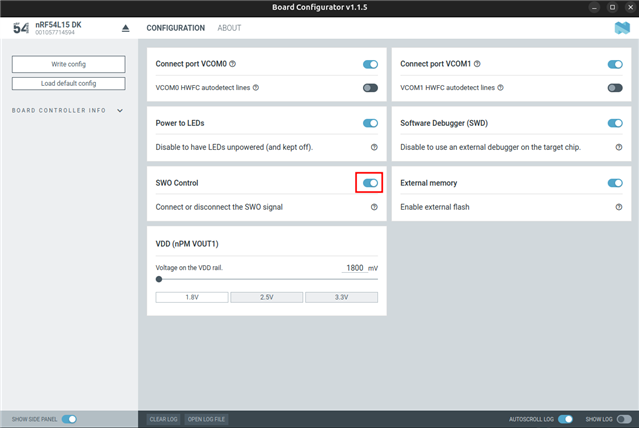
    You need to enable SWO control in the board configurator:

    Please note that this is only supported on nRF54L15 DK v1.0.0 and newer.

    Best regards,
    Marte

  • Hi Marte,

    Unfortunately, the version of my DK is 0.9.1.

    Do you know how to enable SWO on a custom board with nRF54L10 SoC? I am asking about nRF54L10 since in our project we use our custom board with this SoC and we have exactly the same issue with SWO as described above for nRF54L15-DK.

    Best Regards,

    Damian

  • Hi Damian,

    The board configurator tool configures the board controller (interface MCU) on the DK itself, it does not configure the nRF54L chip. This means what you want to replicate in firmware is the trace port enablement on the nRF54L chip itself, not the DK board controller configuration.

    For the nRF54L, the following sequence is required to enable SWO support:

    /* Trace configuration */
    #define TRACE_PORT                  NRF_P2_S
    #define TRACE_TRACECLK_PIN          (6ul)
    #define TRACE_TRACEDATA0_PIN        (7ul)
    #define TRACE_TRACEDATA1_PIN        (8ul)
    #define TRACE_TRACEDATA2_PIN        (9ul)
    #define TRACE_TRACEDATA3_PIN        (10ul)
    #define TRACE_PIN_CONFIG            ((GPIO_PIN_CNF_DRIVE0_E0 << GPIO_PIN_CNF_DRIVE0_Pos) \
    | (GPIO_PIN_CNF_DRIVE1_E1 << GPIO_PIN_CNF_DRIVE1_Pos) \
    | (GPIO_PIN_CNF_DIR_Output << GPIO_PIN_CNF_DIR_Pos))
    
    #define TRACE_PIN_CLEAR             (~(GPIO_PIN_CNF_CTRLSEL_Msk | GPIO_PIN_CNF_DRIVE0_Msk | GPIO_PIN_CNF_DRIVE1_Msk | GPIO_PIN_CNF_DIR_Msk))
    /* End Trace configuration */
    
    
    // Enable trace and debug
    NRF_TAD_S->ENABLE = TAD_ENABLE_ENABLE_Msk;
    
    // Configure trace port pads
    TRACE_PORT->PIN_CNF[TRACE_TRACECLK_PIN] &= TRACE_PIN_CLEAR;
    TRACE_PORT->PIN_CNF[TRACE_TRACEDATA0_PIN] &= TRACE_PIN_CLEAR;
    
    TRACE_PORT->PIN_CNF[TRACE_TRACECLK_PIN] |= TRACE_PIN_CONFIG;
    TRACE_PORT->PIN_CNF[TRACE_TRACEDATA0_PIN] |= TRACE_PIN_CONFIG;
    
    // Configure trace port speed
    NRF_TAD_S->TRACEPORTSPEED = TAD_TRACEPORTSPEED_TRACEPORTSPEED_DIV2;

    However, this should automatically be set when you have SWO enabled with CONFIG_LOG=y and CONFIG_LOG_BACKEND_SWO=y as you can see from these files:

    https://github.com/nrfconnect/sdk-zephyr/blob/main/modules/hal_nordic/nrfx/CMakeLists.txt#L116

    https://github.com/nordicsemi/nrfx/blob/master/bsp/stable/mdk/system_nrf54l.c#L260-L278

    Since this is not working in your case, can you try manually enabling SWO using the code above? If this does not work, please let me know.

    Best regards,
    Marte

  • Hi Marte,

    Thanks for clarifying how the board configurator works and what it does.

    I have added the above code snippet but it did not help. I still cannot see the logs in SEGGER J-Link SWO Viewer.

    Best Regards,

    Damian

  • Hi Damian,

    What debugger are you using? The debugger must be SWO capable to work.

    Is there a specific reason for using SWO instead of RTT?

    Best regards,
    Marte

  • Hi Marte,

    The debugger I use is SEGGER J-Link Base.

    The reason behind using SWO is that in our project we would like to have two builds: release and test. Release one uses SWO log backend but the application does not enable SWO. It can be enabled and set up by the attached debugger when needed.
    Test build which is used for measuring power consumption. Here the enables SWO by itself. No debugger is attached, only one wire to the SWO pin to gather the logs.


    I have an update regarding the logs in SEGGER J-Link SWO Viewer, I can get the logs, I just had to power cycle the target device. So after the reboot the logs are received. Setting `CONFIG_LOG_BACKEND_SWO=y` was enough. My apologies, it was my mistake.

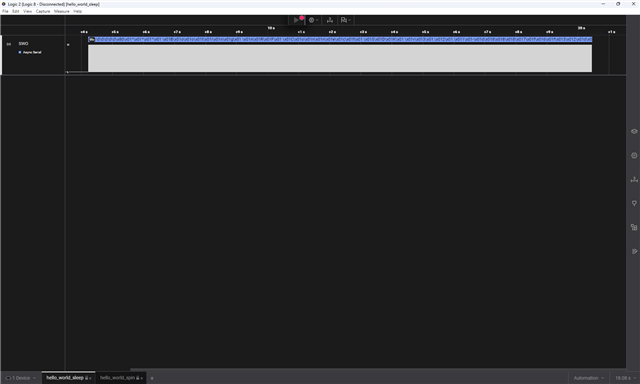
    Nevertheless, the logs look corrupted. When running the simple application (from the code snippet above) every couple of lines of logs the ending of the line is incorrect.

    *** Booting nRF Connect SDK v3.2.1-d8887f6f32df ***
    
    *** Using Zephyr OS v4.2.99-ec78104f1569 ***
    
    Hello World! hcm200/nrf54l10/app
    
    Hello World! hcm200/nrf54l10/cpuapp
    
    Hello World! hcm200/nrf54l10/app
    
    Hello World! hcm200/nrf54l10/p
    
    Hello World! hcm200/nrf54l10/cuapp
    
    Hello World! hcm200/nrf54l10/uapp
    
    Hello World! hcm200/nrf54l10/puapp
     

    The correct ending should be `cpuapp`.

    I have attached a logic analyzer to SWO pin to see what really is happening on the wire. It occurs, there is unexpected data sent via SWO. Here are the waveforms:

    hello_world_sleep.sal

    I modified the application so that it does not use `k_msleep` function but a spin wait instead, like this:

    static void spin_wait_ms(int64_t duration_ms)
    {
        const int64_t start_ms = k_uptime_get();
    
        while ((k_uptime_get() - start_ms) < duration_ms) {}
    }

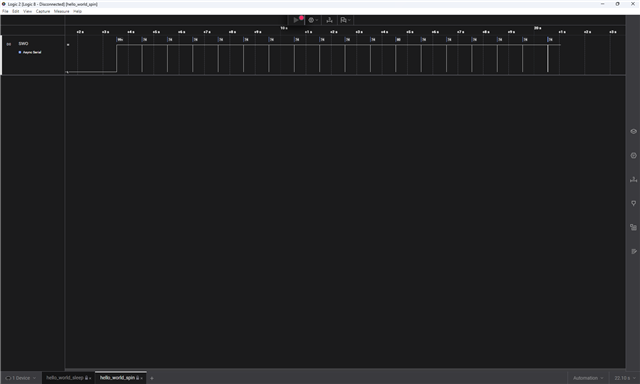
    After that the logs look correctly. The waveforms:

    hello_world_spin.sal

    It has been run on a custom board with nRF54L10 SoC on it.


    I have the following questions:

    1. Do you know why the logs are corrupted when using a sleep function in the code?
    2. Is there a way to use SWO log backend in Zephyr/NCS but not enabling SWO? Only the debugger would enable it when attached. It would save some power when the debugger is not attached.

    Best Regards,
    Damian

  • Hi Damian,

    1. It is likely caused by the HF clock being turned off when k_msleep() is called. The logging module uses deferred logging, so when LOG_INF() is called, the message is not sent immediately. Instead, it is queued and sent later by the logging thread. After the logging thread finishes writing all the bytes into the ITM FIFO (with ITM_SendChar()), the CPU goes to sleep. But the TPIU is still slowly serializing those bytes out over the SWO wire, and when the CPU sleeps, HFCLK is gated, cutting power to the TPIU mid-transmission, causing the message to be truncated.

    With a spin wait, the CPU stays awake, and HFCLK stays on, so the TPIU always finishes transmitting before sleep.

    I recommend using deferred logging, but you can log immediately instead of queuing logs by enabling CONFIG_LOG_MODE_IMMEDIATE.

    2. No, this is not possible. CONFIG_LOG_BACKEND_SWO must be enabled at build time to include the backend code. This includes log_backend_swo_init(), which enables ITM and TPIU on boot.

    Best regards,
    Marte

Reply
  • Hi Damian,

    1. It is likely caused by the HF clock being turned off when k_msleep() is called. The logging module uses deferred logging, so when LOG_INF() is called, the message is not sent immediately. Instead, it is queued and sent later by the logging thread. After the logging thread finishes writing all the bytes into the ITM FIFO (with ITM_SendChar()), the CPU goes to sleep. But the TPIU is still slowly serializing those bytes out over the SWO wire, and when the CPU sleeps, HFCLK is gated, cutting power to the TPIU mid-transmission, causing the message to be truncated.

    With a spin wait, the CPU stays awake, and HFCLK stays on, so the TPIU always finishes transmitting before sleep.

    I recommend using deferred logging, but you can log immediately instead of queuing logs by enabling CONFIG_LOG_MODE_IMMEDIATE.

    2. No, this is not possible. CONFIG_LOG_BACKEND_SWO must be enabled at build time to include the backend code. This includes log_backend_swo_init(), which enables ITM and TPIU on boot.

    Best regards,
    Marte

Children
Related