Thingy91 (nRF52840) detected as MCUBOOT but unusable – broken USB descriptor

Hi, all!
I'm currently facing an issue with upgrading the nRF52840 firmware on a Thingy91 and would greatly appreciate your guidance. I'm following the official  instructions  from DevZone for this process.
Current procedure:
1. Connect Thingy91 to PC via USB.
2. Press and hold SW4 to enter MCUBOOT mode.
3. Power on the device while holding SW4.
4. Launch nRF Connect Programmer (v4.7.3) and check device detection.
Problem description:
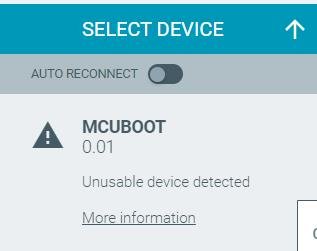
1. Programmer detects MCUBOOT, but it is descripted as “unusable device”.
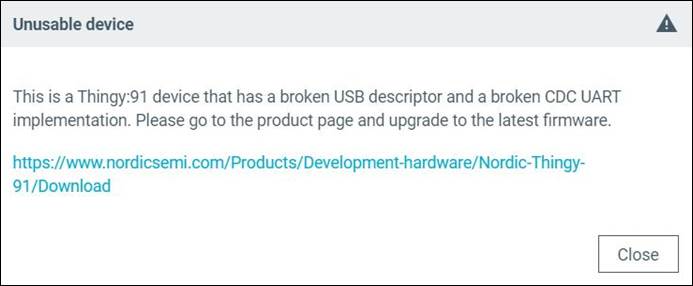
2.  Programmer displays following error message which indicates that USB descriptor and CDC UART implementations are broken.  Because of this, flashing via Programmer is not possible. There is no information about this error on the linked page (only firmware packages are available there).
3.While using Visual Studio Code with nRF Connect Extension (nRF Connect SDK V.2.7.0, nRF Connect SDK Toolchain v2.7.0), running 'west flash -d xxxx --dev-id .01' command reports errors related to SeggerBackend.

Observations: It seems that the USB interface or bootloader on the nRF52840 might be corrupted. Unfortunately, the history of this device or its current memory layout are unknown.
Question: Have you encountered a similar issue? What is the recommended recovery procedure for a Thingy:91 (nRF52840) in this state (MCUBOOT detected but unusable)?
Is it possible to recover the nRF52840 on Thingy:91 without using an external debug probe (e.g., only via USB), or is a J-Link/Nordic DK strictly required in this case?

Thank you in advance for your help

Parents Reply Children
  • Thank you for your quick reply!  

    I followed the official instructions and successfully: 

    1.Flashed the Connectivity Bridge firmware to the nRF52840 on Thingy:91 via nrf9160dk (as stated in the instruction Programming Nordic Thingy prototyping platforms in “Updating nRF52840 SoC firmware” section). 

    2.When Thingy91 is connected via USB, it appears correctly as “Thiny:91 UART”. SWD switch is set to nRF52. 

    1. I am also able to enter MCUBOOTmode.

    So the initial setup seems to be working as expected. 

    However, I am encountering new issues when trying to upload my custom firmware (for tests I’m using simple code for blinky from zephyr official repositorium on github zephyr/samples/basic/blinky/src/main.c at main · zephyrproject-rtos/zephyr ) 

    Problem description – Cannot upload  and run custom firmware on Thingy91 

    - When device is connected via SWD while uploading my firmware, it seems that the uploading has been finished correctly (using Erase & Write button). However, the application doesn’t seem to run – the LED does not change its state. I observe the same issue with other custom firmware as well, including BLE beacon advertising samples.  

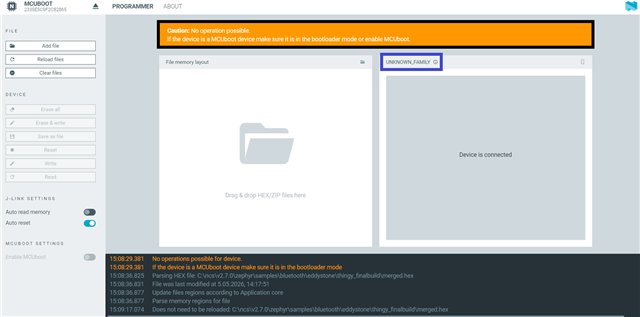
    - When I connect Thingy91 via USB directly to the computer and make the device enter MCUBOOT, the Programmer tool reports the following error - “No operation is possible.” Moreover, the family of the device is unknown. This preventt me from uploading or reading firmware thorugh USB. 


    Observations: 

    From my perspective, the Connectivity Bridge works correctly, but custom firmware doesn’t run through SWD and it’s not possible to upload custom firmware with MCUBOOT. 


    Question:  

    Is it possible to run custom firmware on Thingy91 (nrf52840) when flashing via SWD? What is the recommended procedure for flashing a Thingy:91 with custom firmware in this state (Unknown family, No operations possible)?  


Related