Unable to detect external device when programming custom PCB with nrf5340 via JTAG and nrf5340DK

Hi, I have previously posted issue with flashing that was already solved.  Issues with flashing code on MDBT53V mounted on cusotm board 

Unfortunately for some reasons I had to send the nrf52840DK module to my colleague and I have currently only nrf5340DK version 2.0.2 at hand.

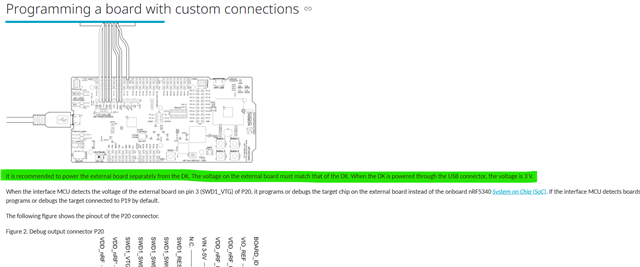
The setup is same as with as in the issue linked above with the only exception of using different DK to flash the external board (running on 1.8V). The issue I am facing is the fact I am not even able to detect the external connected PCB so I am technicaly not able to flash it.Tried to supply 1.8V on VTG or Vioref, short and unshort SB19, use different version of nrf connect in vscode but all without success. Also following this issues didnt helped:
Unable to flash custom nRF5340 board with nRF5340DK
I can't program external board with nRF5340 2.0.2    

Is there some difference between flashing with nrf52840DK and nrf5340DK I dont know about? Have I possibly damaged my dev board so it is no longer able to flash?

Regards,
Marosh

Parents
  • There is a difference between DKs depending on which debugger is on the board. Have you made sure to connect ALL wires listed in the user guide and not taken shortcuts and not connected some of them? Missing wires is the number 2 failure mode, number one is difference in voltage level between external board and DK.

  • Sorry for the late response. I spent some time investigating further.

    I tested the flashing eventually with an nRF52840 DK as well and observed the same behavior. I am using SDK/toolchain v3.2.1 and SEGGER J-Link v9.24a.

    Current situation:

    • Flashing the custom board works successfully via VS Code
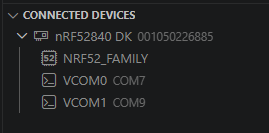
    • Only the DK itself appears in the VS Code Connected Devices view. The custom board's chip (previously visible as e.g. C45613446) no longer appears
    • RTT logging via VS Code is therefore not accessible

    Key finding: When using SEGGER J-Link RTT Viewer directly, I can successfully connect and see the expected logs. The RTT log shows the nRF5340 application core is detected correctly with no errors (no APPROTECT, Cortex-M33 found, secure debug enabled).

    LOG: J-Link RTT Viewer V9.24a: Logging started.
    LOG: Connecting to J-Link via USB...
    LOG: Device "NRF5340_XXAA_APP" selected.
    LOG: ConfigTargetSettings() start
    LOG: ConfigTargetSettings() end - Took 1.12ms
    LOG: InitTarget() start
    LOG: InitTarget() end - Took 1.86ms
    LOG: Found SW-DP with ID 0x6BA02477
    LOG: DPIDR: 0x6BA02477
    LOG: CoreSight SoC-400 or earlier
    LOG: AP map detection skipped. Manually configured AP map found.
    LOG: AP[0]: AHB-AP (IDR: Not set, ADDR: 0x00000000)
    LOG: AP[1]: AHB-AP (IDR: Not set, ADDR: 0x00000000)
    LOG: AP[2]: MEM-AP (IDR: Not set, ADDR: 0x00000000)
    LOG: AP[3]: MEM-AP (IDR: Not set, ADDR: 0x00000000)
    LOG: AP[0]: Core found
    LOG: AP[0]: AHB-AP ROM base: 0xE00FE000
    LOG: CPUID register: 0x410FD214. Implementer code: 0x41 (ARM)
    LOG: Feature set: Mainline
    LOG: Cache: No cache
    LOG: Found Cortex-M33 r0p4, Little endian.
    LOG: FPUnit: 8 code (BP) slots and 0 literal slots
    LOG: Security extension: implemented
    LOG: Secure debug: enabled
    LOG: CoreSight components:
    LOG: ROMTbl[0] @ E00FE000
    LOG: [0][0]: E00FF000 CID B105100D PID 000BB4C9 ROM Table
    LOG: ROMTbl[1] @ E00FF000
    LOG: [1][0]: E000E000 CID B105900D PID 000BBD21 DEVARCH 47702A04 DEVTYPE 00 Cortex-M33
    LOG: [1][1]: E0001000 CID B105900D PID 000BBD21 DEVARCH 47701A02 DEVTYPE 00 DWT
    LOG: [1][2]: E0002000 CID B105900D PID 000BBD21 DEVARCH 47701A03 DEVTYPE 00 FPB
    LOG: [1][3]: E0000000 CID B105900D PID 000BBD21 DEVARCH 47701A01 DEVTYPE 43 ITM
    LOG: [1][5]: E0041000 CID B105900D PID 002BBD21 DEVARCH 47724A13 DEVTYPE 13 ETM
    LOG: [1][6]: E0042000 CID B105900D PID 000BBD21 DEVARCH 47701A14 DEVTYPE 14 CSS600-CTI
    LOG: [0][1]: E0040000 CID B105900D PID 000BBD21 DEVARCH 00000000 DEVTYPE 11 TPIU
    LOG: RTT Viewer connected.
    LOG: Terminal 0 added.

    I have tried reinstalling the SEGGER software and the nRF Connect VS Code extension without success.

    Is there a known fix for the custom board chip not appearing in the Connected Devices view in VS Code when using an external DK as programmer? Could this be related to plugin-probe-worker?


    For reference, this is my prj.conf setup:

    # SPDX-License-Identifier: Apache-2.0

    # Enabling GPIO and Input subsystems
    CONFIG_GPIO=y
    CONFIG_INPUT=y
    CONFIG_INPUT_GPIO_KEYS=y
    CONFIG_INPUT_LONGPRESS=y

    # Enable logging
    CONFIG_LOG=y
    CONFIG_LOG_DEFAULT_LEVEL=3
    CONFIG_LOG_MODE_IMMEDIATE=y

    # Disable UART logging
    CONFIG_UART_CONSOLE=n
    CONFIG_LOG_BACKEND_UART=n

    # Enable RTT logging
    CONFIG_CONSOLE=y
    CONFIG_USE_SEGGER_RTT=y
    CONFIG_RTT_CONSOLE=y
    CONFIG_LOG_BACKEND_RTT=y
    CONFIG_SEGGER_RTT_BUFFER_SIZE_UP=4096

    # Enable power management and system off
    #CONFIG_PM=y
    CONFIG_PM_DEVICE=y
    CONFIG_POWEROFF=y

    # External QSPI NOR Flash
    CONFIG_NORDIC_QSPI_NOR=y
    CONFIG_NORDIC_QSPI_NOR_FLASH_LAYOUT_PAGE_SIZE=4096
    # CONFIG_NORDIC_QSPI_NOR_STACK_WRITE_BUFFER_SIZE=16  # Optional tuning parameter

    # Memory configs:
    CONFIG_NVS=y
    CONFIG_FLASH=y
    CONFIG_FLASH_MAP=y
    CONFIG_FLASH_PAGE_LAYOUT=y
    CONFIG_PM_PARTITION_REGION_NVS_STORAGE_EXTERNAL=y

    #CONFIG_MPU_ALLOW_FLASH_WRITE=y??

    # Enable haptics library
    CONFIG_HAPTICS=y
    CONFIG_HAPTICS_DRV2605=y
    CONFIG_PWM=y

    # Enable npm1300
    CONFIG_REGULATOR=y #should add automaticaly CONFIG_REGULATOR_NPM13XX=y if "nordic,npm1300" in device tree overlay
    CONFIG_SENSOR=y
    CONFIG_LED=y
    CONFIG_SHELL=y

    CONFIG_I2C=y

    # For faster boot time replace CryptoCell entropy with nRF RNG
    CONFIG_SYSTEM_CLOCK_NO_WAIT=y

    # Remove boot delay
    CONFIG_BOOT_BANNER=n
    CONFIG_NCS_BOOT_BANNER=n
    CONFIG_BOOT_DELAY=0
Reply
  • Sorry for the late response. I spent some time investigating further.

    I tested the flashing eventually with an nRF52840 DK as well and observed the same behavior. I am using SDK/toolchain v3.2.1 and SEGGER J-Link v9.24a.

    Current situation:

    • Flashing the custom board works successfully via VS Code
    • Only the DK itself appears in the VS Code Connected Devices view. The custom board's chip (previously visible as e.g. C45613446) no longer appears
    • RTT logging via VS Code is therefore not accessible

    Key finding: When using SEGGER J-Link RTT Viewer directly, I can successfully connect and see the expected logs. The RTT log shows the nRF5340 application core is detected correctly with no errors (no APPROTECT, Cortex-M33 found, secure debug enabled).

    LOG: J-Link RTT Viewer V9.24a: Logging started.
    LOG: Connecting to J-Link via USB...
    LOG: Device "NRF5340_XXAA_APP" selected.
    LOG: ConfigTargetSettings() start
    LOG: ConfigTargetSettings() end - Took 1.12ms
    LOG: InitTarget() start
    LOG: InitTarget() end - Took 1.86ms
    LOG: Found SW-DP with ID 0x6BA02477
    LOG: DPIDR: 0x6BA02477
    LOG: CoreSight SoC-400 or earlier
    LOG: AP map detection skipped. Manually configured AP map found.
    LOG: AP[0]: AHB-AP (IDR: Not set, ADDR: 0x00000000)
    LOG: AP[1]: AHB-AP (IDR: Not set, ADDR: 0x00000000)
    LOG: AP[2]: MEM-AP (IDR: Not set, ADDR: 0x00000000)
    LOG: AP[3]: MEM-AP (IDR: Not set, ADDR: 0x00000000)
    LOG: AP[0]: Core found
    LOG: AP[0]: AHB-AP ROM base: 0xE00FE000
    LOG: CPUID register: 0x410FD214. Implementer code: 0x41 (ARM)
    LOG: Feature set: Mainline
    LOG: Cache: No cache
    LOG: Found Cortex-M33 r0p4, Little endian.
    LOG: FPUnit: 8 code (BP) slots and 0 literal slots
    LOG: Security extension: implemented
    LOG: Secure debug: enabled
    LOG: CoreSight components:
    LOG: ROMTbl[0] @ E00FE000
    LOG: [0][0]: E00FF000 CID B105100D PID 000BB4C9 ROM Table
    LOG: ROMTbl[1] @ E00FF000
    LOG: [1][0]: E000E000 CID B105900D PID 000BBD21 DEVARCH 47702A04 DEVTYPE 00 Cortex-M33
    LOG: [1][1]: E0001000 CID B105900D PID 000BBD21 DEVARCH 47701A02 DEVTYPE 00 DWT
    LOG: [1][2]: E0002000 CID B105900D PID 000BBD21 DEVARCH 47701A03 DEVTYPE 00 FPB
    LOG: [1][3]: E0000000 CID B105900D PID 000BBD21 DEVARCH 47701A01 DEVTYPE 43 ITM
    LOG: [1][5]: E0041000 CID B105900D PID 002BBD21 DEVARCH 47724A13 DEVTYPE 13 ETM
    LOG: [1][6]: E0042000 CID B105900D PID 000BBD21 DEVARCH 47701A14 DEVTYPE 14 CSS600-CTI
    LOG: [0][1]: E0040000 CID B105900D PID 000BBD21 DEVARCH 00000000 DEVTYPE 11 TPIU
    LOG: RTT Viewer connected.
    LOG: Terminal 0 added.

    I have tried reinstalling the SEGGER software and the nRF Connect VS Code extension without success.

    Is there a known fix for the custom board chip not appearing in the Connected Devices view in VS Code when using an external DK as programmer? Could this be related to plugin-probe-worker?


    For reference, this is my prj.conf setup:

    # SPDX-License-Identifier: Apache-2.0

    # Enabling GPIO and Input subsystems
    CONFIG_GPIO=y
    CONFIG_INPUT=y
    CONFIG_INPUT_GPIO_KEYS=y
    CONFIG_INPUT_LONGPRESS=y

    # Enable logging
    CONFIG_LOG=y
    CONFIG_LOG_DEFAULT_LEVEL=3
    CONFIG_LOG_MODE_IMMEDIATE=y

    # Disable UART logging
    CONFIG_UART_CONSOLE=n
    CONFIG_LOG_BACKEND_UART=n

    # Enable RTT logging
    CONFIG_CONSOLE=y
    CONFIG_USE_SEGGER_RTT=y
    CONFIG_RTT_CONSOLE=y
    CONFIG_LOG_BACKEND_RTT=y
    CONFIG_SEGGER_RTT_BUFFER_SIZE_UP=4096

    # Enable power management and system off
    #CONFIG_PM=y
    CONFIG_PM_DEVICE=y
    CONFIG_POWEROFF=y

    # External QSPI NOR Flash
    CONFIG_NORDIC_QSPI_NOR=y
    CONFIG_NORDIC_QSPI_NOR_FLASH_LAYOUT_PAGE_SIZE=4096
    # CONFIG_NORDIC_QSPI_NOR_STACK_WRITE_BUFFER_SIZE=16  # Optional tuning parameter

    # Memory configs:
    CONFIG_NVS=y
    CONFIG_FLASH=y
    CONFIG_FLASH_MAP=y
    CONFIG_FLASH_PAGE_LAYOUT=y
    CONFIG_PM_PARTITION_REGION_NVS_STORAGE_EXTERNAL=y

    #CONFIG_MPU_ALLOW_FLASH_WRITE=y??

    # Enable haptics library
    CONFIG_HAPTICS=y
    CONFIG_HAPTICS_DRV2605=y
    CONFIG_PWM=y

    # Enable npm1300
    CONFIG_REGULATOR=y #should add automaticaly CONFIG_REGULATOR_NPM13XX=y if "nordic,npm1300" in device tree overlay
    CONFIG_SENSOR=y
    CONFIG_LED=y
    CONFIG_SHELL=y

    CONFIG_I2C=y

    # For faster boot time replace CryptoCell entropy with nRF RNG
    CONFIG_SYSTEM_CLOCK_NO_WAIT=y

    # Remove boot delay
    CONFIG_BOOT_BANNER=n
    CONFIG_NCS_BOOT_BANNER=n
    CONFIG_BOOT_DELAY=0
Children
Related