west flash on nrf9151dk failed

Hi,

I have an Ubuntu 22.04 LTS virtual machine where I installed the version v3.4.0 of all the needed
tools and libraries as explained in
nrfconnectdocs.nordicsemi.com/.../install_ncs.html.

I started a scratch project on a nRF9151DK board that I successfully built.
Specifically I executed the following steps:

  1. Cloning the version v3.4.0 of github.com/.../ncs-example-application project;
  2. Executed from the root project directory the command
    nrfutil sdk-manager toolchain launch --ncs-version=v3.4.0 --shell;
  3. In the root project directory created a directory scratch with the an empty
    prj,conf file and a CMakeLists.txt and a main.c file whose contents are

    - CMakeLists.txt
         cmake_minimum_required(VERSION 3.20.0)
         find_package(Zephyr REQUIRED HINTS $ENV{ZEPHYR_BASE})
         project(hello_work)
         target_sources(app PRIVATE src/main.c)Code


    - main.c
        #include <zephyr/kernel.h>
        #include  <zephyr/sys/printk.h>
    
        int main(void)
        {
            while (1) {
                printk("Hello World!\n);
                k_msleep(1000);
            }
            
            return 0;
        }


  4. In the root project directory successfully executed the command
    west build -b nrf9151dk_nrf9151 -p=always scratch
  5. I attaches the nrf9151dk board to an usb type-C port in the PC.
    Immediately a Windows Explorer popped up showing that an usb mass storage
    device was detected. In the VM in the root project directory I unsuccessfully
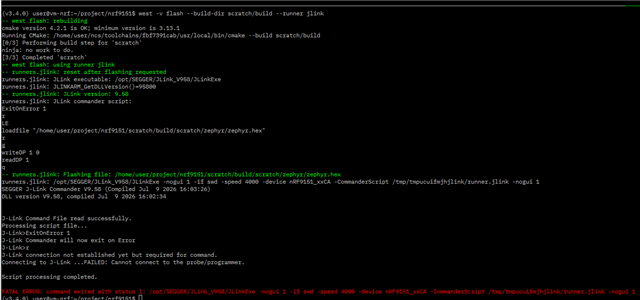
    executed west flash --build-dir scratch/build --runner jlink obtaining this
    error screen
When I set up the VM, I ran the sudo dpkg -i nrf-udev_1.0.1-all.deb to add udev rules
for the Ubuntu guest.

I also copied udev rules:
sudo cp ~/ncs/toolchains/fbf7391cab/usr/lib/udev/rules.d/60-dfu-util.rules /etc/udev/rules.d/
followed by sudo udevadm control --reload but with no success.
Also inspectioning those rules they seem suitable for STM32 microcontrollers/

Anyway, running nrfutil device list --traits seggerUsb inside the VM reported Supported devices found: 0

Are someone that already faced this kind of problems?
Thanks in advance for any help.

Parents
  • Hi,

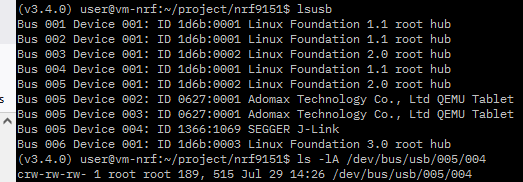
    A few things, in your recent comment you input productod instead of productid. That might just be a typo, but just in case it wasn't QEMU might error from that or ignore the typo. Also, could you run lsusb, I am curious to see if your VM was able to grab the USB.

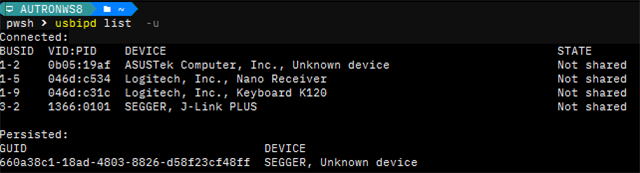
    If not, we can try to see if device is shared in the first place. Just open up powershell on your Windows Host and run usbipd list. If the USB device has been binded properly, you should see "Shared" next to it and if it is claimed by your VM, you should see "Attached".

    Best, 

    Adam 

  • Hi Adam,

    the prodctod you refer was an typing error.. I meant to write productid.

    Below I repost the output of lsusb:

    So it seems that the VM is able to grab the USB.
    Also here is the output from dmesg:

    It seems that the composite USB for the J-Link cannot be configurated.
    I googled around to see if there is information about that error, I found
    most configuration errors with value -71 but not -32.

    And here the output of usbipd list

    Ok, it seems that the USB device is neither shared nor attached..

  • To launch in Windows10 via QEMU the Ubuntu guest VM I use a powershell script or
    a bash script where there are all the options that I have to pass to qemu-system-x86_64
    (the bash script is running in a bash enviroment present in a MSYS2 installation).

    Both of them show the same problem.


    Here the full  qemu-system-x86_64 options : 

    -name "XUBUNTU Linux 24.04.4 VM"
    -M q35 -accel whpx,kernel-irqchip=off
    -cpu qemu64 -smp 8 -m 4096 -rtc base=utc
    -device virtio-net-pci,netdev=net0 
    -boot order=c
    -drive file="xubuntu-24.04.4-minimal-amd64.qcow2",if=virtio,format=qcow2,media=disk,index=2
    -netdev tap,id=net0,ifname=tap0,script=no,downscript=no
    -usb -device qemu-xhci,id=xhci
    -device usb-host,bus=xhci.0,vendorid=0x1366,productid=0x1069
    -device usb-kbd -device usb-mouse 
    -device virtio-vga-gl,xres=1920,yres=1200 -display sdl,gl=on,full-screen=on

  • I would drop the line below from your QEMU invocation, just so the QEMU is not fighting over the USB as well. 

    -device usb-host,bus=xhci.0,vendorid=0x1366,productid=0x1069

    Then run sudo usbip attach --remote=<HOST> --busid=<BUSID> through the guest VM. 

  • Well,

    From the qemu-system-x86_64 invokation, I removed the argument
     

    -device usb-host,bus=xhci.0,vendorid=0x1366,productid=0x1069

    Next I ran on the Ubuntu VM guest the command

    sudo usbip attach --remote=<HOST> --busid=3-2 

    but it failed because of vhcd-hcd driver was not loaded.


    So I executed the command

    sudo modprobe vhci-hcd

    Loading the toochain with
    nrfutil sdk-manager toolchain launch --ncs-version=v3.4.0 --shell

    and entering the scratch project directory executing the command
    west -v flash --build-dir scratch/build 


    produces the following output:


    This seems to work... 
    But after the above operation, in the Window host machine, I can not see anymore COM9 or COM11 virtual serial ports where I would like to see the printing of the loaded application (Do you remember
    main.c?)

  • That is expected, usbip attach hands over the USB device over to the VM, which is why the ports disappeared. 
    You can view the COM ports through the serial interfaces or RTT in the VM. If that does not work for you, I can look for an alternative solution.

  • I tried to reproduce the fix you suggested, but this time the flashing command
    fails with the following errors:


    It seems this time it trying to upload a new firmware in the J-Link OB component
    on the nRF9151DK board.

Reply Children
Related