This post is older than 2 years and might not be relevant anymore
More Info: Consider searching for newer posts

Regarding Python Scripts for nrf52840 to connect and transfer data.

Hi ,

What I am trying:- 

-connect the custom board with nrf52840 chip using nrf52 dongle on pc with python.

-Already set some commands on custom board so when my pc (via dongle) connects to custom board, I want to send some commands and accordingly receive the response.

For this I got my hands-on nrf dongle to give my laptop a BLE access.

And I am trying to access the board using dongle (using python script) and I am getting below error,


raise NordicSemiException('Failed to {}. Error code: {}'.format(wrapped.__name__, err_code))
pc_ble_driver_py.exceptions.NordicSemiException: Failed to open. Error code: 13.

Would anyone able to tell me how do i resolve this. 

I want to have python code that can connect and do some data transfer over BLE using Dongle connected to my pc and I have tried with hart_rate_monitor unsuccessfully. 

EDIT 1:- I am able to scan and connect my board using the nRF Connect windows app. Same I wanted to implement over python.

Thanks,

Hinesh

Parents
  • Hi,

    Can you provide the full command that you run (for starting the python script) and all output to the command line afterwards? (Both what parameters you send to the script, any debug output, and the full traceback may give clues as to what is the problem.)

    Regards,
    Terje

  • HI

    Actually I have resolved the above error.

    By going through various questions and answers here I came to know some tools.

    So When I was opening 'nrf connect' windows app , it was flashing firmware and I was having impression that this will be samefirmware will be used for scanning and connect via python. But It was not working.

    And the I have installed windows command line tools and format the board using 'nrfproject' command. And Let the python  application 'Hear rate monitor' do the flashing. Then it started working.

    It seems the mismatch on the firmware version on nrf52840 PDK Board (that I am using as dongle to connect to custom board via my pc).

    So To come on another query I have,

    Can you point me any example or script that can do the same work as 'nrf connect' does?

    Scan, connect (to particular given mac id) and explore services of connected device.


    Basically I am trying what I have explained on above question.

    This would be very help full for us as we are already on advance stage for development.

    Thanks,

    Hinesh

  • Hi

    You have explained well.

    But two questions:-

    1. How do I convert UUID to BLEUUDIBase Format? just separating  with '0x00' will not work (I think).

    2. This is for writing, once this command given , device will start transmitting data. So I have to initiate a reader thread/function as well. is there any read function as I was not able to find in examples.

    Thanks,

    Hinesh

  • Hi,

    The line

    BASE_UUID = BLEUUIDBase([0x8E, 0xC9, 0x00, 0x00, 0xF3, 0x15, 0x4F, 0x60,
                             0x9F, 0xB8, 0x83, 0x88, 0x30, 0xDA, 0xEA, 0x50])

    creates a base UUID of

    0x8EC9xxxx-F315-4F60-9FB8-838830DAEA50

    As you can see, each value in the array of hexadecimal values corresponds to one byte of the base UUID. The two bytes that are written using x in the UUID are filled in using the call to BLEUUID, so that e.g.

        BLE_DFU_BUTTONLESS_CHAR_UUID        = BLEUUID(0x0003, BASE_UUID)

    creates the UUID of

    0x8EC90003-F315-4F60-9FB8-838830DAEA50

    So you must divide your UUID into base UUID and 16 bit part, exactly the same way.

    Regards,
    Terje

  • I have tried your suggestions and changed

    CCCD_UUID = '00002902-0000-1000-8000-00805f9b34fb'
    
    DC_SERVICE_UUID = '00001111-0000-1000-8000-00805f9b34fb'
    DATA_CHAR_UUID  = '00002222-0000-1000-8000-00805f9b34fb'
    DATA2_CHAR_UUID = '00003333-0000-1000-8000-00805f9b34fb'
    
    
    DC_SERVICE_BASE_UUID = BLEUUIDBase([0x00, 0x00, 0x22, 0x22, 0x00, 0x00, 0x10, 0x00,
                                        0x80, 0x00, 0x00, 0x80, 0x5f, 0x9b, 0x34, 0xfb])
    ## Also Tried with above CCCD_UUID for checking as below , but not worked
    #--CCCD_BASE_UUID = BLEUUIDBase([0x00, 0x00, 0x29, 0x02, 0x00, 0x00, 0x10, 0x00,
    #                              0x80, 0x00, 0x00, 0x80, 0x5F, 0x9B, 0x34, 0xFB])
    # Buttonless characteristics
    BLE_DFU_BUTTONLESS_CHAR_UUID = BLEUUID(0x2902, DC_SERVICE_BASE_UUID)
    BLE_DFU_BUTTONLESS_BONDED_CHAR_UUID = BLEUUID(0x2901, DC_SERVICE_BASE_UUID)
    ## The 0x2902 and 0x2901 are I have checked via nrf connect app and they are showing
    ## same. I have also changed as per the suggestionns of 0x2222 and 0x1111. But
    ## not able to connect
    
    self.adapter.service_discovery(new_conn)
            self.adapter.enable_notification(new_conn,
                                             BLEUUID(0x2901, DC_SERVICE_BASE_UUID))
    ## Here also changes and tested.

    Still I get this error as below.

    ATT MTU exchanged: conn_handle=0 att_mtu=23
    ATT MTU exchange response: conn_handle=0
    Traceback (most recent call last):
      File "C:/My_Projects/Script.py", line 267, in <module>
        main(serial_port)
      File "C:/My_Projects/Script.py", line 248, in main
        conn_handle = collector.connect_and_discover()
      File "C:/My_Projects/Script.py", line 198, in connect_and_discover
        BLEUUID(0x2901, DC_SERVICE_BASE_UUID))  # BLEUUID(BLEUUID.Standard.battery_level))
      File "C:\Python27\lib\site-packages\pc_ble_driver_py\ble_driver.py", line 125, in wrapper
        err_code = wrapped(*args, **kwargs)
      File "C:\Python27\lib\site-packages\pc_ble_driver_py\ble_adapter.py", line 254, in enable_notification
        raise NordicSemiException('CCCD not found')
    pc_ble_driver_py.exceptions.NordicSemiException: CCCD not found

    I see one function below

        def enable_notification(self, conn_handle, uuid):
            cccd_list = [1, 0]
    
            handle = self.db_conns[conn_handle].get_cccd_handle(uuid)
            if handle == None:
                raise NordicSemiException('CCCD not found')

    So in this function I believe the passed 'UUID' is not correct.

    But passed in the function is correct.

    can you input here what Is going wrong?

    (Kindly ignore other copy & paste as it was not showing prior log of and log in)

    Thanks,

  • Hi,

    Why are you still defining BLE_DFU_BUTTONLESS_CHAR_UUID and BLE_DFU_BUTTONLESS_BONDED_CHAR_UUID? That was an example, for how to make UUIDs. You should do e.g.:

    DC_SERVICE_BASE_UUID = BLEUUIDBase([0x00, 0x00, 0x22, 0x22, 0x00, 0x00, 0x10, 0x00,
                                        0x80, 0x00, 0x00, 0x80, 0x5f, 0x9b, 0x34, 0xfb])
    
    DATA_CHAR_UUID  = BLEUUID(0x2222, DC_SERVICE_BASE_UUID)
    DATA2_CHAR_UUID = BLEUUID(0x3333, DC_SERVICE_BASE_UUID)
    
    self.adapter.service_discovery(new_conn)
    self.adapter.enable_notification(new_conn, DATA_CHAR_UUID)

    If you attach a screenshot of what you get in nRF Connect then I can try to explain what it means. It sounds like you have mixed up several UUIDs (what they mean and how they are used.)

    Regards,
    Terje

  • Hi

    Below is my output of the terminal.

    File "C:\Python27\lib\site-packages\pc_ble_driver_py\ble_adapter.py", line 254, in enable_notification
        raise NordicSemiException('CCCD not found')
    pc_ble_driver_py.exceptions.NordicSemiException: CCCD not found

    Also The BLE_DFU_BUTTONLESS_CHAR_UUID is there, but not using them,

Reply Children
  • Hi,

    Can you provide a screenshot or image from nRF Connect, showing the UUIDs that are found on the device?

    Regards,
    Terje

  • Hi

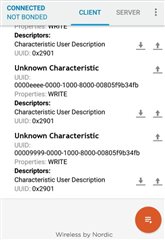
    Enclosing screenshot from app.

    sorry, was misunderstood previously.

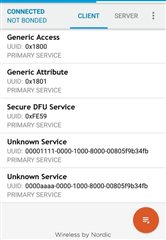
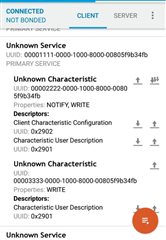
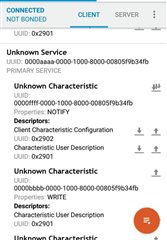
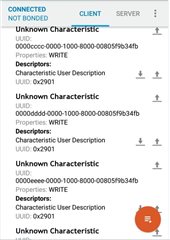
    In mobile app I can see two unknown services, and for both I am pasting screen shots here. and you were correct about mixed up on several uuid's.

    Thanks,

  • Hi,

    So does it work now? If not, what is your code now?

    Regards,
    Terje

  • Hi  

    It is not working.

    My code Is same that I have pasted above.

    Any changes I do I end up in CCCD UUID not valid.

    I needed your input here.

    EDIT: - Still getting the same error.

    Received advertisment report, address: 0x5031ADC0000A, device_name: POC1_2-3
    New connection: 0
    ATT MTU exchanged: conn_handle=0 att_mtu=23
    ATT MTU exchange response: conn_handle=0
    Traceback (most recent call last):
      File "C:\Program Files\JetBrains\PyCharm Community Edition 2018.1.3\helpers\pydev\pydevd.py", line 1664, in <module>
        main()
      File "C:\Program Files\JetBrains\PyCharm Community Edition 2018.1.3\helpers\pydev\pydevd.py", line 1658, in main
        globals = debugger.run(setup['file'], None, None, is_module)
      File "C:\Program Files\JetBrains\PyCharm Community Edition 2018.1.3\helpers\pydev\pydevd.py", line 1068, in run
        pydev_imports.execfile(file, globals, locals)  # execute the script
      File "C:/My_Projects/Script.py", line 269, in <module>
        main(serial_port)
      File "C:/My_Projects/Script.py", line 250, in main
        conn_handle = collector.connect_and_discover()
      File "C:/My_Projects/Script.py", line 200, in connect_and_discover
        self.adapter.enable_notification(new_conn,BLEUUID(0x2902, CCCD_BASE_UUID))#BLEUUID(0x2902, DC_SERVICE_BASE_UUID))  # BLEUUID(BLEUUID.Standard.battery_level))
      File "C:\Python27\lib\site-packages\pc_ble_driver_py\ble_driver.py", line 125, in wrapper
        err_code = wrapped(*args, **kwargs)
      File "C:\Python27\lib\site-packages\pc_ble_driver_py\ble_adapter.py", line 254, in enable_notification
        raise NordicSemiException('CCCD not found')
    pc_ble_driver_py.exceptions.NordicSemiException: CCCD not found
    

    Thanks,

  • Hi,

    It is still hard to tell without getting to see the exact code that you run. In order to figure out what is wrong, it is necessary to have both the code and the error message.

    In this case also the device in the other end is important, but you have already provided enough information about it and I assume that that one does not change. The code however you have changed several times up until now, and so it is important to know what it looks like right now.

    Regards,
    Terje

Related