This post is older than 2 years and might not be relevant anymore
More Info: Consider searching for newer posts

nRF9160 sleep current to high

Hi there,

I have been testing with the nrf9160 DK for a while now and I cant figure out how to get the device to sleep properly. I have been working with the asset_tracker example and made some modifications to send data to myself and left out any unused parts.

The lowest current draw is around 500 uA, measured on the nrf current measurement pins, which, is way to high. The datasheet shows that it is possible to get around 1~2 uA, which is what I need.

The device needs to be able to sleep for long periods of time, and only wake op on an external interrupt or RTC timer. Does anyone know how to get here? At this moment I am kind of stuck.

Thanks in advance.

Karst

Parents
  • Thank you for your reply, I have tried this, but unfortunately without luck.

    Could it be that some functions stay active when put to deep sleep mode?

  • Did you notice a change in the current consumption with that?

    Have you taken a look at the power optimization chapter here & implemented the eDRX or Power Saving Mode?

    I would start with Power Saving Mode, as it seems eDRX may work depending on the carrier you are using.

    It seems you can set the PSM either via the code itself (see here), or via AT commands (see here & here). If you want to do it via the AT commands, I would suggest to either run the AT Client example or include the AT client example functionality in the asset tracker example.

    Please note that there is an active time after connection before we can enter PSM sleep, i.e. power consumption stays on the “idle DRX” level before we move to “PSM level”.

    You may need to wait a few minutes until the nRF91 reaches PSM current level. You can see the value for this timer with the negotiated PSM parameters. Use the AT+CEREG=5 command to "subscribe to unsolicited network state notifications". Take a look at the AT Commands PDF for more info.

    If you ask me, it seems easiest to set the PSM in the code directly in the asset tracker example. Then, I would measure the current consumption after a few minutes when the PSM mode kicks in.

    Otherwise, you could also run the at_client example, set the PSM via the link monitor application & the at commands & then measure the current of the at_client example.

    Also, make sure to keep in mind that the debugger prevents the modem from entering deep sleep. At the moment, you cannot check the sleep level of the modem from the application side.

    Hope that helps!

  • We have tried everything you said here, but we cant get the current consumption low enough.

    What is the lowest current you can get if in sleep? We are, with the asset tracker sample, at lowest drops about 1mA or higher. We also tried to put the device to sleep ourselves where we got about 700uA which is still to high.

    We hope to get the consumption lower then 20 uA, if possible.

    I hope you can help us out.

  • We tested with another customer & were able to get the secure boot with an application down to 5 uA of current consumption in sleep mode.

    It seems that the secure boot in the current implementation turns on UART & UART remains on when switching from secure boot to the application. What you can do is try to configure the secure boot & your example application to not use uart to see if that lowers the consumption. Still keep the PSM mode on naturally!

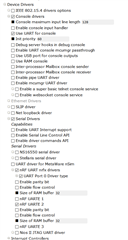
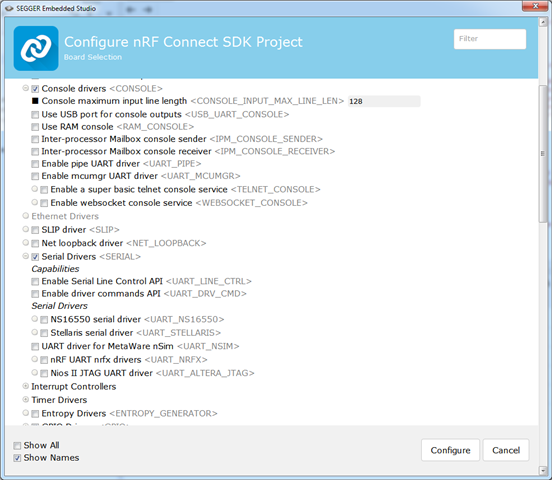
    First, in the secure boot example, go to Build -> Configure nRF Connect SDK Project ... at the bottom. Then, open up Device Drivers -> Serial Drivers -> & uncheck everything related to UART:

    Under console drivers, I would also uncheck "Use UART for console".

    I would then do the same for your application. Then, erase the nRF91 board (nrfjprog -f nrf91 --eraseall), compile both examples & program them to the board.

    Then, you should be able to see lower current consumption.

    We have noticed a few issues with the Project Configuration settings in SES, so if that did not work, I would try disabling UART via menuconfig instead.

  • Hi Bjorn,

    I have been following this as I have noticed the exact same issue as the original poster, with very similar idle power measurements.

    I tried to follow your instructions. When I do, I see that the virtual JLink COM port for the console no longer shows up. I assume this means I can't have serial console output for debugging without it consuming 1mA of standby power?

    Even this limitation aside, it appears to me that it just doesn't work. Calls to "socket(AF_LTE, 0, NPROTO_AT);" just hang now without the UART pieces enabled.

    Am I missing something?

    Thanks,

    Eric Gross

  • Ok, I think I may have been a bit hasty in my original response. It was just user error that my serial port wasn't showing up, though definitely I get no output anymore since presumably the UART is disconnected.

    The issue I was seeing with the socket(AF_LTE) call seemingly hanging appears to just be oddities with the step function in the debugger (since I was trying to validate what was going on without serial output)

    One mismatch I am seeing with the instructions is that for the secure bootloader example, the UART items in the config simply don't exist. They do exist in the other application example and I did disable them, but see no change in power usage. Any idea why I am not seeing options to disable the UARTs in the secure_boot example?

    Thanks,
    Eric

Reply
  • Ok, I think I may have been a bit hasty in my original response. It was just user error that my serial port wasn't showing up, though definitely I get no output anymore since presumably the UART is disconnected.

    The issue I was seeing with the socket(AF_LTE) call seemingly hanging appears to just be oddities with the step function in the debugger (since I was trying to validate what was going on without serial output)

    One mismatch I am seeing with the instructions is that for the secure bootloader example, the UART items in the config simply don't exist. They do exist in the other application example and I did disable them, but see no change in power usage. Any idea why I am not seeing options to disable the UARTs in the secure_boot example?

    Thanks,
    Eric

Children
No Data
Related