This post is older than 2 years and might not be relevant anymore
More Info: Consider searching for newer posts

nRF9160 SES project load

Hi Team,

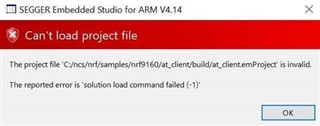
May I know your kind advice on the following issue when I tried to Open the SDK project in SES. I have seen some discussions on line but none of them works for me. I am using Win10 64bit OS. Thanks.

Loading solution at_client.emProject

Executing load commands

cmake -GNinja -DBOARD=nrf9160_pca10090 -DBOARD_DIR=C:/ncs/zephyr/boards/arm/nrf9160_pca10090 -DZEPHYR_TOOLCHAIN_VARIANT=gnuarmemb -DGNUARMEMB_TOOLCHAIN_PATH=C:/gnuarmemb -BC:/ncs/nrf/samples/nrf9160/at_client/build -HC:/ncs/nrf/samples/nrf9160/at_client

Project load failed

Reported error: solution load command failed (-1) 
Thanks.

Parents Reply
  • This applies to all three of you. I find it weird that you all receive so little logging information. Normally, you can easily see where the error lies. If you have recently downloaded the Nordic Connect SDK (around the12.2.2019), I believe the cause of this may be that we are now using west, Zephyr's meta-tool. There is more documentation here that may be helpful. Could you try to download west, update to the newest repositories & then try opening the SES examples again? Hopefully, you will then receive more logging information that can help you debug the issue.

Children
Related