This post is older than 2 years and might not be relevant anymore
More Info: Consider searching for newer posts

NRf9160 factory restore

Hello, i recently used a gateway to sensor example and am unable to revert back to factory program of nrf9160 DK. 

I toggled the switch 5 to nrf52840 and flashed the first program and then toggled back to nrf9160 and flashed it with the other. 

I am trying to revert back by erasing nrf9160 and nrf52840 using programmer from nrf connect app. 

I used secure boot for nrf9160 part but what can i use for nrf52840? 

Also, what is the placement of  switch 5 by default? Nrf9160 or nrf52840? 

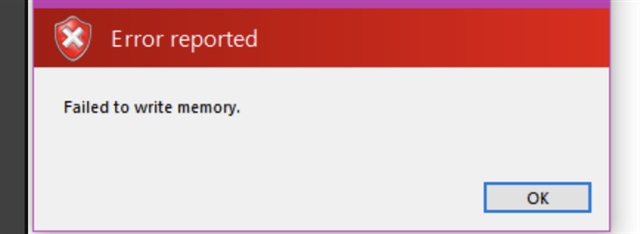
I am trying to get back to it’s original state as all worked well with asset tracker previously  but now if i try and program nrf9160, I have a memory location issue. 

Thanks! 

Parents
  •  This is the error i receive when trying to flash asset tracker. 

  • Hi,

    There are currently some issues with building with Segger Embedded Studio when you are on the git master branch. This have to do with the new nrf9160_pca10090ns target added on the master branch, and how SES handles this. See this link. We are working on fixing this issue.

    You can however still use the command line to build the project:

    # Use cmake to configure a Ninja-based build system:
    cmake -GNinja -DBOARD=nrf9160_pca10090ns ..
    
    # Now run ninja on the generated build system:
    ninja
    ninja flash

    Please note that when building for secure_boot, you need to use the -DBOARD=nrf9160_pca10090

    But if you are reliant on using SES, then I would suggest using the project from the v0.3.0 release

    cd <sourcecode_root>\ncs\zephyr ; git checkout tags/v1.13.99-ncs2
    cd <sourcecode_root>\ncs\mcuboot ; git checkout tags/v1.2.99-ncs2
    cd <sourcecode_root>\ncs\nrf ; git checkout tags/v0.3.0
    cd <sourcecode_root>\ncs\nrfxlib ; git checkout tags/v0.3.0

  • Hi Sigurd, I tried to building using the latest master branch.

    Here is the log from trying to build through SES:

    Building ‘zephyr/include/generated/driver-validation.h’ from solution ‘build’ in configuration ‘Common’
    1> Combining ‘zephyr/include/generated/driver-validation.h’
    Building ‘zephyr/include/generated/kobj-types-enum.h’ from solution ‘build’ in configuration ‘Common’
    1> Combining ‘zephyr/include/generated/kobj-types-enum.h’
    Building ‘zephyr/include/generated/otype-to-str.h’ from solution ‘build’ in configuration ‘Common’
    Building ‘zephyr/misc/generated/syscalls.json’ from solution ‘build’ in configuration ‘Common’
    1> Combining ‘zephyr/misc/generated/syscalls.json’
    Building ‘zephyr/include/generated/syscall_list.h’ from solution ‘build’ in configuration ‘Common’
    1> Combining ‘zephyr/include/generated/syscall_list.h’
    Building ‘zephyr/include/generated/syscall_dispatch.c’ from solution ‘build’ in configuration ‘Common’
    Building ‘zephyr/include/generated/syscall_macros.h’ from solution ‘build’ in configuration ‘Common’
    1> Combining ‘zephyr/include/generated/syscall_macros.h’
    Building ‘zephyr/include/generated/offsets.h’ from solution ‘build’ in configuration ‘Common’
    1> Combining ‘zephyr/include/generated/offsets.h’
    1> Traceback (most recent call last):
    1> File "C:/Nordic/ncs/zephyr/scripts/gen_offset_header.py", line 72, in <module>
    1> input_file = open(args.input, 'rb')
    1> FileNotFoundError: [Errno 2] No such file or directory: 'C:/Nordic/ncs/nrf/applications/asset_tracker/build/zephyr/CMakeFiles/offsets.dir/arch/arm/core/offsets/offsets.c.obj'
    Build failed

  • I tried to building using the latest master branch.
    Here is the log from trying to build through SES:

    Yes, this is part of the issue I was mentioning in my previously reply. We are working on fixing this, but as for now, if you are on the master branch, you will need to build using the command line tools. See this link and this link for that.

  • Hi Sigurd, i tried running those commands but still having some issues. 

    What would the command look like for the asset tracker application where the build directory is in nrf and not zephyr? 

    Or will i have to run CMake for both? 

    Thanks

  • but still having some issues. 

    What error-codes or issues did you see?

    What would the command look like for the asset tracker application where the build directory is in nrf and not zephyr? 

    Use these commands:

    # Use cmake to configure a Ninja-based build system:
    cmake -GNinja -DBOARD=nrf9160_pca10090ns ..
    
    # Now run ninja on the generated build system:
    ninja
    ninja flash

    or if west is properly configured, use west build

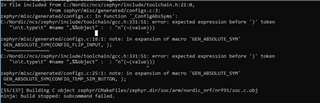
  • Hi Sigurd, I ran those commands and see other issues. See output below. This looks like there may be some issues with the toolchain? I remebered I installed the latest GNU Arm toolchain but had to use a older version because of some issues. Should I need to upgrade?

    Thanks.

Reply Children
  • Hi,

    Are you on an updated master branch on both the nrf and the zephyr repo ?

     What sample did you try to build ?

    RicFlair said:
    I remebered I installed the latest GNU Arm toolchain but had to use a older version because of some issues. Should I need to upgrade?

     No, just make sure that you are not using GNU Arm Embedded Toolchain 8-2018-q4-major.

  • Yes, i am on the latest master branches for both repos. And trying to use asset tracker application. 

    Also using q2 of gnu as well. 

    I am able to get it working with the head mafter but not sure why i can’t with the latests. 

    Thanks 

  • I am able to get it working with the head mafter but not sure why i can’t with the latests. 

    So it's working on the master branch, correct?

  • It works when I checkout with these:

    cd <sourcecode_root>\ncs\zephyr ; git checkout tags/v1.13.99-ncs2
    cd <sourcecode_root>\ncs\mcuboot ; git checkout tags/v1.2.99-ncs2
    cd <sourcecode_root>\ncs\nrf ; git checkout tags/v0.3.0
    cd <sourcecode_root>\ncs\nrfxlib ; git checkout tags/v0.3.0

    But not when I go to git and checkout the latest masters from there it does not work.

  • Hi Sigurd, I think I may have figured out my compile problem. I can successfully build the project now.

    However I am still receiving the Failed to write to memory error message when trying to flash to the DK using SES. I am trying to use your steps with ninja flash but its not working.

    C:\Nordic\ncs\nrf\applications\asset_tracker\build>ninja flash
    [0/1] cmd.exe /C "cd /D C:\Nordic\ncs\nrf\applications\asset_tracker\build\zephyr\...l west bootstrapper with: 'pip install west --user', and thereafter 'west init'.""
    West was not found in path. To support 'C:/ProgramData/chocolatey/bin/ninja.exe flash', please install west bootstrapper with: 'pip install west --user', and thereafter 'west init'.

    C:\Nordic\ncs\nrf\applications\asset_tracker\build>pip install west --user
    Requirement already satisfied: west in c:\users\XXXX\appdata\roaming\python\python37\site-packages (0.5.4)
    Requirement already satisfied: PyYAML in c:\python37\lib\site-packages (from west) (3.13)
    Requirement already satisfied: colorama in c:\python37\lib\site-packages (from west) (0.4.1)
    Requirement already satisfied: pykwalify in c:\python37\lib\site-packages (from west) (1.7.0)
    Requirement already satisfied: docopt>=0.6.2 in c:\python37\lib\site-packages (from pykwalify->west) (0.6.2)
    Requirement already satisfied: python-dateutil>=2.4.2 in c:\python37\lib\site-packages (from pykwalify->west) (2.7.5)
    Requirement already satisfied: six>=1.5 in c:\python37\lib\site-packages (from python-dateutil>=2.4.2->pykwalify->west) (1.12.0)

    Are the steps above correct? I did ninja and then ninja flash and then it asked me to install west and I did west init but that did not work either.

    Thanks

Related