This post is older than 2 years and might not be relevant anymore
More Info: Consider searching for newer posts

NRf9160 factory restore

Hello, i recently used a gateway to sensor example and am unable to revert back to factory program of nrf9160 DK. 

I toggled the switch 5 to nrf52840 and flashed the first program and then toggled back to nrf9160 and flashed it with the other. 

I am trying to revert back by erasing nrf9160 and nrf52840 using programmer from nrf connect app. 

I used secure boot for nrf9160 part but what can i use for nrf52840? 

Also, what is the placement of  switch 5 by default? Nrf9160 or nrf52840? 

I am trying to get back to it’s original state as all worked well with asset tracker previously  but now if i try and program nrf9160, I have a memory location issue. 

Thanks! 

Parents Reply Children
  • I am able to get it working with the head mafter but not sure why i can’t with the latests. 

    So it's working on the master branch, correct?

  • It works when I checkout with these:

    cd <sourcecode_root>\ncs\zephyr ; git checkout tags/v1.13.99-ncs2
    cd <sourcecode_root>\ncs\mcuboot ; git checkout tags/v1.2.99-ncs2
    cd <sourcecode_root>\ncs\nrf ; git checkout tags/v0.3.0
    cd <sourcecode_root>\ncs\nrfxlib ; git checkout tags/v0.3.0

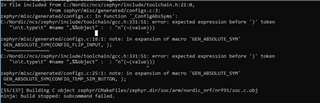
    But not when I go to git and checkout the latest masters from there it does not work.

  • Hi Sigurd, I think I may have figured out my compile problem. I can successfully build the project now.

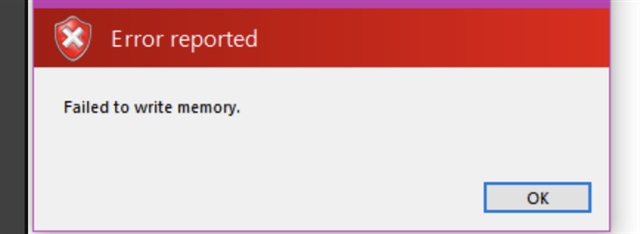
    However I am still receiving the Failed to write to memory error message when trying to flash to the DK using SES. I am trying to use your steps with ninja flash but its not working.

    C:\Nordic\ncs\nrf\applications\asset_tracker\build>ninja flash
    [0/1] cmd.exe /C "cd /D C:\Nordic\ncs\nrf\applications\asset_tracker\build\zephyr\...l west bootstrapper with: 'pip install west --user', and thereafter 'west init'.""
    West was not found in path. To support 'C:/ProgramData/chocolatey/bin/ninja.exe flash', please install west bootstrapper with: 'pip install west --user', and thereafter 'west init'.

    C:\Nordic\ncs\nrf\applications\asset_tracker\build>pip install west --user
    Requirement already satisfied: west in c:\users\XXXX\appdata\roaming\python\python37\site-packages (0.5.4)
    Requirement already satisfied: PyYAML in c:\python37\lib\site-packages (from west) (3.13)
    Requirement already satisfied: colorama in c:\python37\lib\site-packages (from west) (0.4.1)
    Requirement already satisfied: pykwalify in c:\python37\lib\site-packages (from west) (1.7.0)
    Requirement already satisfied: docopt>=0.6.2 in c:\python37\lib\site-packages (from pykwalify->west) (0.6.2)
    Requirement already satisfied: python-dateutil>=2.4.2 in c:\python37\lib\site-packages (from pykwalify->west) (2.7.5)
    Requirement already satisfied: six>=1.5 in c:\python37\lib\site-packages (from python-dateutil>=2.4.2->pykwalify->west) (1.12.0)

    Are the steps above correct? I did ninja and then ninja flash and then it asked me to install west and I did west init but that did not work either.

    Thanks

  • Could be that west was not properly installed. 

    Please see this page on how to install west. In short, you will need to run:

    # Linux
    pip3 install --user west
    
    # macOS and Windows
    pip3 install west

    You should then change into your ncs/folder (the one that contains the zephyr, nrf, mcuboot, and nrfxlib folders) and run:

    west init -l nrf/

    Once that is done you can run:

    west update

Related