

1.do I need to write a XX_client.c and XX_server.c myself ? is there a basic model that I can build on it ?
2.I need myself model to send a custom message, how to do that ?
1.do I need to write a XX_client.c and XX_server.c myself ? is there a basic model that I can build on it ?
2.I need myself model to send a custom message, how to do that ?
Hi ycp,
I am pretty new to the NRF52 ecosystem and so I was wondering the same. After a lot of research and trial & error I found the following:
A model_init_cb function can be specified in the init_params of the mesh_stack_init function. In your model_init_cb function this should be done:
The function that actually adds the model is access_model_add. This function takes two arguments, access_model_add_params_t and access_model_handle_t which is just a uint16_t. Here is a code example of my usecase:
uint16_t model_handle;
access_model_add_params_t add_params =
{
.model_id = ACCESS_MODEL_VENDOR(0xFFAA, 0xF001), // Format of ACCESS_MODEL_VENDOR is (model_id, company_id)
.element_index = 0,
.p_opcode_handlers = &m_opcode_handlers[0],
.opcode_count = ARRAY_SIZE(m_opcode_handlers),
.p_args = NULL,
.publish_timeout_cb = publish_interval_cb
};
uint32_t status = access_model_add(&add_params, &model_handle);
Some of the Parameters inside the access_model_add_params_t need some explaining:
- model_id: The Model ID is used for identifying predefined Models, like the Simple_OnOff_Client you are probably using. If you want to make your own you you can choose your own ID and Company value. What I have found is, that the two MSB of these values should be 1 (0xC0 or higher).
- element_index: Defines in which element your model will be imported. Health and Config Server are at index 0.
- p_opcode_handlers: This contains your OpCodes and should look something like this:
static const access_opcode_handler_t m_opcode_handlers[] =
{
{ACCESS_OPCODE_VENDOR(0xC1, 0xF001), your_opcode_handler_function},
};
// Format of ACCESS_OPCODE_VENDOR is (opcode, company_id)
// Again what I have found is, that the two MSB of these values should be 1 (0xC0 or higher).
// Your OpCode Handler Function should look like this:
// static void your_opcode_handler_function(access_model_handle_t handle, const access_message_rx_t * p_rx_msg, void * p_args);
- p_args: Can be any additional arguments
- publish_timeout_cb: Haven't played around with it yet, currently is just an empty function for me.
After calling access_model_add you should call access_model_subscription_list_alloc, to allow it to subscribe to addresses. If both of these functions return the status 0 (NRF_SUCCESS) your model is added.
To send data you can now use the access_model_publish function. In my example I have it bound to a button in the button event handler. The parameter for the function look like this:
const uint8_t data[] = {0x00};
const access_message_tx_t msg = {
.opcode = ACCESS_OPCODE_VENDOR(0xC2, 0xF001), // Format of ACCESS_OPCODE_VENDOR is (opcode, company_id)
.p_buffer = &data,
.length = ARRAY_SIZE(data),
.force_segmented = false,
.transmic_size = NRF_MESH_TRANSMIC_SIZE_SMALL,
.access_token = nrf_mesh_unique_token_get()
};
access_model_publish(model_handle, &msg);
Here you can now specify your own data. You could make a Structure with all your Data and a Function which converts it to a uint8_t Array, aswel as a function which can then convert it back from a uint8_t Array to your Structure.
For most of the Information I used the Mesh SDK Documentation: www.nordicsemi.com/.../index
I hope this was helpful and if you have any more questions feel free to ask.
Cheers,
Kilian

yes ,it's very helpful ,thank you for shre your experience , but there are still have some detail , i can't figure it out ?
0.I know the model add process basically now , but dont know the detail yet.
1.if we define a server type compare to __generic_onoff_server_t
struct __vendor_xx_server_t
{
/** Model handle assigned to this instance. */
access_model_handle_t model_handle;
/** Tid tracker structure. */
tid_tracker_t tid_tracker; .........................does this member must include??
/** Model settings and callbacks for this instance. */
vendor_xx_server_settings_t settings; ..........................and this menber
}
and the client ........................
struct __generic_onoff_client_t
{
/** Model handle assigned to this instance */
access_model_handle_t model_handle;
/** Holds the raw message packet data for transactions */
generic_onoff_client_msg_data_t msg_pkt; .........................does this member must include??
/* Acknowledged message context variable */
access_reliable_t access_message; ..................I thanke maybe user access_model_reliable_publish more better
/** Model settings and callbacks for this instance */
generic_onoff_client_settings_t settings; .........................does this member must include??
};
2.Because i dont know if don't use some parament , does the state will stable , parament like transition_time_ms , tid ..., what those parament used for ?
1.yes ,you are right , now i create server_model successfully ,use mesh app can send message ,and it can return some message .
2.but send from a board client_model ,it is failed , but log show it was transmitted .
3. because i have no 2 J-LINK, i can not see the log both , when i drop the J-LINK the board seems can not run. i am so new to nrf52832,maybe i use the wrong way to download the firmware ,can you show me the wright way? thank you. i am use the SEGGER embedded studio IDE .
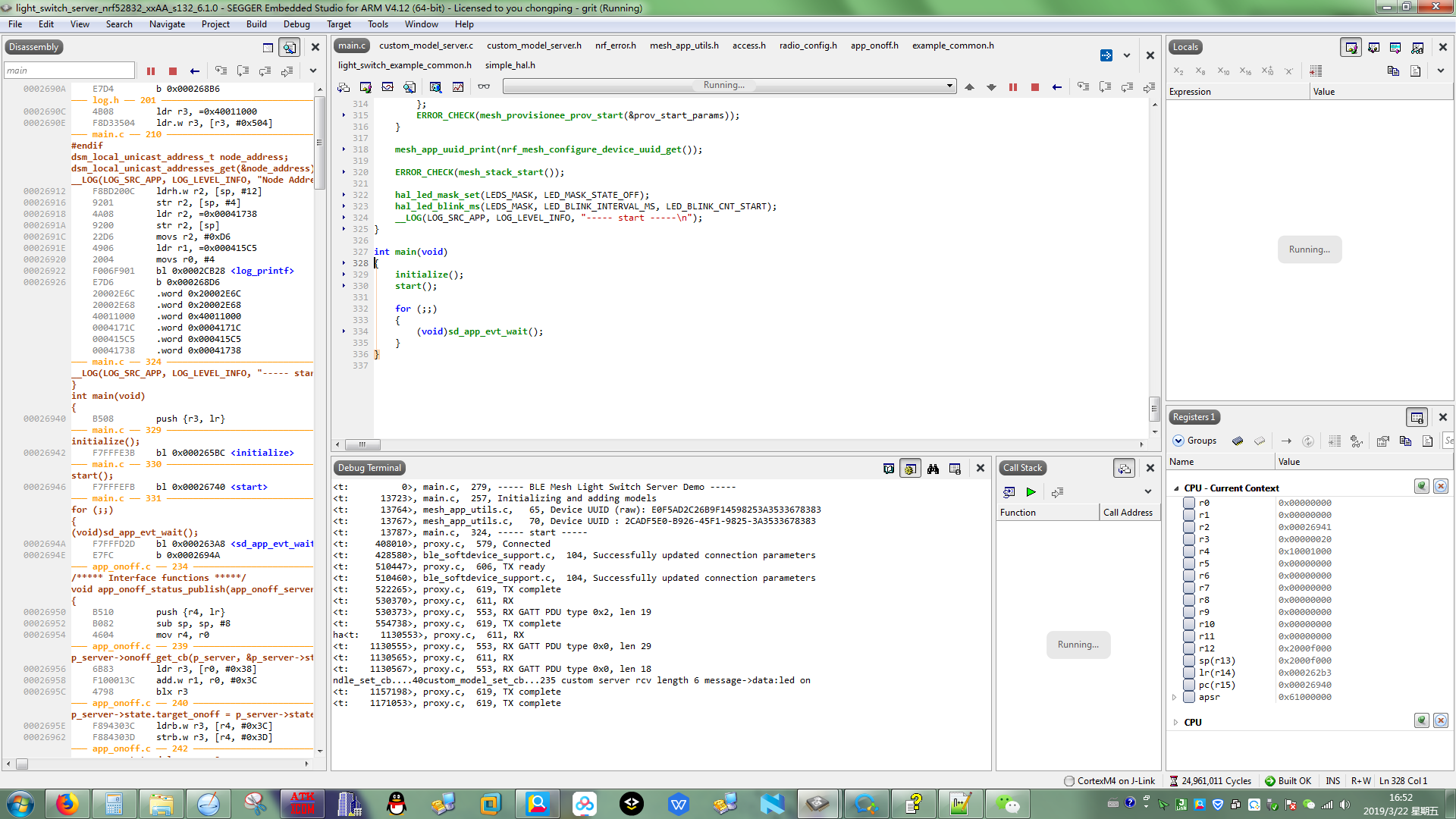
4.below is my client_model functions , it runs no error but can not transmit message out :
0).................................................client struct..............................................................
struct __custom_model_client
{
access_model_handle_t model_handle;
custom_status_cb_t status_cb;
custom_model_timeout_cb_t timeout_cb;
struct
{
bool reliable_transfer_active;
uint8_t* data;
uint16_t data_lenth;
} state;
};
1).....................................................init client.....................................................
uint32_t custom_model_client_init(custom_model_client_t * p_client, uint16_t element_index)
{
uint32_t status;
if (p_client == NULL ||
p_client->status_cb == NULL)
{
return NRF_ERROR_NULL;
}
access_model_add_params_t init_params;
init_params.model_id.model_id = CUSTOM_MODEL_CLIENT_ID ;
init_params.model_id.company_id = CUSTOM_MODEL_COMPANY_ID;
init_params.element_index = element_index;
init_params.p_opcode_handlers = &m_opcode_handlers[0];
init_params.opcode_count = sizeof(m_opcode_handlers) / sizeof(m_opcode_handlers[0]);
init_params.p_args = p_client;
init_params.publish_timeout_cb = handle_publish_timeout;
status = access_model_add(&init_params, &p_client->model_handle);
if (status == NRF_SUCCESS)
{
status = access_model_subscription_list_alloc(p_client->model_handle);
}
return status;
}
2).....................................................set.....................................................
uint32_t custom_model_client_set(custom_model_client_t * p_client, uint8_t* data , uint16_t length)
{
uint32_t status;
if (p_client == NULL || p_client->status_cb == NULL)
{
return NRF_ERROR_NULL;
}
else if (p_client->state.reliable_transfer_active)
{
return NRF_ERROR_INVALID_STATE;
}
printf("\n data:%s...lengh:%d \n",data,length);
if (access_reliable_model_is_free(p_client->model_handle))
{
uint32_t status = send_reliable_message(p_client,CUSTOM_MODEL_OPCODE_SET,data,length);
if (status == NRF_SUCCESS)
{
p_client->state.reliable_transfer_active = true;
}
}
else
{
printf("[error]model busy ...\n");
return NRF_ERROR_BUSY;
}
printf("%s...status:%d \n",__FUNCTION__,status);
return status;
}
3).....................................................application demo.....................................................
{
memset(custom_data,0,sizeof(custom_data));
i++;
if(i%2==0)
{
memcpy(custom_data,"led on",strlen("led on"));
}
else
{
memcpy(custom_data,"led off",strlen("led off"));
}
status = access_model_publish_address_set(custom_client.model_handle,publish_address_handle_dev);
(void)access_model_reliable_cancel(custom_client.model_handle);
custom_model_client_set(&custom_client,custom_data, strlen(custom_data));
hal_led_pin_set(BSP_LED_1, (bool)(i&(0x01)));
break;
}
Hi,
to program you can simply press the green play-button, as you probably did. To play it safe(and erase provisioning data) you can also do "Target -> Connect J-Link" and then "Target -> Erase all". I usually only do this, if I program a completely different example on the board or if I get a Mesh assert error right at the start.
You are using the access_model_publish_address_set-function to set the publication address. You can check if this succeeds by using the function ERROR_CHECK() on the status you get back.
But I suspect, that before setting the publication address you first need to bind a appkey to the model. I think this is done by the provisioner.
I am using the nrf-mesh app on android and provision the nodes by hand. This means I do not bind the appkey as well as set the publication address in my program.
Hi Tierli,
i find i used printf() to print log , when i comment all the printf() functions , it works!! maybe it is the reason ,after comment them all,drop J-LINK can still run !! i do not know why . i thank i should use __LOG instead , but i do not fully kown what it is..
That makes sense. I think printf() sends the data to stdout and LOG will use the J-Link RTT.
yes!
yes!