How are you testing whether you receive information on the PC side? Are you running the example in debug mode in Segger Embedded Studio (SES)? The serial example is used together with the interactive py software, so I am not sure it will work out of the box to send information from a device to the RTT terminal if that is what you want to do.
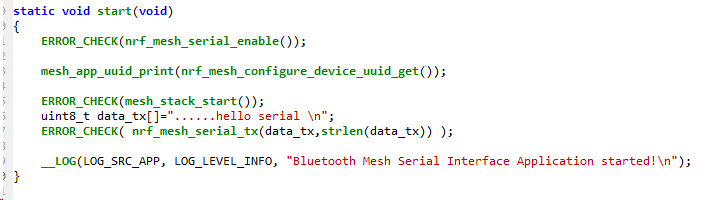
Do you get any error codes after you run the ERROR_CHECK(nrf_mesh_serial_tx(data_tx,strlen(data_tx))); line?
You can use the J-Link RTT Viewer application to get logging information for the example or run a debug session in SES.
How are you testing whether you receive information on the PC side? Are you running the example in debug mode in Segger Embedded Studio (SES)? The serial example is used together with the interactive py software, so I am not sure it will work out of the box to send information from a device to the RTT terminal if that is what you want to do.
Do you get any error codes after you run the ERROR_CHECK(nrf_mesh_serial_tx(data_tx,strlen(data_tx))); line?
You can use the J-Link RTT Viewer application to get logging information for the example or run a debug session in SES.
0.it have two COM , the board P0.6 P0.8 (COM12) , the SEGGER has a COM4 , i think this example use COM12,is it right?
1.YES,i use SES,I use P0.6 P0.8 as uart serial , i am not use the python script now , i just use a teminal tool to RX / TX ,now it can receive message from PC ,but PC can not receive from the board .
2.besides , when PC send the correct format massage like : 04 20 01 07 01 , it can works well , if PC send the wrong massage like 05 20 01 07 01 ,or 04 20 01 07 01 02 , it will block ,and send the correct massage again ,it still not work? seem crashed, so i want know when the board receive wrong massage ,what it will do?
1.I do not want to send to RTT terminal now , I want to send to PC throught UART , ERROR_CHECK(nrf_mesh_serial_tx(data_tx,strlen(data_tx))); returns no error.
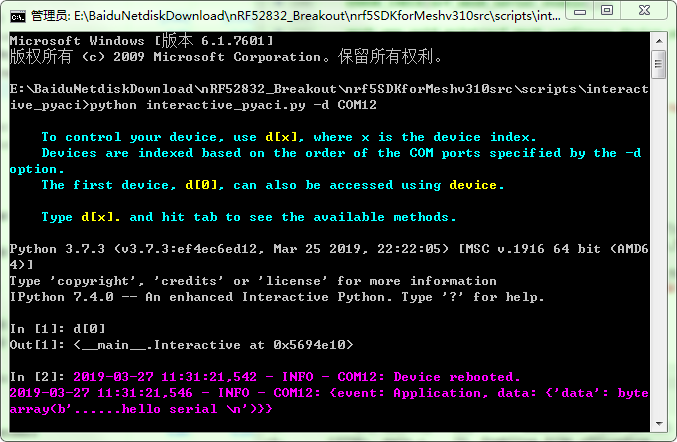
2.I try the python interactive ,it shows below , but it not what i want , i want it send to TX pin ,and in the futrue ,it can connect to anther board: