This post is older than 2 years and might not be relevant anymore
More Info: Consider searching for newer posts

Zigbee debugging

Hi,

I'm using the NRF52840 with the "nRF5_SDK_for_Thread_and_Zigbee_2.0.0".

I tested the zigbee light_bulb example and zigbee light_bulb + ble. It works fine so my next step was to do combination with my own ble service in a existing project.
In my new project the ble part works fine. The zigbee (still the light bulb example) part does not work at the moment. When i sniff, i don't see the Beacon request frames.

When i look at the uart logging i still see "Production config is not present or invalid" and "Failed to join network. Status: -1".

extra info:
i used sd_softdevice_vector_table_base_set((uint32_t) vector_table) to change the vector table to RAM. For the Zigbee part i registered the following interrupts: 

SysInt_RegisterIsr(TIMER3_IRQn, (ISR_CALLBACK) TIMER3_IRQHandler);
SysInt_RegisterIsr(SWI3_EGU3_IRQn, (ISR_CALLBACK) SWI3_IRQHandler);
SysInt_RegisterIsr(RTC2_IRQn, (ISR_CALLBACK) RTC2_IRQHandler);

this is needed if i look at the documentation. 

My goal is to let the zigbee and the BLE part to work together in my code. Any tips how to debug the Zigbee part so i can figure out the problem?

Best regards,

Mathias

Parents
  • Hello

    We are still unable to connect with zigbee using "nRF5_SDK_for_Thread_and_Zigbee_3.0.0".  However, with the "eddystone" example (multiprotocol / zigbee / ble), we see that the NRF52840 DK almost immediately a zigbee-connection can be made with our Amazon Alexa. 

    When we use the SDK for our own project, also BLE+zigbee, the BLE stack is up and running and advertising.  The zigbee stack also is up and running, but we always get the message "Failed to join network. Status: -1".  Our own project is derived from the "eddystone" example.

    This is wat we have tried:

     - We stripped the eddystone example from cryptography, pwm and the eddystone functionality itself.  What remains is the BLE stack init, scheduler init and zigbee init.  Zigbee connection still works.

     - Our project uses exact the same sdk_config.h file

     - Our project uses exact the same "system_nrf52840.c" file.  We also use the "multiprotocol_802451_config.h" file.

     - Our Zigbee initialisation is exact the same as in the eddystone example.  The stack runs because the "zboss_signal_handler" is periodically called.

     - Beacon requests are send too.  The "zb_set_network_router_role" is set to ZB_TRANSCEIVER_ALL_CHANNELS_MASK.

     - I have enable the Zboss logging.  This is what we get out from it.  I hope you can help us in some way.  If you need some other info / code fragments,... , please ask.

    <info> app: Stack init done

    <info> app: StartAdvPublic

    <info> zboss:  DE AD 0E 02 00 00 00 00|........

    <info> zboss:  7A 00 00 0F 00 F8 FF 07|z.......

    <info> zboss:  DE AD 0A 02 00 00 01 00|........

    <info> zboss:  47 01 6F 00 DE AD 0A 02|G.o.....

    <info> zboss:  00 00 02 00 47 01 99 00|....G...

    <info> zboss:  DE AD 0A 02 00 00 03 00|........

    <info> zboss:  47 01 F1 00 DE AD 0A 02|G.......

    <info> zboss:  00 00 04 00 48 01 36 00|....H.6.

    <info> zboss:  DE AD 0A 02 00 00 05 00|........

    <info> zboss:  B9 08 83 00 DE AD 0A 02|........

    <info> zboss:  00 00 06 00 B9 08 86 00|........

    <info> zboss:  DE AD 0A 02 00 00 07 00|........

    <info> zboss:  B9 08 8A 00 DE AD 0A 02|........

    <info> zboss:  00 00 08 00 B9 08 8D 00|........

    <info> zboss:  DE AD 0A 02 00 00 09 00|........

    <info> zboss:  47 01 94 00 DE AD 0A 02|G.......

    <info> zboss:  00 00 0A 00 69 00 5C 00|....i.\.

    <info> zboss:  DE AD 16 02 00 00 0B 00|........

    <info> zboss:  69 00 77 00 0C 00 00 00|i.w.....

    <info> zboss:  8A 02 00 00 C3 00 00 00|........

    <info> zboss:  DE AD 0A 02 00 00 0C 00|........

    <info> zboss:  69 00 79 00 DE AD 0E 02|i.y.....

    <info> zboss:  00 00 0D 00 2B 08 96 00|....+...

    <info> zboss:  01 00 00 00 DE AD 0A 02|........

    <info> zboss:  00 00 0E 00 90 0C DD 00|........

    <info> zboss:  DE AD 16 02 00 00 0F 00|........

    <info> zboss:  90 0C A8 00 00 80 00 00|........

    <info> zboss:  00 00 00 00 08 00 00 00|........

    <info> zboss:  DE AD 16 02 00 00 10 00|........

    <info> zboss:  90 0C A8 00 01 80 00 00|........

    <info> zboss:  01 00 00 00 08 00 00 00|........

    <info> zboss:  DE AD 16 02 00 00 11 00|........

    <info> zboss:  90 0C A8 00 02 80 00 00|........

    <info> zboss:  02 00 00 00 08 00 00 00|........

    <info> zboss:  DE AD 16 02 00 00 12 00|........

    <info> zboss:  90 0C A8 00 03 80 00 00|........

    <info> zboss:  03 00 00 00 08 00 00 00|........

    <info> zboss:  DE AD 16 02 00 00 13 00|........

    <info> zboss:  90 0C A8 00 04 80 00 00|........

    <info> zboss:  04 00 00 00 08 00 00 00|........

    <info> zboss:  DE AD 16 02 00 00 14 00|........

    <info> zboss:  90 0C A8 00 05 80 00 00|........

    <info> zboss:  05 00 00 00 08 00 00 00|........

    <info> zboss:  DE AD 16 02 00 00 15 00|........

    <info> zboss:  90 0C A8 00 06 80 00 00|........

    <info> zboss:  06 00 00 00 08 00 00 00|........

    <info> zboss:  DE AD 16 02 00 00 16 00|........

    <info> zboss:  90 0C A8 00 1F 80 00 00|........

    <info> zboss:  07 00 00 00 08 00 00 00|........

    <info> zboss:  DE AD 16 02 00 00 17 00|........

    <info> zboss:  90 0C B6 00 00 00 00 00|........

    <info> zboss:  00 00 00 00 09 00 00 00|........

    <info> zboss:  DE AD 16 02 00 00 18 00|........

    <info> zboss:  90 0C B6 00 01 00 00 00|........

    <info> zboss:  01 00 00 00 09 00 00 00|........

    <info> zboss:  DE AD 16 02 00 00 19 00|........

    <info> zboss:  90 0C B6 00 02 00 00 00|........

    <info> zboss:  02 00 00 00 09 00 00 00|........

    <info> zboss:  DE AD 16 02 00 00 1A 00|........

    <info> zboss:  90 0C B6 00 03 00 00 00|........

    <info> zboss:  03 00 00 00 09 00 00 00|........

    <info> zboss:  DE AD 16 02 00 00 1B 00|........

    White small square[1;31mLogs dropped (162)White small square[0m

    <info> zboss:  BC 08 22 01 DE AD 0A 02|..".....

    <info> zboss:  41 00 66 00 B9 08 23 04|A.f...#.

    <info> zboss:  DE AD 0A 02 41 00 67 00|....A.g.

  • This is a Zboss log of a successful connection with the eddystone to Alexa:

    <info> zboss:  0B 00 00 00 FF FF FF FF|........

    <info> app: Failed to join network. Status: -1

    <info> zboss:  05 00 00 00 DE AD 1E 02|........

    <info> zboss:  49 08 3C 00 AA 01 A0 01|I.<.....

    <info> zboss:  01 00 00 00 00 00 00 00|........

    <info> zboss:  00 00 00 00 00 00 00 00|........

    <info> zboss:  00 00 00 00 DE AD 12 02|........

    <info> zboss:  59 0A 3D 00 2B 08 73 05|Y.=.+.s.

    <info> zboss:  00 00 00 00 01 00 00 00|........

    <info> zboss:  DE AD 16 02 59 0A 3E 00|....Y.>.

    <info> zboss:  45 01 1D 01 5C D3 00 00|E...\...

    <info> zboss:  19 00 00 00 00 00 00 00|........

    <info> zboss:  DE AD 1A 02 79 0A 3F 00|....y.?.

    <info> zboss:  2B 08 2E 07 00 00 00 00|+.......

    <info> zboss:  19 21 00 00 19 00 00 00|.!......

    <info> zboss:  00 00 00 00 DE AD 12 02|........

    <info> zboss:  79 0A 40 00 2B 08 2F 07|y.@.+./.

    <info> zboss:  DA DD B1 0B 1D 53 CF 95|.....S..

    <info> zboss:  DE AD 1A 02 80 0A 43 00|......C.

    <info> zboss:  44 01 49 00 00 00 00 00|D.I.....

    <info> zboss:  00 00 00 00 00 00 00 00|........

    <info> zboss:  00 00 00 00 DE AD 0E 02|........

    <info> zboss:  7A 0A 41 00 7A 6E 08 03|z.A.zn..

    <info> zboss:  05 00 00 00 DE AD 0E 02|........

    <info> zboss:  7A 0A 42 00 7A 6E 08 03|z.B.zn..

    <info> zboss:  05 00 00 00 DE AD 16 02|........

    <info> zboss:  AC 0A 45 00 2B 08 FA 03|..E.+...

    <info> zboss:  0D 00 00 00 00 00 00 00|........

    <info> zboss:  05 00 00 00 DE AD 0E 02|........

    <info> zboss:  A4 0A 44 00 7A 6E 75 02|..D.znu.

    <info> app: Joined network successfully

    <info> zboss:  02 00 00 00 DE AD 0E 02|........

    <info> zboss:  5C 0B 46 00 2F 08 6B 01|\.F./.k.

    <info> zboss:  02 00 00 00 DE AD 0E 02|........

    <info> zboss:  12 13 4D 00 2F 08 8C 01|..M./...

    <info> zboss:  0A 00 00 00 DE AD 0E 02|........

    <info> zboss:  41 0D 47 00 7A 6E 08 03|A.G.zn..

    <info> zboss:  03 00 00 00 DE AD 0E 02|........

    <info> zboss:  52 0D 48 00 7A 6E 08 03|R.H.zn..

    <info> zboss:  03 00 00 00 DE AD 0E 02|........

    <info> zboss:  67 0D 49 00 7A 6E 08 03|g.I.zn..

    <info> zboss:  03 00 00 00 DE AD 0E 02|........

    <info> zboss:  7A 0D 4A 00 7A 6E 08 03|z.J.zn..

    <info> zboss:  03 00 00 00 DE AD 0E 02|........

    <info> zboss:  3F 0E 4B 00 7A 6E 08 03|?.K.zn..

    <info> zboss:  03 00 00 00 DE AD 0E 02|........

    <info> zboss:  A8 12 4C 00 7A 6E 08 03|..L.zn..

  • Could it be possible that the commissioning is failing ? This could explain why I don't see the APS packets in my project, while I do see some APS packets in the "eddystone" example.

    But how can I figure out what is going wrong now ?

  • Further investigation from my part reveils that in my project, the call to zboss_signal_handler(zb_uint8_t param) for signal ZB_BDB_SIGNAL_DEVICE_REBOOT, the param argument is 0x0B.  The status becomes RET_ERROR.

    While in the example project, the param argument is 0x0A and the status becomes RET_OK.

    Maybe this information helps to give some support from the Nordic engineers ?

    Thanks

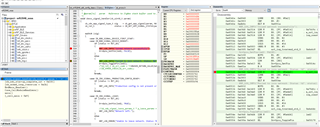
    The screenshot below shows my current call stack, cpu registers and coe dissambly

  • Hello,

    I have forwarded your logs for decryption. Maybe they can give some more hints on what's going on.

    You have the same network settings in your application as it was in the unmodified eddystone example? Same zigbee channel?

    It may be if you are running the examples on the same board that your device thinks it is already commisioned, if the flash is not erased properly. Can you make sure that you erase all the flash before you try to run your custom example? You can use "nrfjprog -e" if you have the Nordic's command line tools installed. Then try to flash your application.

    If the board thinks it is commissioned, and tries to join the network as another device, Alexa may reject it. 

    Can you try to erase the chip, run your application, and let me know if that makes any difference?

    Best regards,

    Edvin

Reply
  • Hello,

    I have forwarded your logs for decryption. Maybe they can give some more hints on what's going on.

    You have the same network settings in your application as it was in the unmodified eddystone example? Same zigbee channel?

    It may be if you are running the examples on the same board that your device thinks it is already commisioned, if the flash is not erased properly. Can you make sure that you erase all the flash before you try to run your custom example? You can use "nrfjprog -e" if you have the Nordic's command line tools installed. Then try to flash your application.

    If the board thinks it is commissioned, and tries to join the network as another device, Alexa may reject it. 

    Can you try to erase the chip, run your application, and let me know if that makes any difference?

    Best regards,

    Edvin

Children
  • Hello

    Thanks for the suggestion, but I'm afraid it doesn't work.

    I have erased the chip with nrfjprog and programmed my project.
    My project and 'eddystone' both running on same zigbee channel (25)

    The 'eddystone' connects with Alexa immediately again.
    My project doesn't connect with Alexa.

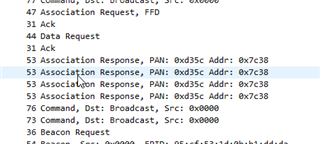
    The difference I see in the packet sniffer is that, for the eddystone project, a APS packet is send after the successful association.  While in my project, this packet is never send.  The source of that packet is 0x0000 (this packet is probably coming from Alexa) - The destination is 0x0f2c (probably the address of my development board ?)

    It might be that Alexa rejects the connection from my project for some reason ?

    edit:

    Another difference is that in my project I always get 4x an association response.  While in the eddystone example, there is only 1 association response:

  • Hi

    It seems we have solved the problem.  Our systick timer was using TIMER_1, which is also used by the radio driver.

    I see the APS packets coming and Alexa recognizes our device.

    Thanks for your help anyway.

Related