This post is older than 2 years and might not be relevant anymore
More Info: Consider searching for newer posts

nRF9160 Cannot make Kconfig options have an effect in Segger Embedded Studio

I have a nRF9160 DK and I'm adapting the asset tracker to connect to our own AWS cloud solution.

I see the code nrf_cloud uses defines coming from the Kconfig at \nrf\subsys\net\lib\nrf_cloud\Kconfig.
For example: NRF_CLOUD_HOST_NAME, NRF_CLOUD_PORT, NRF_CLOUD_PROVISION_CERTIFICATES, NRF_CLOUD_CERTIFICATES_FILE etc

How do I make changes to the Kconfig have an effect when building in Segger Embedded Studio? No matter what I do, changes to this Kconfig doesn't have an effect to the built result.

Am I missing the point, how it's supposed to work perhaps?
Anyone who can educate me, how to work "correctly" with this, would be appreciated.

I tried to build from commandline, but couldn't make it work, so I'm sticking with Segger Embedded Studio so far.
Build platform: win7

Johan

Parents
  • Hi Johan, 

    The NCS tag v0.4.0 just got released! https://developer.nordicsemi.com/nRF_Connect_SDK/doc/0.4.0/nrf/doc/release-notes-0.4.0.html

    Please go to:

    cd ncs/nrf
    git checkout master
    git pull
    git checkout v0.4.0
    west update

    To get the stable release.

    Remember that you need to flash the nrf52 (nrf52840_pca10090) on the nRF91 DK with the HCI_UART sample.

    as described here: https://developer.nordicsemi.com/nRF_Connect_SDK/doc/latest/nrf/samples/nrf9160/lte_ble_gateway/README.html

    Best Regards,

    Martin L.

  • Some more questions for you Martin:

    1.How do I know what kind of connection the LTE is using, with the sample BLE_LTE_gateway?
    I want to be in control of and set it to NB-LTE forced, and also read and verify this setting has been taken effect.
    How can I accomplish this?

    2. What is "Security tag to use for nRF Cloud connection"? Is it for AWS or just your own solution? I haven't found any documentation on AWS of this yet.

    Cheers,
    Johan

  • I tried with another e-sim card and I get the same reaction. led 3 blinks, not led 4 (which should also blink).

    In the code:

    /**@brief Callback for nRF Cloud events. */
    static void cloud_event_handler(const struct nrf_cloud_evt *evt)
    {
    int err;

    switch (evt->type) {

    case NRF_CLOUD_EVT_TRANSPORT_CONNECTED:
    printk("NRF_CLOUD_EVT_TRANSPORT_CONNECTED\n");
    break;

    case NRF_CLOUD_EVT_USER_ASSOCIATION_REQUEST:
    printk("NRF_CLOUD_EVT_USER_ASSOCIATION_REQUEST\n");
    on_user_association_req(evt);
    break;


    I need the 2nd case to be triggered, but the nrfCloud doesn't send out the request, just instead sends connected - which is useless, since I have deleted the LTE device from the web - so it should send the user association request. Or is there something I need to do to disassociate the e-sims with the cloud which is an option I missed in your nrfCloud-site?

    I'm stuck here Martin.

  • Hi Johan, 


    I assume that you know you can get a network connection ?

    This can be verified sending AT commands to the modem when running LTE Link Monitor.


    We can now try the "asset_tracker" application which will connect to the nrf cloud.

    I am adding the precompiled .hex file of the "Asset_tracker" merged with the "Secure Partition Manager" (SPM):

    asset_tracker.hex

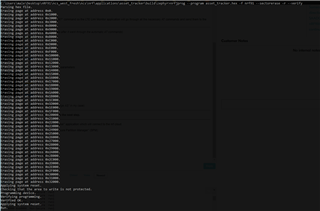
    To flash this .hex file please use the following command in the command line:

    nrfjprog --program asset_tracker.hex -f nrf91 --sectorerase -r --verify

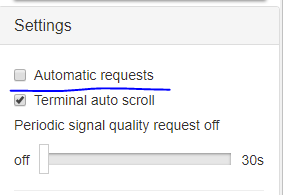
    Note: You can use the LTE Link Monitor as a standard serial output Terminal if you deselect the "Automatic requests" setting:

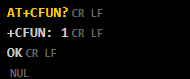
    This will prohibit that the LTE Link Monitor will run through the script  sending AT commands when sending for example "AT+CFUN?". (it will only send it once)


    Please have the LTE Link Monitor open while testing the "asset_tracker" application to easier see what is actually going on.

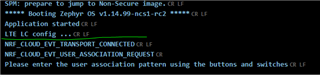
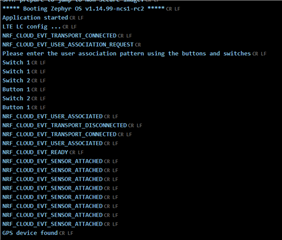
    Here you can see the output after the "asset_tracker" got a connection with the nrf cloud server.

    - "LTE LC config ..." is showing while the kit is trying to get a network attachment, and the following output is from the application itself saying it found and got access to the nrf cloud server.

    If you get the same output, you can now go into www.nrfcloud.com and pair your nRF91DK with your account following the steps on the nrf cloud webpage. (you do not need to register the iBasis SIM card more than once)

    After you have followed the Pairing sequence given by nrfcloud you should see this verified in the output terminal as well.

    Now you should be connected to nrfcloud.


    Extra tip:

    For faster attachment with the network the next time you power on the board is to save the information about the network in the modem flash.

    To do this just send the AT command "AT+CFUN=0".

    This will Power off the modem as well as saving the network information in the modem flash.

    (note that you need to power cycle the board after this command to turn on the modem)


    Please share some logs/snippets if you have further issues.

    Best Regards,
    Martin  L.

  • Martin, the pairing has worked before.
    It has stopped working.

    Your cloud solution doesn't send pairing commands back to my DK anymore.

    This is the problem.

    I dont have problem with getting an LTE-connection, as you are suggesting.
    I dont need to try those steps you put below.

    Look at this log:
    ***** Booting Zephyr OS v1.14.99-ncs1 *****
    Application started
    Initializing Bluetooth..
    Establishing LTE link (this may take some time) ...
    Bluetooth ready
    Scanning...
    Device found: c7:ed:e7:7e:0f:f0 (random)
    Connected: c7:ed:e7:7e:0f:f0 (random)
    Orientation: 0
    NRF_CLOUD_EVT_TRANSPORT_CONNECTED


    It's connected to the nRFCloud, but the cloud sends NRF_CLOUD_EVT_TRANSPORT_CONNECTED.
    Even If go through the pairing, It STILL sends NRF_CLOUD_EVT_TRANSPORT_CONNECTED ONLY.

    The code needs to receive: NRF_CLOUD_EVT_USER_ASSOCIATION_REQUEST


  • Martin:

    Trying to download your attachment : (asset_tracker.hex)
    You do not have permission to view this directory or page.


Reply Children
Related