This post is older than 2 years and might not be relevant anymore
More Info: Consider searching for newer posts

No connection to network after update - No LED indication

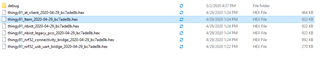
I have update my thingy91 with thingy91_ltem_dfu_2020-04-29_bc7ade8b.hex and mfwnrf9160120 as I was not longer able see anything in nrfcloud.The 

Thingy91 does not connect to the network (I am using the SIM provided in the package and there is enough allowance there). There is no LED indication when the device starts.

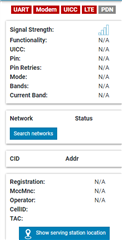
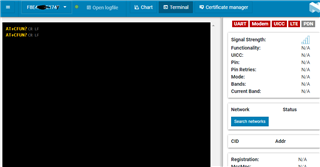
On nrfConnect i am able to see the device and also update firmware. On LTE Monitor it does not look to connect to a network ... AT commands are timing-out.

Can you please advice? How to bring the device back to life?

Parents Reply Children
  • Yes, it may give you the feedback that it has successfully programmed your device. However, if you program the wrong .hex file, you will see these kinds of issues.

    As explained in the thingy91_fw_2020-04-29_bc7ade8b\CONTENTS.txt when programming with MCUboot or USB, you will need to use images from thingy91_fw_2020-04-29_bc7ade8b\images_dfu_hex.

    Here is what you need to do, if you have verified that modem is programmed, skip to Update application.


    Update modem

    1. Make sure SW2 is in the nRF91 position.
    2. Start MCUboot (Recovery mode) by pressing SW3 while powering on the Thingy:91. (No LED will blink)
    3. In the nRF Programmer app select your Thingy:91, select Enable MCUboot in the Device pane on the right.
    4. Load modem image: thingy91_fw_2020-04-29_bc7ade8b/mfwnrf9160120.zip 
    5. Click write.
      1. Note: The contents of the flash memory are deleted and the applications must be reprogrammed (see below)
      2. If not successful, please provide a screenshot of the error

    Update Application

    1. Based on the steps above, start MCUboot again.
    2. Select device
    3. Load image thingy91_ltem_dfu_2020-04-29_bc7ade8b.hex
    4. Enable MCUboot
    5. Click write and the MCUboot DFU dialog box appears.
    6. Click write.

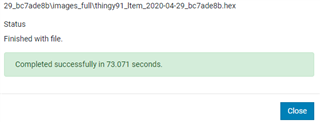
    Once "Completed successfully", your device should start pulsing LED. Power cycle the Thingy:91 and then everything should appear as normal in LTE Link Monitor. 


    Kind regards,
    Øyvind

  • I have the same problem, but the above procedure does not solve it. (The steps under "update modem" are incorrect for USB programming using nRF Connect v3.3.3 - Programmer.)

    I too have just received my Thing91, and following the online guide attempted to update first using the same files as listed above, and got the same result as the OP.

    I followed the instructions at https://infocenter.nordicsemi.com/index.jsp?topic=%2Fug_nc_programmer%2FUG%2Fnrf_connect_programmer%2Fncp_updating_modem_thingy91_intro.html,

    but at the end that page says AT+CGMR can be used to check the update. However, when using nRF Connect v3.3.3 - LTE Link Monitor all AT commands time out (my screen looks the same as the OP's).

    Following the Update Application instructions I get the reported result that the load completed successfully in 70.7 seconds, but still no LEDs or AT response.

    What should be my next attempt?

Related