This post is older than 2 years and might not be relevant anymore
More Info: Consider searching for newer posts

SDK UART coexistence example problem

Hello,

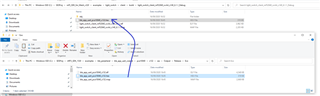
I am trying to follow the tutorial SDK UART coexistence example, but it seems like the last step cannot be completed. As you can see, that .hex file does not exist in the folder. Do you have any suggestion?
Thanks. 

Parents
  • Hi,

    The Output folder in .../pca10040/s132/ses/ and all the files in it are generated when you build your project. Try building the ble_app_uart_coexist example in SES. The folder, and then also the .hex file, should be then generated, and you should be able to find the file.

    Best regards,

    Marte

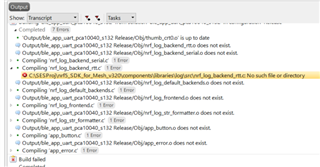
  • Hi. Trying to build the example (did not do any modification), these errors occur:

    The problem is that the components folder does not even exist in the Mesh folder, but rather in the other one (SDK folder). And the global macros in SES are defined as:

    SDK_ROOT=C:\SESProj\nRF5_SDK_1530

    MESH_ROOT=C:\SESProj\nrf5_SDK_for_Mesh_v320

    Do you have any clue why this happens? Thanks.

  • Ms. , is it possible that I  did not do the last step from the coexistence example correctly?

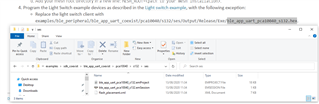
    I just replaced the .hex file:

    Is there some other trick? Thanks!

  • I see in this post that  "SDK UART coexistence example does not work with nRF Mesh APP. You need find some other provisioning ways..." - So, I wonder: is this true Question  

    Could you test this project successfully Grey question

  • Hi,

    I'm sorry for the late reply. I had to test this example myself and it took some time.

    The guide can be a bit confusing when it comes to the last part with the light switch example, but I will try to explain the process here.

    • You need two DKs, one for the light switch server example and one for uart coexistence example.
    • Build and flash the light switch server example as explained in the guide for the example on one of the DKs.
    • Instead of flashing light switch client to the second DK, you should instead flash the SDK uart coexistence example to it, after following the guide for the example (copying the ble_app_uart_coexist folder to examples/ble_peripheral in nRF5 SDK etc.)

    I just tested that this works. However, I used the provisioner example in the nRF Mesh SDK instead of the Mesh app as it fixes everything with provisioning so you don't have to do it manually, which you have to do with the nRF Mesh app. In order to test it with the provisioner example like I did, you should do the following:

    • Build and flash light switch server and uart coexistence on two DKs as explained above.
    • Build and flash the provisioner example on a third DK. I did not have to change or do anything with the example for it to work as intended.
    • Turn on the three DKs and press button 1 on the provisioning board in order to start the provisioning process.
    • When LED 1 on the provisioning board remains lit steadily for a few seconds, all available boards have been provisioned and configured, and you can start testing the example.
    • Open nRF Connect app on your phone and connect to NORDIC_UART (which is the uart coexistence board)
    • Simulate button presses on the uart coexistence board by sending a number (1-4) to it using the nRF Connect App. You will then see the LEDs on the light switch server board are turned on and off. For example, sending 1 will turn on LED1, and 2 will turn it off. You can also check that this is the same as when you press buttons 1 and 2 on the uart coexistence board.

    I hope this helps you understand how to test this out.

    As for the question about the uart coexistence example not working with the nRF Mesh App. This is because the nRF Mesh app does provisioning over GATT, since smart phones don't support provisioning or Mesh activity over ADV. However, the uart coexistence example does not use GATT (both GATT proxy and GATT provisioner bearer are disabled). This is likely because the example is a combination of mesh and BLE examples, so you already have BLE+mesh there, and the the GATT proxy functionality will make it so you kind of get an additional instance of BLE. You could try to implement GATT provisioning and functionality in the example yourself, but I don't know if it will work, and I wouldn't recommend it.

    Best regards,

    Marte

  • Hi Ms.  and thank you very much for the complete and well documented answer!

    I have not answered so far, because I have been waiting for another Development Board, to try the set-up which you proposed. Slight smile

    So my setup is now: 3 Development boards, from which 2 are nRF52840 and one is nRF52833. Unfortunately, it seems more difficult than I thought, to run the mesh on the nRF52833.

    I loaded the light_switch_client_nrf52832_xxAA project and it does advertise in the nRF Mesh App Okso it looks like to code is successfully flashed and the board is responsive. However, neither the button (for the client code), nor the LED (for the server code) are responding. I have a guess that it may only be a problem of I/O routing, that is solvable from the code.

    Do you have an idea how I could make this?

    Thank you very much and I wish you a nice day! Sun with face

  • Hi Marry,

    I'm happy to help!

    If you're programming light_switch_client_nrf52832_xxAA to your nRF52833 DK you will get problems, as that project is for the nRF52832, and should be used if your board is a nRF52 DK. Instead, you should use light_switch_server_nrf52833_xxAA, which is for the nRF52833 DK. The hardware and layout of the DKs are different, so the buttons and LEDs are connected to different GPIOs, and as such, the buttons and LEDs on the nRF52833 DK will not work as expected with a project for another DK. For instance, LED 1 is P0.13 on the the nRF52833 DK, while on the nRF52 DK LED 1 is P0.17. If you want to, you can find the tables for the buttons and LEDs here and here for the nRF52833 DK and nRF52 DK respectively.

    Thank you, and have a great day yourself!

    Best regards,

    Marte

Reply
  • Hi Marry,

    I'm happy to help!

    If you're programming light_switch_client_nrf52832_xxAA to your nRF52833 DK you will get problems, as that project is for the nRF52832, and should be used if your board is a nRF52 DK. Instead, you should use light_switch_server_nrf52833_xxAA, which is for the nRF52833 DK. The hardware and layout of the DKs are different, so the buttons and LEDs are connected to different GPIOs, and as such, the buttons and LEDs on the nRF52833 DK will not work as expected with a project for another DK. For instance, LED 1 is P0.13 on the the nRF52833 DK, while on the nRF52 DK LED 1 is P0.17. If you want to, you can find the tables for the buttons and LEDs here and here for the nRF52833 DK and nRF52 DK respectively.

    Thank you, and have a great day yourself!

    Best regards,

    Marte

Children
No Data
Related