This post is older than 2 years and might not be relevant anymore
More Info: Consider searching for newer posts

SDK UART coexistence example problem

Hello,

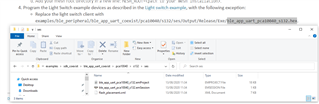
I am trying to follow the tutorial SDK UART coexistence example, but it seems like the last step cannot be completed. As you can see, that .hex file does not exist in the folder. Do you have any suggestion?
Thanks. 

Parents
  • Hi,

    The Output folder in .../pca10040/s132/ses/ and all the files in it are generated when you build your project. Try building the ble_app_uart_coexist example in SES. The folder, and then also the .hex file, should be then generated, and you should be able to find the file.

    Best regards,

    Marte

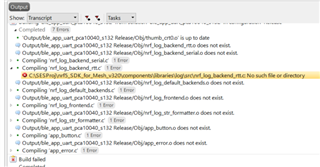
  • Hi. Trying to build the example (did not do any modification), these errors occur:

    The problem is that the components folder does not even exist in the Mesh folder, but rather in the other one (SDK folder). And the global macros in SES are defined as:

    SDK_ROOT=C:\SESProj\nRF5_SDK_1530

    MESH_ROOT=C:\SESProj\nrf5_SDK_for_Mesh_v320

    Do you have any clue why this happens? Thanks.

  • Hi Ms.  and thank you very much for the complete and well documented answer!

    I have not answered so far, because I have been waiting for another Development Board, to try the set-up which you proposed. Slight smile

    So my setup is now: 3 Development boards, from which 2 are nRF52840 and one is nRF52833. Unfortunately, it seems more difficult than I thought, to run the mesh on the nRF52833.

    I loaded the light_switch_client_nrf52832_xxAA project and it does advertise in the nRF Mesh App Okso it looks like to code is successfully flashed and the board is responsive. However, neither the button (for the client code), nor the LED (for the server code) are responding. I have a guess that it may only be a problem of I/O routing, that is solvable from the code.

    Do you have an idea how I could make this?

    Thank you very much and I wish you a nice day! Sun with face

  • Hi Marry,

    I'm happy to help!

    If you're programming light_switch_client_nrf52832_xxAA to your nRF52833 DK you will get problems, as that project is for the nRF52832, and should be used if your board is a nRF52 DK. Instead, you should use light_switch_server_nrf52833_xxAA, which is for the nRF52833 DK. The hardware and layout of the DKs are different, so the buttons and LEDs are connected to different GPIOs, and as such, the buttons and LEDs on the nRF52833 DK will not work as expected with a project for another DK. For instance, LED 1 is P0.13 on the the nRF52833 DK, while on the nRF52 DK LED 1 is P0.17. If you want to, you can find the tables for the buttons and LEDs here and here for the nRF52833 DK and nRF52 DK respectively.

    Thank you, and have a great day yourself!

    Best regards,

    Marte

  • Hi!

    Thank you, again extremely helpful answer! The only difference is that I was using SDK Mesh version 3.2.0. And there was no support for this board. But now I had a look over the newer version and I see that they support nrf52833_xxAA. I will try this now, thank you!! First place

  • Hi ! I have some updates and a question about my progress.

    I installed  SDK Mesh 4.2.0 and SDK 17.0.2, so that I can run the nRF52833 example. 

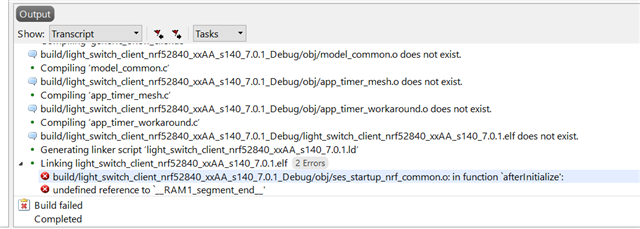
    Unfortunately I get this error and it happens for all projects in my newer Mesh folder. 

    Do you have any idea why this happens? It's an unmodified version, downloaded from the official website.

    As a note, I have included the correct path from Options - Building - global macros. Slight smile

    Thank you in advance!

  • Hi Marry,

    The examples in nRF5 SDK for Mesh v4.2.0 are built for nRF5 SDK v16.0.0, so I can't guarantee that they'll work with v17.0.2. When I tested the coexistence example I used SDK Mesh v4.2.0 and SDK v16.0.0, and it worked, so switching to 16.0.0 might fix your problem.

    If you want to use v17.0.2 you should look at the release notes for v17.0.2 as well as the migration guide in order to figure out what was changed between the two releases. Someone had a similar problem when trying to build an example built for v17.0.0 with v17.0.2, so you could try out the solution by Simon to that problem, which can be found here.

    Best regards,

    Marte

Reply
  • Hi Marry,

    The examples in nRF5 SDK for Mesh v4.2.0 are built for nRF5 SDK v16.0.0, so I can't guarantee that they'll work with v17.0.2. When I tested the coexistence example I used SDK Mesh v4.2.0 and SDK v16.0.0, and it worked, so switching to 16.0.0 might fix your problem.

    If you want to use v17.0.2 you should look at the release notes for v17.0.2 as well as the migration guide in order to figure out what was changed between the two releases. Someone had a similar problem when trying to build an example built for v17.0.0 with v17.0.2, so you could try out the solution by Simon to that problem, which can be found here.

    Best regards,

    Marte

Children
Related