Hello,
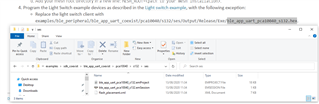
I am trying to follow the tutorial SDK UART coexistence example, but it seems like the last step cannot be completed. As you can see, that .hex file does not exist in the folder. Do you have any suggestion?
Thanks.
Hello,
I am trying to follow the tutorial SDK UART coexistence example, but it seems like the last step cannot be completed. As you can see, that .hex file does not exist in the folder. Do you have any suggestion?
Thanks.
Hi,
The Output folder in .../pca10040/s132/ses/ and all the files in it are generated when you build your project. Try building the ble_app_uart_coexist example in SES. The folder, and then also the .hex file, should be then generated, and you should be able to find the file.
Best regards,
Marte
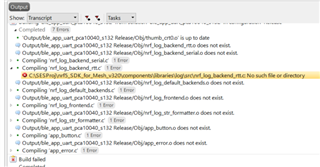
Hi. Trying to build the example (did not do any modification), these errors occur:
The problem is that the components folder does not even exist in the Mesh folder, but rather in the other one (SDK folder). And the global macros in SES are defined as:
SDK_ROOT=C:\SESProj\nRF5_SDK_1530
MESH_ROOT=C:\SESProj\nrf5_SDK_for_Mesh_v320
Do you have any clue why this happens? Thanks.
Hello! And thank you very much for the quick reply!
I tried with SDK16 and I have the same error unfortunately - and it persits for every project in the Mesh folder. Very strange.
SDK Mesh v4.2.0 and SDK v16.0.0
I have the same set-up as you. I wonder if I missed other setting from SES. But from my perspective, it should be fine.
UPDATE: I build successfully the project.
I just restarted SES, the laptop etc. Thanks a lot for your help, I'm looking forward to the next challenge
Great that you managed to get it to work!
Good luck with your development, and don't hesitate to ask if you happen upon any new problems.
Best regards,
Marte
Thanks Ms. Marte Myrvold! You are indeed helpful!
As a matter of fact, I will ask one further question, since you seem to understand my questions very well. My goal for some good weeks/months has been to implement the Blinky Application and to extend its range. After doing some trials, I came to the conclusion that one solution could be the following:
- On one end: phone with the Blinky Application, receiving notifications from an nRF52840 far-away
- On the other end: an nRF52840, sending notifications (via the button push)
- In between: Nordic Thingy:52 devices, loaded with the mesh example. Because when they are configured as servers(aka LEDs), they relay the messages, so that's very convenient, for my purpose of extending the range :)
Now, my question is the following: how should I integrate these two functionalities? The Blinky for the end-devices and the mesh for the middle devices?
If I load them separately, then the Nordic Thingy:52 devices do not relay the messages. And this is normal, because for the relaying, the group addresses are assigned from the phone first. Whereas for the Blinky Application, we do not assign any address; the phone just scans for the board and then connects to it.
I hope that I presented my problem as clear as possible.
Thanks a lot and I wish you a great day!
Hi Marry,
It's not recommended to combine BLE and mesh unless necessary, as they are two different protocols, and therefore it's a lot of work to get them to work together, and you also risk a worse connection on the mesh side. If you were to combine them you would need one node that has both BLE and mesh, and that node would have to switch between the two protocols in order to communicate with both the mesh and BLE devices. If you want to use mesh, you should instead use mesh examples on all devices and then implement the functionality for toggling the light, such as in the Blinky example, yourself.
However, if using mesh is not important to you, I would recommend you take a look at the BLE Relay example instead. As stated in the documentation, the example acts as a relay that receives values and passes them on. The example uses a sensor as peripheral and a collector as central, but you should be able to get it to work with BLE blinky.
Best regards,
Marte
Hi Marry,
It's not recommended to combine BLE and mesh unless necessary, as they are two different protocols, and therefore it's a lot of work to get them to work together, and you also risk a worse connection on the mesh side. If you were to combine them you would need one node that has both BLE and mesh, and that node would have to switch between the two protocols in order to communicate with both the mesh and BLE devices. If you want to use mesh, you should instead use mesh examples on all devices and then implement the functionality for toggling the light, such as in the Blinky example, yourself.
However, if using mesh is not important to you, I would recommend you take a look at the BLE Relay example instead. As stated in the documentation, the example acts as a relay that receives values and passes them on. The example uses a sensor as peripheral and a collector as central, but you should be able to get it to work with BLE blinky.
Best regards,
Marte
Hello Marte!
as they are two different protocols
What do you mean by this?
unless necessary
It is indeed kind of necessary for my use case to use the mesh, because I'd like to have a lot of such relays, to extend the range. And the information would travel without a specific destination from one end to another; instead, when a phone is in nearby, it would receive the notification immediately. (from my understanding, that's when I would use a mesh topology).
one node that has both BLE and mesh
- Yes, that is exactly what I had in mind. And this is why I am trying to add the Blinky part into the Mesh Client part. My approach would be to add a characteristic to the mesh client code, with the same properties as the Blinky example. This BLE Characteristics tutorial gave me this idea.
Do you think this is a good idea? Do you have other suggestions of what I should take care of?
Thank you!
Hi Marry,
Marry said:What do you mean by this?
BLE and Bluetooth Mesh work differently, so things like how the network is set up (BLE is one-to-one communication, different provisioning, etc.), the services (mesh models vs. GATT Services), and the stacks are different. You can check out this case which discuss this a bit.
Marry said:Do you think this is a good idea? Do you have other suggestions of what I should take care of?
As I stated, it's a lot of work to do combine BLE and mesh. However, it's a case of "you shouldn't do it if you don't have to" and not "you shouldn't do it at all", so it's possible to do so. It just requires some work and you need to know what you're doing and be aware that you risk degrading the mesh traffic.
If you only wanted to turn on/off the light, I would recommend using the mesh light switch example directly, but you can also see if it's possible to implement what you can do in that example. I recommend you read about mesh models. Models define the behavior and communication formats of all data that is transmitted across the mesh. There are several different models in the SDK, for instance the generic OnOff model, which is used to set the OnOff value. I don't know what characteristic you want to implement in the Blinky example, but it could be that you find something to use for it in one of the models. You can read about mesh models here, and you can find the API for mesh models here.
Best regards,
Marte