

I have installed the latest SDK 1.3.0 using the Toolchain Manager.
I would now like to open nRF Connect SDK Projekt and get the follwoing error:
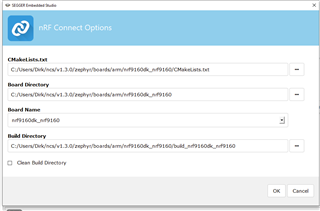
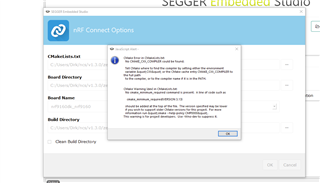
I have added the CXX environment variable, but it did not help 
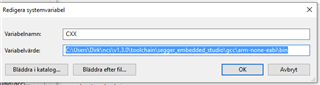
I have installed the latest SDK 1.3.0 using the Toolchain Manager.
I would now like to open nRF Connect SDK Projekt and get the follwoing error:
I have added the CXX environment variable, but it did not help
Hi,
The "CMakeLists.txt" field should point to the CMakeLists.txt of your project, not the board.
E.g. if you want to build the asset_tracker project, the path should be <your NCS folder>/nrf/applications/asset_tracker/CMakeLists.txt.
In addition, if you want to use the modem in the nRF9160, you must build your application as non-secure. To do that, you must select the non-secure version of the board.
I.e. nrf9160dk_nrf9160ns (notice the "ns" at the end).
Finally, in case you are not already doing it, when you install NCS using the Toolchain Manager, you must open SES (or bash/cmd) from the Toolchain Manager for the environment to be configured correctly.
Best regards,
Didrik

Hi Didrik,
thank you for your swift reply and help. now I can build the asset tracker and even the lwm2m_client which will be the base for our application.
Later yesterday the toolchain manager downloaded SDK 1.3.1, but it seems incomplete. When I select the lwm2m_client in the 1.3.1 folder the build process fails again:
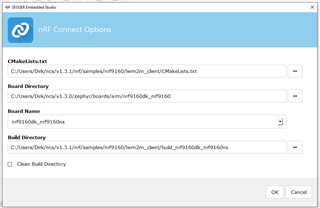
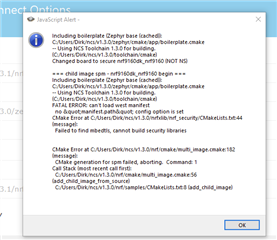
For the time being I will continue with lwm2m_client from the 1.3.0 folder which works. Just to let you know there is a problem with 1.3.1.
Best regards
Dirk

I notice that you are still using the board folder from NCS v1.3.0.
Could you try to change that to 1.3.1 as well, and see if that helps?
The zephyr map for the 1.3.1 has no boards subdirectory. It only contains module.yml. That is the reason I tried to use the old board directory.
Another question is in regard to the secure and non secure partititon. The lwm2m_client takes 169.8k Code and 111.2k Data. From the nrf9169dk_nrf9160ns.yaml file it seems 256k FLASH and 128k SRAM are available. I assume we need to put our application into the non secure partition as well. Does this mean we have only86.2k FLASH and 16.8k SRAM left for our application? What is in the secure partition?
Another question is in regard to the secure and non secure partititon. The lwm2m_client takes 169.8k Code and 111.2k Data. From the nrf9169dk_nrf9160ns.yaml file it seems 256k FLASH and 128k SRAM are available. I assume we need to put our application into the non secure partition as well. Does this mean we have only86.2k FLASH and 16.8k SRAM left for our application? What is in the secure partition?
dhandzic said:The zephyr map for the 1.3.1 has no boards subdirectory. It only contains module.yml.
Are you sure you checked <your NCS folder>/v1.3.1/zephyr, and not <your NCS folder>/v1.3.1/nrf/zephyr?
dhandzic said:What is in the secure partition?
The secure partition is used by the bootloader (MCUBoot) and/or the Secure Partition Manager (SPM).
dhandzic said:The lwm2m_client takes 169.8k Code and 111.2k Data
Where do you get those numbers from?
You should also note that in NCS, the flash partitioning is not decided by the device tree, but by the Partiion Manager script: https://developer.nordicsemi.com/nRF_Connect_SDK/doc/1.3.0/nrf/scripts/partition_manager/partition_manager.html
But the actual amount of flash and RAM available is also dependent on if you enable DFU or not.

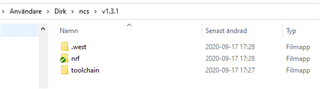
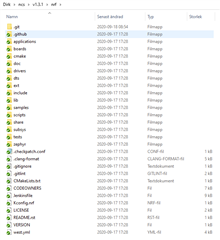

The lwm2m_client code and data size I get from the SES after the build process, but I am not sure. They are shown in the project explorer pane but memory usage pane does not have any information. If you have other numbers it would be intresting.
That does not seem right.
The v1.3.1 folder should look like this:
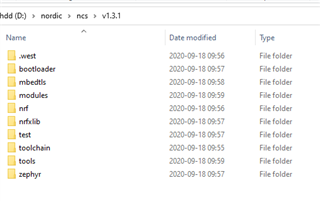
Can you try to "Update SDK"?
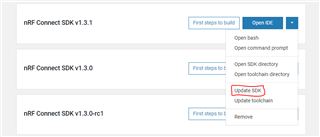
If that does not work, you can try to "Open bash", and run "west update"?
If you get any errors, please send them to me.
Looking at the partition scheme creted by the partition manager, the app partition is 0x6ae00 bytes, or 437,760.
When I build from the comman line, I get the following report:
Memory region         Used Size  Region Size  %age Used
           FLASH:      210832 B     437760 B     48.16%
            SRAM:       79160 B       128 KB     60.39%
        IDT_LIST:         136 B         2 KB      6.64%
(it should also be available in the "output" window in SES.
EMPTY_0:
  address: 0xc000
  placement:
    before:
    - mcuboot_pad
  region: flash_primary
  size: 0x4000
app:
  address: 0x1c200
  region: flash_primary
  size: 0x6ae00
mcuboot:
  address: 0x0
  placement:
    before:
    - mcuboot_primary
  region: flash_primary
  size: 0xc000
mcuboot_pad:
  address: 0x10000
  placement:
    align:
      start: 0x8000
    before:
    - mcuboot_primary_app
  region: flash_primary
  size: 0x200
mcuboot_primary:
  address: 0x10000
  orig_span: &id001
  - spm
  - app
  - mcuboot_pad
  region: flash_primary
  sharers: 0x1
  size: 0x77000
  span: *id001
mcuboot_primary_app:
  address: 0x10200
  orig_span: &id002
  - app
  - spm
  region: flash_primary
  size: 0x76e00
  span: *id002
mcuboot_secondary:
  address: 0x87000
  placement:
    after:
    - mcuboot_primary
    align:
      start: 0x1000
  region: flash_primary
  share_size:
  - mcuboot_primary
  size: 0x77000
otp:
  address: 0xff8108
  region: otp
  size: 0x2f4
settings_storage:
  address: 0xfe000
  placement:
    before:
    - end
  region: flash_primary
  size: 0x2000
spm:
  address: 0x10200
  inside:
  - mcuboot_primary_app
  placement:
    before:
    - app
  region: flash_primary
  size: 0xc000
Hi Didrik,
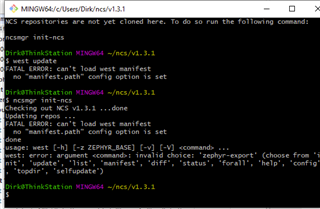
I have tried Update SDK for 1.3.1 from Toolchain Manager without success. I have tried from BASH west update and also ncsmgr init-ncs but I get errors:
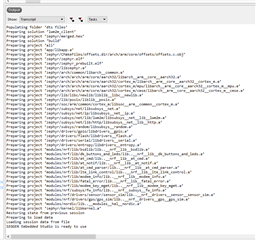
The Output pane in SES does not show memeory usage information after building either.
Hi Didrik,
today I received my nRF9160 DK board and I have the asset tracker running using nrf9160dk_asset_tracker_ltem_2020-04-29_bc7ade8b.hex. Works fine except GPS position even with external antenna and SW12 in CON position and patch antenna near window I dont get GPS readings. Is this part of the LTE-M implementation?