

I have installed the latest SDK 1.3.0 using the Toolchain Manager.
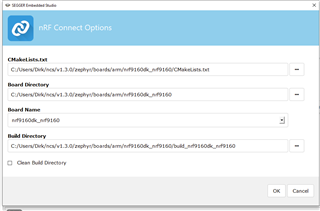
I would now like to open nRF Connect SDK Projekt and get the follwoing error:
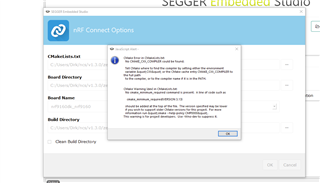
I have added the CXX environment variable, but it did not help 
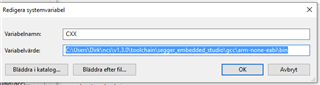
I have installed the latest SDK 1.3.0 using the Toolchain Manager.
I would now like to open nRF Connect SDK Projekt and get the follwoing error:
I have added the CXX environment variable, but it did not help
Hi,
The "CMakeLists.txt" field should point to the CMakeLists.txt of your project, not the board.
E.g. if you want to build the asset_tracker project, the path should be <your NCS folder>/nrf/applications/asset_tracker/CMakeLists.txt.
In addition, if you want to use the modem in the nRF9160, you must build your application as non-secure. To do that, you must select the non-secure version of the board.
I.e. nrf9160dk_nrf9160ns (notice the "ns" at the end).
Finally, in case you are not already doing it, when you install NCS using the Toolchain Manager, you must open SES (or bash/cmd) from the Toolchain Manager for the environment to be configured correctly.
Best regards,
Didrik

Hi Didrik,
thank you for your swift reply and help. now I can build the asset tracker and even the lwm2m_client which will be the base for our application.
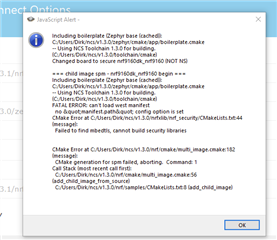
Later yesterday the toolchain manager downloaded SDK 1.3.1, but it seems incomplete. When I select the lwm2m_client in the 1.3.1 folder the build process fails again:
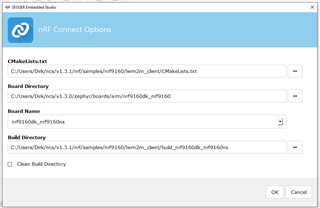
For the time being I will continue with lwm2m_client from the 1.3.0 folder which works. Just to let you know there is a problem with 1.3.1.
Best regards
Dirk

dhandzic said:I have now switched to the LwM2M_client from the 1.3.1 SDK and when using Target>Download zephyr/merged.hex I am getting a strange error at the end of the build process:
Did you re-open the project after changing SDK?
It is often also recommended to check the "Clean build directory"
Hi Didrik,
I got the LwM2M client example from SKD 1.3.1 working now as well after a "clean build directory".
I have almost finished the hardware design of our own board now. What would be needed in order to be able to use the LTE Link Monitor even with our board? Would it be enough to reserve 2 pins for RxD & TxD and use an seriell to USB converter?
Yes, exposing two pins used as TX and RX should be enough.
I would also recommend that you expose a second UART, that can be used to take modem traces, as those are very helpful if you encounter any network related issues.
Thanks Didrik,
will provide a header for two UART connections.
I got a comment from our developer supposed to take care of the LwM2M server part. He says he could not find open source examples for servers supporting DTLS and being scalable to be used for a production server. We tried the Leshan demo server and it works fine but is obviously just a demo not for production. Do you have any suggestions where to look for a start to build a production LwM2M server with DTLS support?
I only know of the Leshan server myself. My understanding was that it should be usable for more than just demo purposes.
You should obviously not use the demo server, but host an instance yourself. What makes your developer say that the Leshan server is not suitable for a production environment?
I only know of the Leshan server myself. My understanding was that it should be usable for more than just demo purposes.
You should obviously not use the demo server, but host an instance yourself. What makes your developer say that the Leshan server is not suitable for a production environment?
Ok, thank you. Is it possible that my colleague writes to this ticket in order to communicate with you? He has set up a LwM2M server on his side and I am not able to connect to it with the DK board. I have entered his IP address directly at CONFIG_APP_LWM2M_SERVER and set CONFIG_LWM2M_DNS to n and even CONFIG_LWM2M_DTLS_SUPPORT to n to make things as simple as possible.
The DK board does connect to the Leshan Demo Server so SIM and LTE part seem to work fine.
Hello Didrik, I am developing the LwM2M server.
What might be the issue if Dirks nrf9160 can't connect to my LwM2M server? I have tried several servers and the latest is Leshan's using this guide: https://github.com/eclipse/leshan/wiki/Getting-Started-:-Server
I can connect with a Wakaama client just fine, but the nrf9160 is stuck. We dont understand why, do you have any advice?
Dirk should be able to you with the logs from the client.
Thank you!
Hi Didrik,
I would like to prepare the developement of the software for our own hardware which will be a board based on nRF9160SICA for debugging with Segger J-LINK (no BLE and no Freescale processor) . Is there any guide on how to generate an application based on Zephyr and the LwM2M client sample?
Best regards
Dirk
Hi Robert K,
Could it be that the server is only accessible from your local network, and not exposed on the internet?
Just my first guess. It is hard to say more without seeing any logs. A modem trace would also be helpful, as that would let us see the IP traffic from the device.
dhandzic, I am not entirely sure what you are after, but this 3 part guide is a nice introduction on NCS, and covers both how to create a project and how to work with custom boards.
Hi, thank you for quick reply.
I have tested it using a client outside of my server's network, and it did work.