

I have installed the latest SDK 1.3.0 using the Toolchain Manager.
I would now like to open nRF Connect SDK Projekt and get the follwoing error:
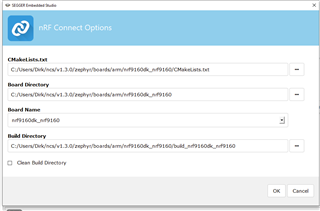
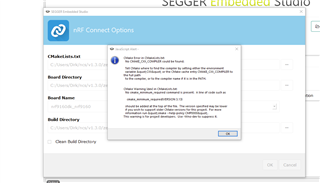
I have added the CXX environment variable, but it did not help 
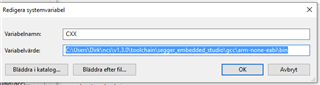
I have installed the latest SDK 1.3.0 using the Toolchain Manager.
I would now like to open nRF Connect SDK Projekt and get the follwoing error:
I have added the CXX environment variable, but it did not help
Hi,
The "CMakeLists.txt" field should point to the CMakeLists.txt of your project, not the board.
E.g. if you want to build the asset_tracker project, the path should be <your NCS folder>/nrf/applications/asset_tracker/CMakeLists.txt.
In addition, if you want to use the modem in the nRF9160, you must build your application as non-secure. To do that, you must select the non-secure version of the board.
I.e. nrf9160dk_nrf9160ns (notice the "ns" at the end).
Finally, in case you are not already doing it, when you install NCS using the Toolchain Manager, you must open SES (or bash/cmd) from the Toolchain Manager for the environment to be configured correctly.
Best regards,
Didrik

Hi Didrik,
thank you for your swift reply and help. now I can build the asset tracker and even the lwm2m_client which will be the base for our application.
Later yesterday the toolchain manager downloaded SDK 1.3.1, but it seems incomplete. When I select the lwm2m_client in the 1.3.1 folder the build process fails again:
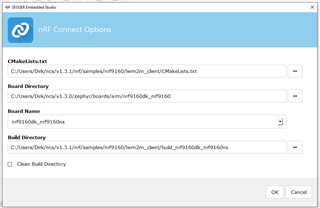
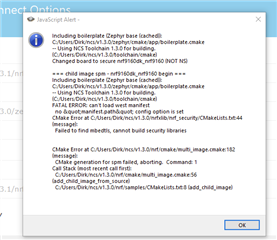
For the time being I will continue with lwm2m_client from the 1.3.0 folder which works. Just to let you know there is a problem with 1.3.1.
Best regards
Dirk
Hi Didrik,
I would like to prepare the developement of the software for our own hardware which will be a board based on nRF9160SICA for debugging with Segger J-LINK (no BLE and no Freescale processor) . Is there any guide on how to generate an application based on Zephyr and the LwM2M client sample?
Best regards
Dirk

Hi Robert K,
Could it be that the server is only accessible from your local network, and not exposed on the internet?
Just my first guess. It is hard to say more without seeing any logs. A modem trace would also be helpful, as that would let us see the IP traffic from the device.
dhandzic, I am not entirely sure what you are after, but this 3 part guide is a nice introduction on NCS, and covers both how to create a project and how to work with custom boards.
Hi, thank you for quick reply.
I have tested it using a client outside of my server's network, and it did work.
trace-2020-10-07T12-54-31.431Z.bin
2020-10-07T12:54:22.691Z INFO Application data folder: C:\Users\Dirk\AppData\Roaming\nrfconnect\pc-nrfconnect-tracecollector
2020-10-07T12:54:22.770Z DEBUG App pc-nrfconnect-tracecollector v1.0.5 official
2020-10-07T12:54:22.770Z DEBUG App path: C:\Users\Dirk\.nrfconnect-apps\node_modules\pc-nrfconnect-tracecollector
2020-10-07T12:54:22.770Z DEBUG nRFConnect 3.5.0 is supported by the app (^3.0.0)
2020-10-07T12:54:22.770Z DEBUG nRFConnect path: C:\Users\Dirk\AppData\Local\Programs\nrfconnect\resources\app.asar
2020-10-07T12:54:22.770Z DEBUG HomeDir: C:\Users\Dirk
2020-10-07T12:54:22.770Z DEBUG TmpDir: C:\Users\Dirk\AppData\Local\Temp
2020-10-07T12:54:23.681Z VERBOSE Could not fetch serial number for serial port at COM1
2020-10-07T12:54:23.681Z VERBOSE Could not fetch serial number for serial port at COM25
2020-10-07T12:54:26.513Z INFO Device opened
2020-10-07T12:54:31.433Z INFO Tracefile created: C:\Users\Dirk\AppData\Roaming\nrfconnect\pc-nrfconnect-tracecollector\trace-2020-10-07T12-54-31.431Z.bin
2020-10-07T13:00:20.188Z INFO Tracefile closed
Please find attached log files from the trace collector.
I think the 3 part guide is a good start.
Thank you!
Thanks, I'll have a look at it on Monday.
But, to be able to decode the trace, I need to know the modem firmware version you are using.
Thanks, I'll have a look at it on Monday.
But, to be able to decode the trace, I need to know the modem firmware version you are using.
Hi Didrik,
I am using the latest version. I think it is 1.2.1
To me, it looks like the device is not able to authenticate itself properly to the netwerk, and is therefore not able to send any data.
The trace shows that the device repeatedly tries to set up an RRC connection, but after the device and network has exchanged 'security mode command' and 'security mode complete' messages, the network keeps requesting RRC connection reconfiguration, until eventually the RRC connection is closed.
I'll also run the trace by our modem team, to see if they can tell why the device is not able to send any data.
Dirk is able to connect to the Leshan demo server but not mine, which indicates the network is working(?). I have hosted it using several different types of servers, Wakaama, Nodejs module and Leshan's library in Java. Same result on all servers, no connection from Dirk's DK to it.
We were thinking if you could try to connect with your DK to my server aswell? It would probably give you some good information about whats going on. If you think this is a good idea, please respond with a time and date when I should setup this server for you.
Thank you!
When we look at the IP packets sent in the trace, the network replies with "Destination port unreachable" messages.
What port is the server listening to?
The DK tries to connect to port 5684
Oh the server is listening on the default port, 5683. ipv4
5684 is bootstrap server? We did try that aswell, no luck